Shopify Tracking Audit: 12 Checks for GA4, Google Ads and Meta

Qudees Kiani, founder · · 9 min read
Short answer
A Shopify tracking audit starts with one question: who sends your purchases? Since the checkout upgrade, old checkout scripts don't run, so purchases come from app pixels, custom pixels and server feeds. List every sender for GA4, Google Ads and Meta, keep one per platform, then test with a real order and compare totals with your orders.
On this page
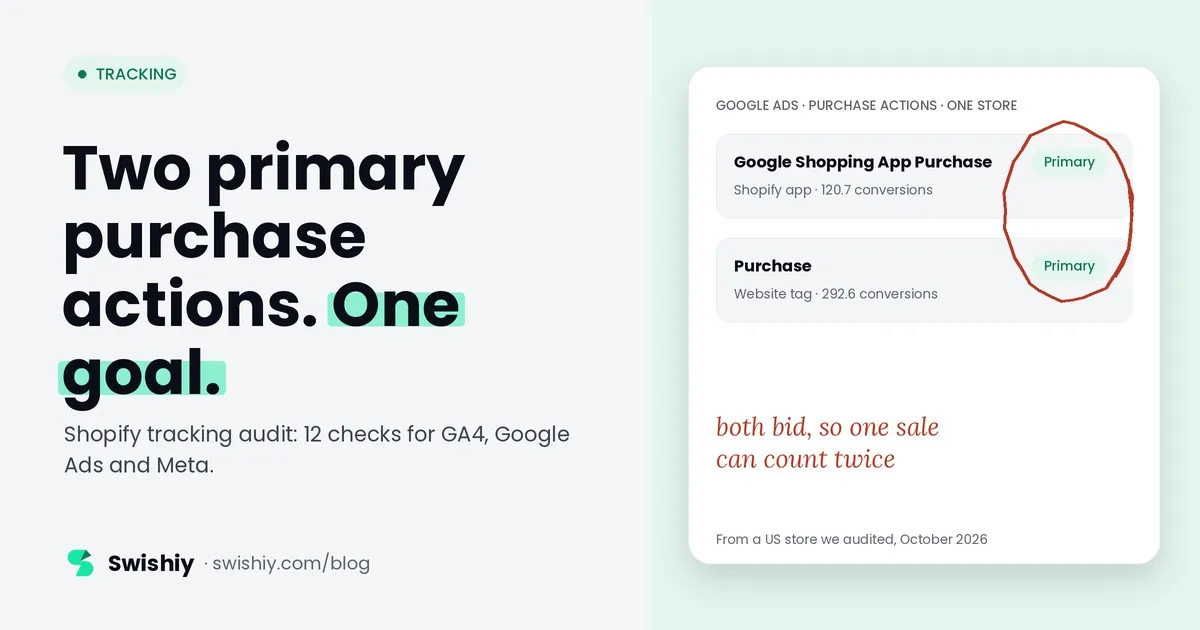
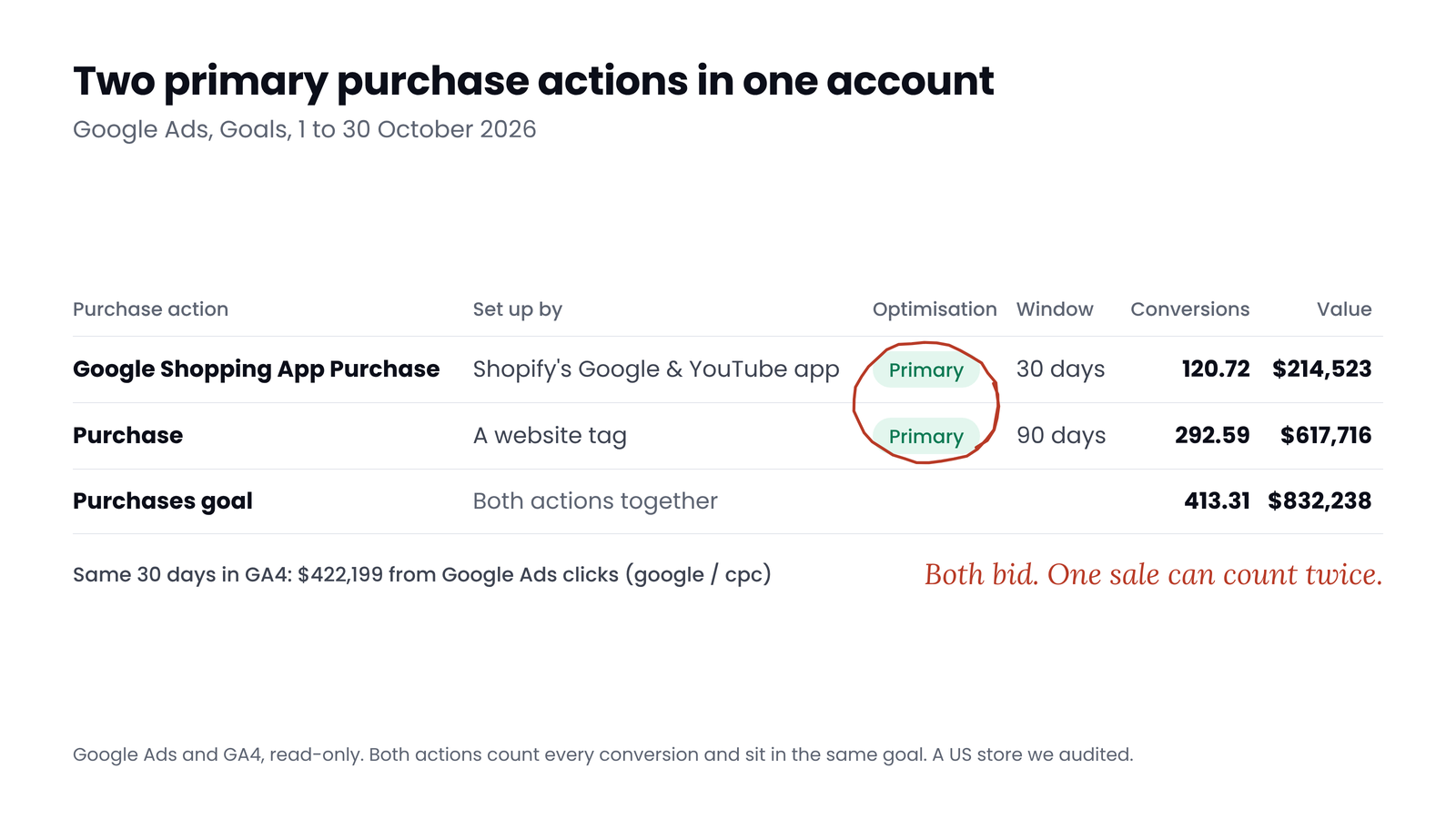
On Shopify, Tag Manager can't run on checkout the way it used to. Something else sends your purchases. Do you know what? Between 1 and 30 October, a US store we audited had two purchase actions set to primary in Google Ads: one created by Shopify's Google & YouTube app and one from a website tag. Google Ads counted 413 purchases worth $832,000 between them. This guide covers what changed on Shopify, where each kind of tracking can still run, and 12 checks to find out who sends what.
What changed on Shopify
For years, most stores tracked purchases with scripts on the thank-you page: the Additional scripts box, often holding a Tag Manager snippet, or checkout.liquid on Plus. Shopify has switched both off:
| Date | What changed | Who |
|---|---|---|
| 28 August 2025 | Additional scripts became view-only. Shopify began shutting down scripts and checkout.liquid on the thank-you and order status pages | Plus for the scripts, all plans for view-only |
| January 2026 | Shopify started upgrading the remaining Plus stores' thank-you and order status pages automatically | Plus |
| 26 August 2026 | The deadline for non-Plus stores to upgrade those pages | All other plans |
| 1 October 2026 | Apps can no longer create or update storefront script tags | All |
| 1 March 2027 | Shopify stops loading storefront script tags | All |
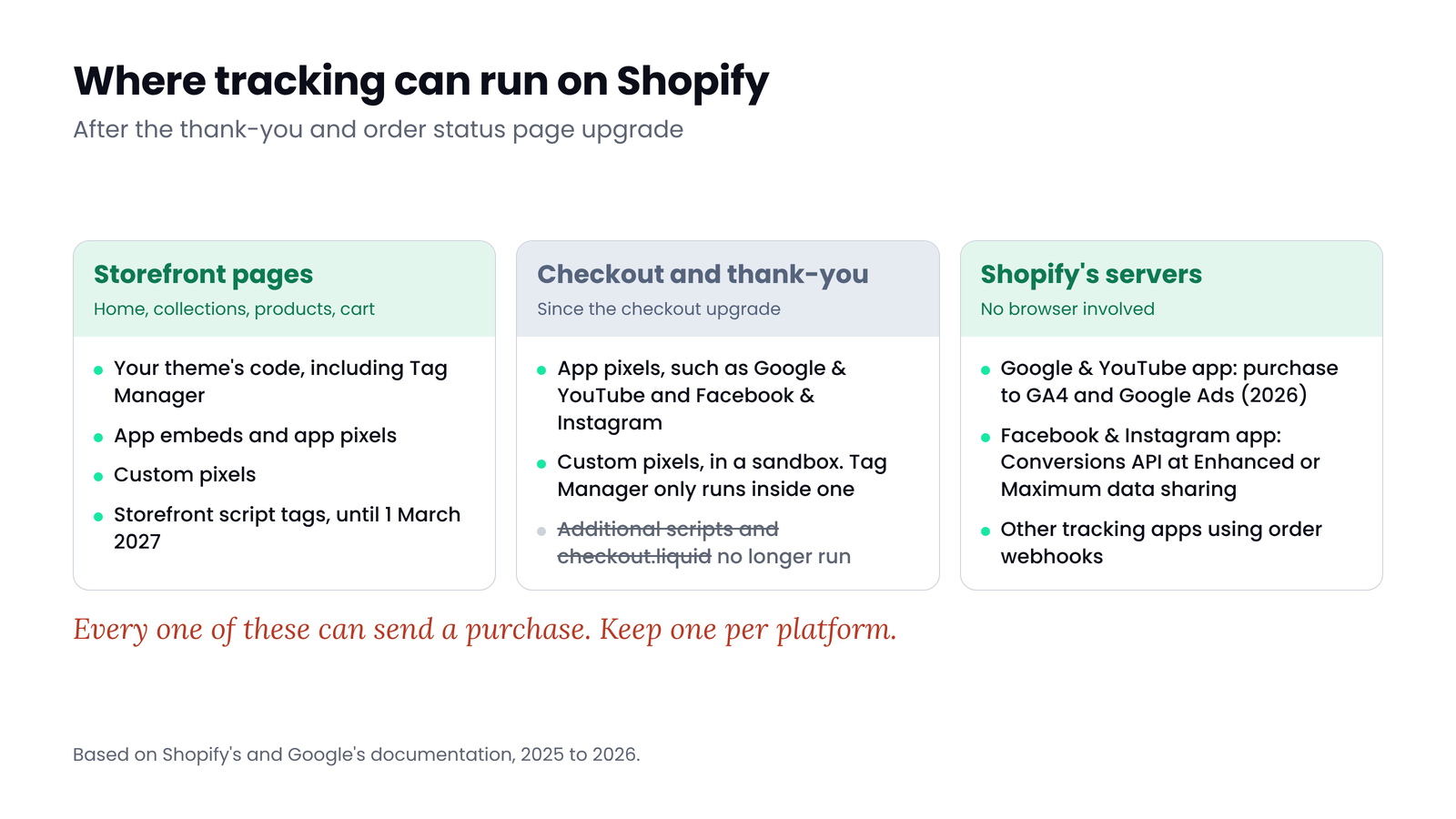
What replaced them: app pixels, installed by apps such as Google & YouTube and Facebook & Instagram; custom pixels, code you add under Settings, then Customer events; and server feeds, which send the purchase from Shopify's servers as well as, or instead of, the browser. Tag Manager can still run on checkout, but only inside a custom pixel, in a sandbox where Tag Assistant's debugging doesn't work, so you test with Shopify's Pixel Helper instead.
 (opens the full-size image in a new tab)
Two consequences matter for an audit. First, anything that only ran in the theme or in old scripts no longer sees the purchase, so some tracking stopped without anyone noticing. Second, it's now easy to have two senders for one platform: an app pixel and a custom pixel, or an app and a Tag Manager tag. Shopify warns about this in its own help pages: "Before you add a custom pixel, remove or modify any existing pixels to ensure customer events aren't counted twice."
What it looked like in two stores
 (opens the full-size image in a new tab)
The US store above had two purchase actions in the same goal, both primary and both counting every conversion: the Google & YouTube app's purchase action (120.7 conversions, $214,523) and a website tag named Purchase (292.6 conversions, $617,716), which Google also marked as needing attention. Google Ads counts each conversion action on its own, so an order that both record counts twice, in the Conversions column and in bidding. For the same 30 days, GA4 credited Google Ads clicks (google / cpc) with $422,199. The two tools credit sales differently, so they never match exactly, but a gap this size needs an explanation. The same store had three Meta pixels: two of them didn't load on checkout in our check.
A second store shows the GA4 side. A US retailer we audited sends purchases to two GA4 properties: one through the Google & YouTube app, one through Tag Manager and a server container. From 1 to 30 October (each tool in its own time zone), Shopify's Online Store channel had 813 orders. The app's property recorded 836 purchases and the Tag Manager property 738. Each sender follows its own rules, which is why every audit needs a written list of who sends what.
The 12 checks
What's installed
- 1. Checkout pages upgraded and old scripts gone. In Settings, then Checkout, check that the thank-you and order status pages are upgraded and that anything in the old Additional scripts box has a replacement. Red flag: an old purchase script with no replacement, which means tracking stopped without an error.
- 2. One written list of purchase senders. Check Settings, then Customer events (app and custom pixels), your sales channels, your apps, your Tag Manager containers and any server setup. Write one line per platform: who sends GA4's purchase, Google Ads' purchase and Meta's Purchase. Red flag: two senders for one platform.
- 3. Every custom pixel has a reason. Open each custom pixel and use Test to run Shopify's Pixel Helper. Red flag: a custom pixel sending a purchase that an app already sends, or one nobody can explain.
- 4. No leftover tags in the theme or Tag Manager. Search theme.liquid and its snippets for
fbq,gtag,GTM-,AW-andG-, and list the purchase tags in Tag Manager. Red flag: a hardcoded Meta pixel next to the app, or a Tag Manager purchase tag next to the Google & YouTube app.
What each platform receives
- 5. GA4 gets one purchase per test order. Place a real order, with a 100% discount code or a cheap product, and watch GA4's Realtime or DebugView. Good: one purchase whose transaction ID matches the Shopify order, with value and currency. A purchase sent from Shopify's server may not show in debug tools.
- 6. No transaction ID counted twice. In GA4's Transactions report, sort by E-commerce purchases. Any ID above 1 was counted more than once. Our guide to duplicate transactions shows how to read it.
- 7. One primary purchase action in Google Ads. In Goals, then Summary, open the purchase goal. Good: one primary purchase action, usually the app's, with any GA4 import or old tag set to secondary. Red flag: two primary purchase actions, as in the store above.
- 8. One Meta pixel and one server source. In the Facebook & Instagram channel, check the data sharing level. Enhanced and Maximum add the Conversions API. Red flag: two pixels on the store, or a second app or server container also sending Purchase to the same pixel.
- 9. Meta counts your test purchase once. Meta removes the copy when the browser and server events reach the same pixel with the same event name and event ID within 48 hours. Don't count on it removing a repeat that arrives twice from the browser or twice from the server. Our guide to Pixel and Conversions API deduplication covers how to check it.
Whether the numbers hold
- 10. Consent works both ways. In the EEA and UK, app pixels wait for consent when Shopify's banner, or a consent app connected to Shopify, covers those regions. Custom pixels wait only if their Permission is set to Required. From a browser in one of those regions, reject and check that nothing non-essential fires, then accept and check that events arrive. Expect lower numbers than the old scripts gave: that is consent working. Not legal advice.
- 11. Upsells and orders the browser never sees. With a post-purchase upsell, Shopify fires checkout_completed on the first upsell page, not the thank-you page. Run a test order with an upsell, and know which orders never pass through a browser checkout: draft orders you mark as paid yourself, point of sale and subscription renewals.
- 12. The totals match your orders. Compare GA4 purchases, Google Ads purchases and Meta purchases with Shopify's Online Store orders for the same days and time zone. GA4 should come close to your orders. Google Ads and Meta count only sales they credit to ads, so either one going above your orders is a red flag. Our guide to GA4 against Shopify has the thresholds we use.
New in 2026
Myth
More tracking apps means more accurate data.
Reality
On Shopify, each extra sender is a chance to count the same order twice. The goal is one sender per platform, plus a server copy only where the platform deduplicates it.
Quick check
Quick check
- Checkout pages upgraded, and every old script replaced or deliberately dropped.
- A written list of who sends GA4's, Google Ads' and Meta's purchase.
- No custom pixel or theme tag duplicating an app.
- One GA4 purchase per test order, with the Shopify order ID.
- No transaction ID counted twice in GA4.
- One primary purchase action in Google Ads.
- One Meta pixel, and browser and server events sharing an event ID.
- Totals compared with Shopify orders for the same days.
Ask yourself
The free Tracking audit visits your store like a shopper, before and after a cookie choice, and reads GA4, Tag Manager and Google Ads to show which events each one sends and receives, with cross-checks for purchases counted twice. It can't place an order, so the test-order checks still need you. Read-only. Audit my Shopify tracking
Frequently asked questions
Can I still use Google Tag Manager on Shopify?
Yes. Tag Manager in your theme runs on storefront pages, as it always has. To track checkout and purchases with it, you load it inside a custom pixel, in Shopify's sandbox, where Tag Assistant's debugging doesn't work.
Why do I see more purchases in GA4 than orders in Shopify?
Usually two senders: the Google & YouTube app and your own Tag Manager tag or another app. It can also be orders from other channels that finish on your checkout. Check the Transactions report for repeated IDs and list every purchase sender.
What happened to Additional scripts on Shopify?
The box became view-only on 28 August 2025, when Shopify began shutting down old scripts for Plus stores. It started upgrading the remaining Plus stores in January 2026, and other plans had until 26 August 2026 to upgrade. Tracking now runs through app pixels, custom pixels and server feeds.
Should I use the Google & YouTube app or Tag Manager for purchases?
Pick one per destination. The app is simpler and now also sends the purchase from Shopify's servers. Tag Manager in a custom pixel gives more control. Running both usually counts purchases twice: in Google Ads they tend to end up as two primary actions, and in GA4 the two senders rarely send the same order ID in the same format.
How do I check my Meta pixel on Shopify?
Check the data sharing level in the Facebook & Instagram channel, remove any hardcoded pixel from the theme, then place a test order and look at Test Events in Meta's Events Manager: one Purchase from the browser and one from the server, with the same event ID.
Why are my numbers lower after the checkout upgrade?
In the EEA and UK, Shopify's app pixels wait for consent, so fewer events arrive than with the old scripts. If the drop is bigger than consent explains, or appears in other regions, a purchase sender may have stopped. Not legal advice.
Sources
- Shopify Help: Upgrade the Thank you and Order status pages (Plus): https://help.shopify.com/en/manual/checkout-settings/customize-checkout-configurations/upgrade-thank-you-order-status/plus-upgrade-guide
- Shopify Help: Upgrade the Thank you and Order status pages: https://help.shopify.com/en/manual/checkout-settings/customize-checkout-configurations/upgrade-thank-you-order-status/upgrade-guide
- Shopify changelog: Online store script tags deprecation: https://shopify.dev/changelog/online-store-script-tags-deprecation
- Shopify Help: Manage custom pixels: https://help.shopify.com/en/manual/promoting-marketing/pixels/custom-pixels/manage
- Shopify Help: Google Tag Manager: https://help.shopify.com/en/manual/reports-and-analytics/google-analytics/google-tag-manager
- Shopify Help: Reviewing additional scripts: https://help.shopify.com/en/manual/checkout-settings/customize-checkout-configurations/upgrade-thank-you-order-status/additional-scripts
- Shopify Dev: checkout_completed event: https://shopify.dev/docs/api/web-pixels-api/standard-events/checkout_completed
- Shopify Help: Meta data sharing: https://help.shopify.com/en/manual/promoting-marketing/analyze-marketing/meta-data-sharing
- Analytics Help: The Shopify integration: https://support.google.com/analytics/answer/16947140
- Google Ads Help: Shopify conversions through the Data Manager: https://support.google.com/google-ads/answer/15496063
- Merchant Center Help: Conversion tracking with the Google & YouTube app: https://support.google.com/merchants/answer/13494537
- Meta for Developers: Deduplicate Pixel and server events: https://developers.facebook.com/docs/marketing-api/conversions-api/deduplicate-pixel-and-server-events
- Shopify Help: Customer privacy settings: https://help.shopify.com/en/manual/privacy-and-security/privacy/customer-privacy-settings/privacy-settings
- Shopify Dev: Pixels and consent: https://shopify.dev/docs/apps/build/marketing-analytics/pixels
- Google Ads Help: Transaction IDs and duplicate conversions: https://support.google.com/google-ads/answer/6386790

Qudees Kiani
Founder of Swishiy. Five years of marketing measurement work across Google Ads, Meta and GA4, for ecommerce and lead-gen businesses.
Book a 30-minute callIs your Google Ads data telling the truth?
The free auditor checks tracking, brand vs non-brand and wasted spend. Automated, Google Ads only, 60 seconds.