Double Counting Conversions: How to Find It in GA4, Google Ads and Meta

Qudees Kiani, founder · · 9 min read
Short answer
Double counting comes in two kinds. One platform recording the same order twice is a tracking bug: two primary purchase actions, two tags, or a Pixel and Conversions API without a shared event ID. Several platforms each claiming the same order is how attribution works. Compare each platform with your orders first, then their sum.
On this page
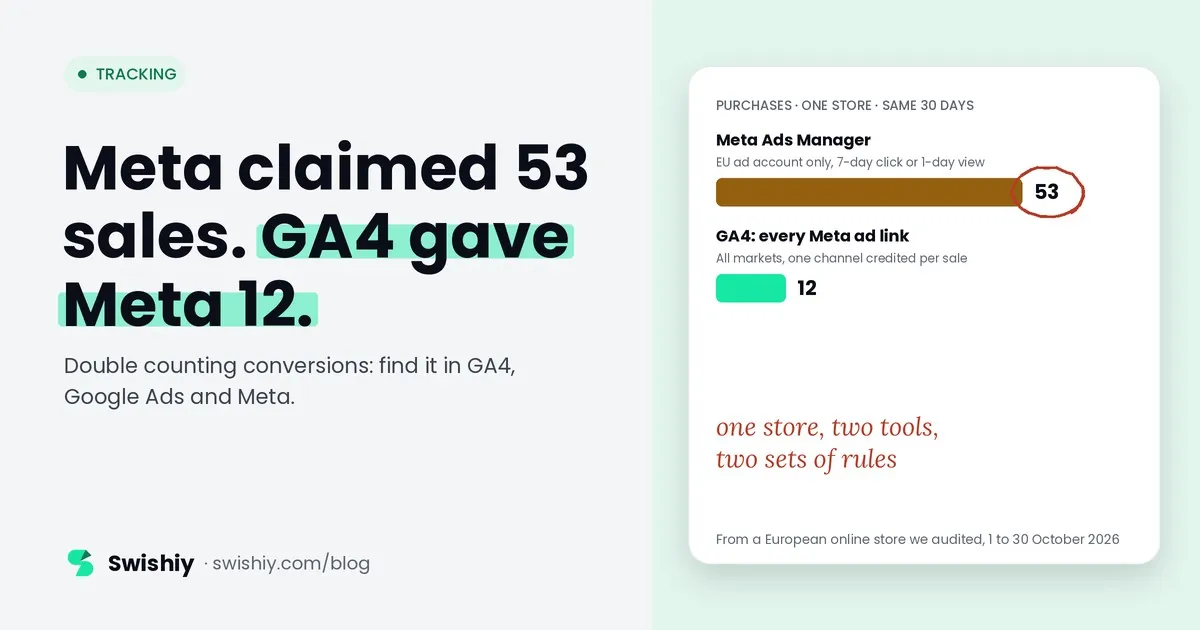
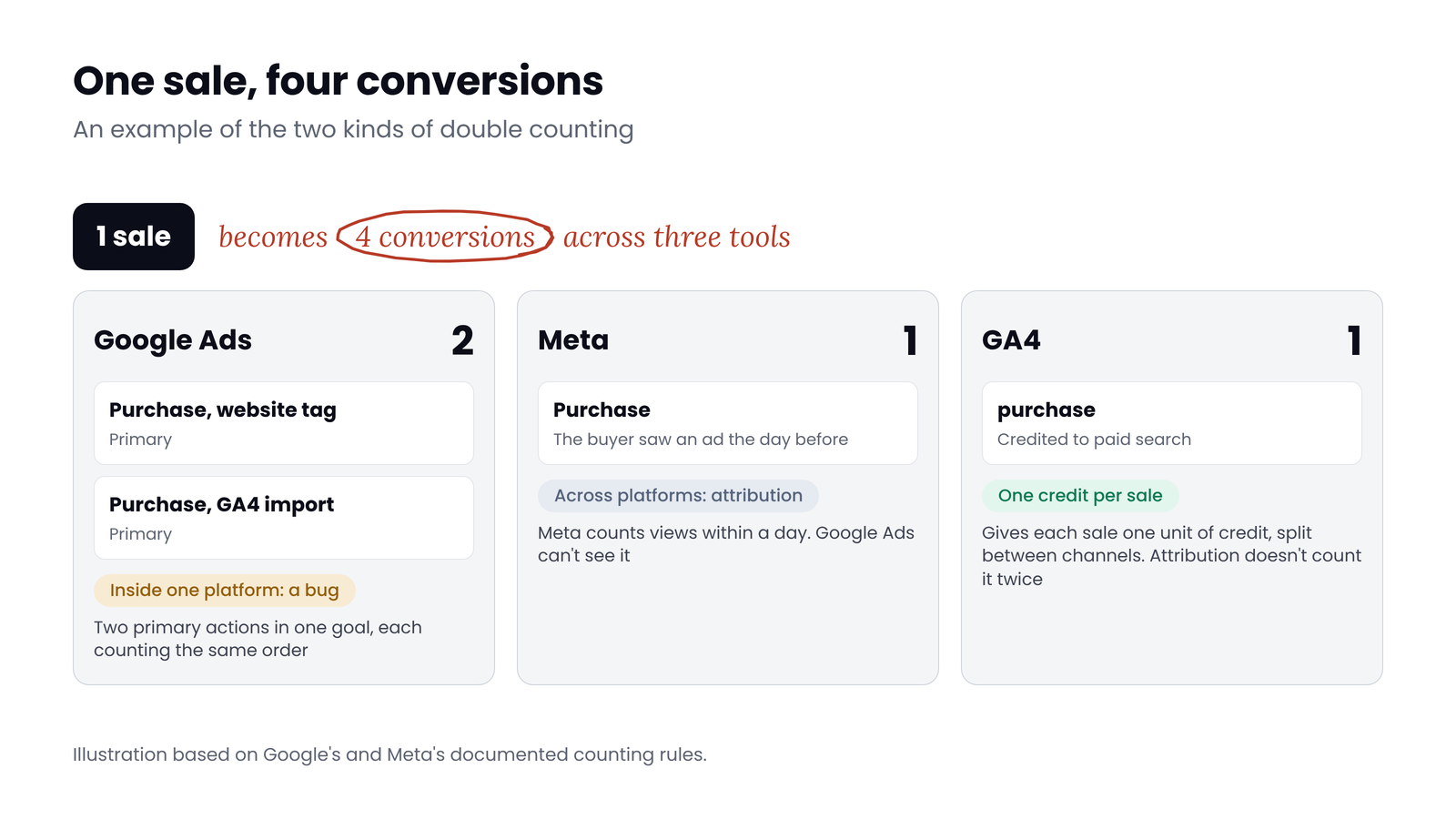
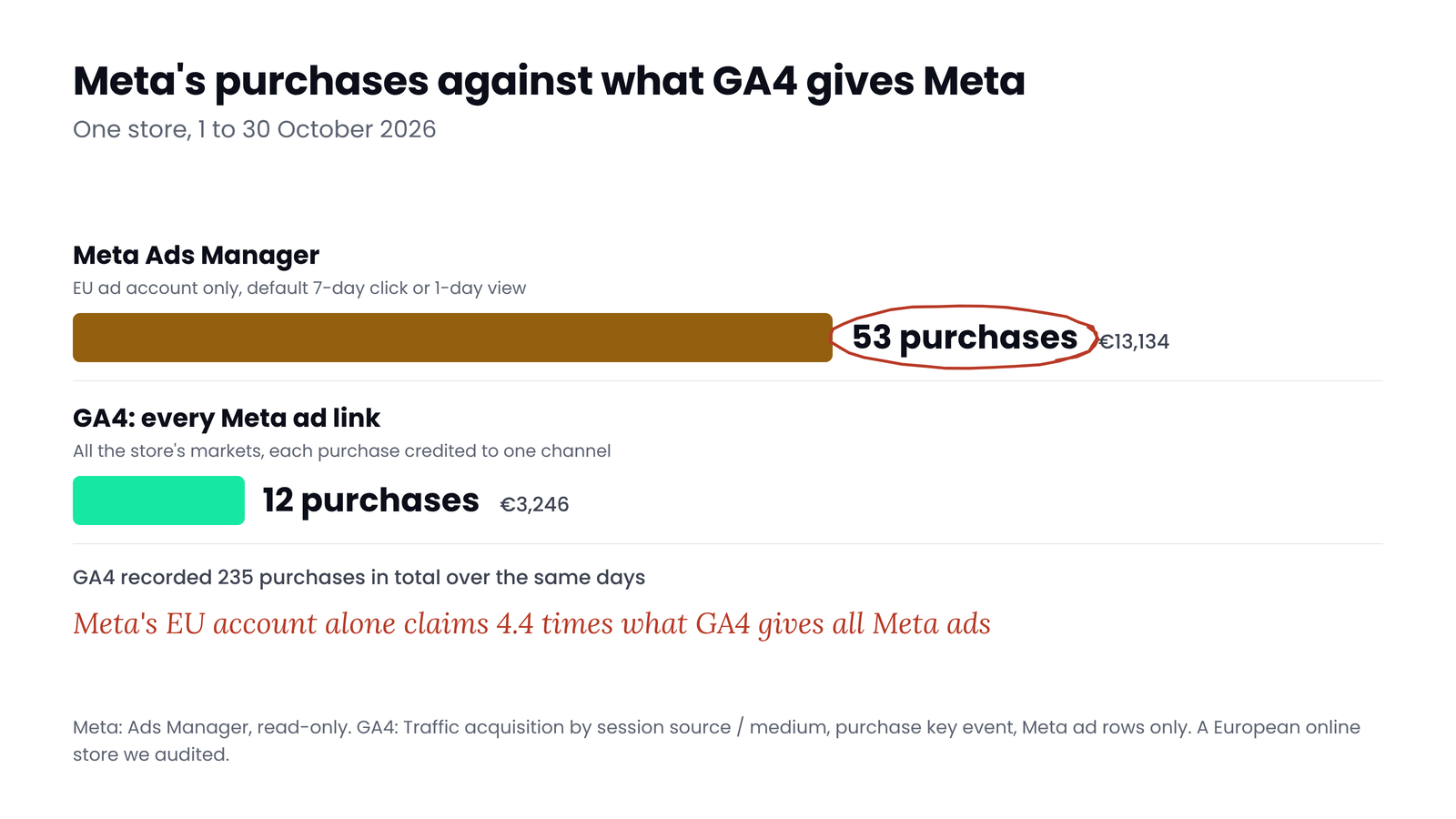
One sale can become four conversions: two in Google Ads because two purchase actions are both primary, one in Meta because the buyer saw an ad the day before, and one in GA4. The extra Google Ads count and the Meta claim are different problems with different fixes. Between 1 and 30 October, a European online store we audited saw Meta report 53 purchases from its EU ad account alone, while GA4 gave Meta's ad links 12 across all its stores. This guide separates the two kinds of double counting, shows where each tool counts, and how to find each kind.
Two kinds of double counting
 (opens the full-size image in a new tab)
| Inside one platform | Across platforms | |
|---|---|---|
| What happens | One tool records the same order twice | Each tool records the order once, and Google Ads, Meta and others each claim it under their own rules |
| Is it a bug? | Yes | No. It's how platform attribution works |
| What it breaks | Every number that platform reports, and what its bidding learns from | Any report that adds the platforms together |
| What to do | Fix the tracking | Compare on one basis instead of adding them up |
Where each tool counts
| Google Ads | GA4 | Meta | |
|---|---|---|---|
| What it can credit | Google Ads interactions only: clicks, engaged video views, and views if included | Every channel, paid and organic. Each purchase gets one unit of credit | Meta ads: link clicks, other engagement and views |
| Default windows | 30 days after a click, 1 day after a view, 3 days after an engaged view | 90 days, or 30 for acquisition key events | In the ad account we read: 7-day click or 1-day view, with one campaign on mixed settings |
| Built-in deduplication | Same conversion action and same transaction ID | Same transaction ID, web streams only | Pixel and Conversions API events with the same event name and event ID, within 48 hours |
| Removes sales another platform claimed? | No | Not needed: it splits each purchase between channels | No |
Google documents deduplication only inside a single conversion action. Two actions that track the same purchase are counted separately, which is why Google sets some GA4-based conversions to secondary "to prevent counting the same event twice for bidding".
The five double counts inside one platform
| Double count | How to spot it | Fix |
|---|---|---|
| 1. Two Google Ads purchase actions, both primary. Often a Shopify app's action next to a website tag or a GA4 import | In Goals, open the Purchase goal and list every primary action. Two with similar daily counts is the sign | Keep one primary. Set the other to secondary |
| 2. One Google Ads action firing twice per order. Two tags, or a reloaded thank-you page | A purchase action with a repeat rate near 2. Google notes YouTube, Demand Gen and wbraid traffic can raise it without overcounting | One tag per action, and a unique transaction ID on every purchase |
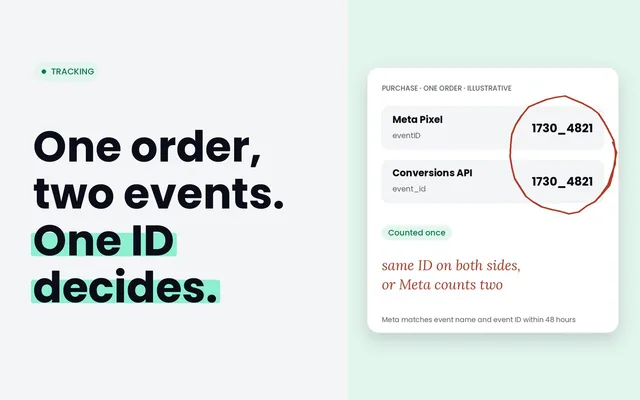
| 3. Meta Pixel and Conversions API without a shared event ID, or an extra pixel | In Events Manager, open Purchase and read the Event Deduplication tab | Same event name and event ID on both, sent within 48 hours. Remove extra pixels |
| 4. A GA4 purchase sent twice | GA4's Transactions report sorted by E-commerce purchases: any order ID above 1 | One sender, and a non-empty transaction ID that equals the order number |
| 5. A second pipeline for the same order: a server upload, an offline import or a second server feed | List every data source for each Google Ads action and each Meta event | One action per real event. Connect uploads to the tag's action with identical IDs |
We found signs of three of the five in stores we audited in October 2026. A US store has two Google Ads purchase actions in the same goal, both primary: one from Shopify's Google & YouTube app and one from a website tag. Their counts differ, 121 and 293 over 30 days, so they may not count the same orders, but both feed bidding. A European store's GA4 counted 5 orders 11 times. And the same US store has a Meta pixel that sent PageView twice on every page we checked. That pixel doesn't load on checkout, so it can't double a purchase, but it's the same pattern. Our posts on primary and secondary conversions, duplicate transactions in GA4 and Pixel and Conversions API deduplication cover the fixes in detail.
Across platforms: when every tool claims the same sale
Google Ads only measures Google Ads interactions. Meta credits its own link clicks, engagement and views. Neither sees the other's touchpoints, so an order with a Google click and a Meta view the day before is claimed by both. Meta's deduplication only matches Meta's own browser and server copies.
 (opens the full-size image in a new tab)
In that store, Meta's EU account reported 53 purchases worth €13,134 over 30 days, with its default 7-day click or 1-day view setting (one campaign used mixed settings). GA4 gave every Meta ad link, across all the store's markets, 12 purchases worth €3,246. GA4 recorded 235 purchases in total. Neither number is wrong. Meta counts sales after a view, which GA4 can't see, and sales where another channel had the last click, which GA4 gives to that channel. GA4 also loses some visitors who decline cookies, and only partly estimates them. Meta's 53 only becomes a problem when someone adds it to Google's number and calls the total sales.
Two traps in the same store
Myth
The Conversions API stops Meta and Google counting the same sale.
Reality
It only matches Meta's own browser and server copies. Meta has no view of what Google reported, and Google Ads doesn't remove sales Meta claimed.
Two ratios that tell you which kind you have
Use your own orders for the same days and time zone as the baseline. These are our rules of thumb, not a platform's.
- Per-platform ratio: one platform's purchases divided by your orders. Over a full month, one platform can't fairly claim more sales than you made, so above 1.0 points to double counting inside that platform.
- Sum ratio: Google Ads plus Meta plus any other platform, divided by your orders. Above 1.0 while each platform stays below it points to overlap between platforms.
- Below 1.0 doesn't prove a clean setup. The US store above counted 413 conversions in Google Ads against 675 purchases in its server-side GA4 property, which we used in place of its orders: a ratio of 0.61, with two primary purchase actions in the same goal. Ad platforms only count the sales they credit to ads, so a duplicate can hide well under your total. Check the setup as well as the ratio.
How to compare platforms on one basis
- Fix the double counts inside each platform first. Until then, every comparison carries the error.
- Use one deduplicated source for the split between channels. GA4 gives each purchase one unit of credit across paid and organic channels. It misses views and journeys it can't see, so treat it as a floor for ad channels, not the truth.
- Compare like with like. In Meta, compare attribution settings and look at click-through on its own. In Google Ads, segment by Ad event type to separate clicks from engaged views, and use the "by conv. time" columns to line up with order dates.
- Test before moving big budgets. Meta itself describes lift experiments as the gold standard. A geographic holdout or a marketing mix model answers what each channel adds, which no platform report can.
What changed in 2026
Quick check
Quick check
- One primary purchase action per goal in Google Ads.
- Every purchase sends a unique, non-empty transaction ID.
- Meta's Pixel and server events share event name and event ID.
- No order ID appears more than once in GA4's Transactions report.
- Each platform's purchases stay below your orders for the same days.
- Nobody adds platform numbers together to report total sales.
Ask yourself
The free Tracking audit reads GA4, Tag Manager and Google Ads together, read-only, and flags the setups behind double counts: a purchase tracked by both a website tag and a GA4 import, purchases sent by both Shopify's app and Tag Manager, Meta tags in Tag Manager without a shared event ID, and repeated transaction IDs in GA4. Find my double counts
Frequently asked questions
Why do Google Ads and Meta both claim the same sale?
Each platform credits its own ads and can't see the other's. A buyer who clicked a Google ad and saw a Meta ad the day before counts as a conversion in both. That's attribution working as designed, so add the platforms together only to measure overlap, never to report sales.
Does Google Ads deduplicate conversions?
Only within one conversion action, using the transaction ID. Two actions that track the same purchase, such as a website tag and a GA4 import, are counted separately. Google sets some GA4-based conversions to secondary for that reason.
Does the Conversions API stop double counting?
Only between Meta's own Pixel and server events, when both carry the same event name and event ID and arrive within 48 hours. Don't count on it removing a repeat sent twice from the same source, and it has no view of other platforms.
How do I know if my conversions are double counted?
Compare each platform's purchases with your orders for the same days. Our rule of thumb: a platform above your orders over a full month points to double counting inside that platform. Then check the setup anyway: two primary purchase actions, missing transaction IDs or a missing event ID can hide below that line.
Which number should I trust?
For the split between channels, one deduplicated source such as GA4 or your order data. For each platform's own optimisation, that platform's numbers. For how much a channel adds, a lift test or a marketing mix model.
What does "Your conversions may be overcounted" mean in Google Ads?
It's a diagnostic for multi-source conversions, a beta feature. Google shows it when fewer than 10% of transaction IDs match between the Google tag and an additional data source over 2 days. It doesn't check for duplicates in general.
Sources
- Google Ads Help: Primary and secondary conversion actions: https://support.google.com/google-ads/answer/11461796
- Google Ads Help: Count, every or one: https://support.google.com/google-ads/answer/3438531
- Google Ads Help: Use a transaction ID to minimize duplicate conversions: https://support.google.com/google-ads/answer/6386790
- Google Ads Help: Create conversions from Google Analytics key events: https://support.google.com/google-ads/answer/10632359
- Google Ads Help: Multi-source conversions diagnostics: https://support.google.com/google-ads/answer/16288216
- Google Ads Help: Multi-source conversions: https://support.google.com/google-ads/answer/17111689
- Google Ads Help: Import Google Analytics conversions: https://support.google.com/google-ads/answer/2375435
- Google Ads Help: Conversion windows: https://support.google.com/google-ads/answer/3123169
- Google Ads Help: Engaged-view conversions: https://support.google.com/google-ads/answer/10048752
- Analytics Help: Transaction ID deduplication: https://support.google.com/analytics/answer/12313109
- Analytics Help: Attribution and attribution modeling: https://support.google.com/analytics/answer/10596866
- Analytics Help: Attribution settings: https://support.google.com/analytics/answer/10597962
- Analytics Help: What's new in Google Analytics: https://support.google.com/analytics/answer/9164320
- Meta for Developers: Deduplicate Pixel and server events: https://developers.facebook.com/docs/marketing-api/conversions-api/deduplicate-pixel-and-server-events/
- Meta for Developers: Verify your Conversions API setup: https://developers.facebook.com/documentation/ads-commerce/conversions-api/verifying-setup.md
- Meta Newsroom: Simplifying ad measurement (March 2026, Portuguese edition): https://about.fb.com/br/news/2026/03/simplificando-a-mensuracao-de-anuncios-para-um-mundo-social-first/
- Search Engine Land: Meta's click and engage-through attribution update (2026): https://searchengineland.com/meta-introduces-click-and-engage-through-attribution-updates-470629

Qudees Kiani
Founder of Swishiy. Five years of marketing measurement work across Google Ads, Meta and GA4, for ecommerce and lead-gen businesses.
Book a 30-minute callIs your Google Ads data telling the truth?
The free auditor checks tracking, brand vs non-brand and wasted spend. Automated, Google Ads only, 60 seconds.