Primary vs Secondary Conversions in Google Ads: Which Actions Should Bid

Qudees Kiani, founder · · 10 min read
Short answer
A primary conversion action is one Google Ads bids on and counts in the Conversions column. A secondary action is observation only and shows in All conv. Make the business result primary: the purchase for a shop, the qualified lead for lead gen. Keep add to cart, checkout steps, page views and newsletter sign-ups secondary.
On this page
A store owner on r/googleads had a Performance Max campaign reporting 480% ROAS for months, against a 150% target, and didn't believe it. Add to cart, begin checkout and add payment info were all set as primary next to Purchase. Their freelancer said every conversion goal needs a primary action, and Google's interface seemed to agree: it labels such goals "Misconfigured". This guide explains what primary and secondary mean, which actions should bid for your kind of business, and why Google's prompts often point the wrong way.
What primary and secondary mean
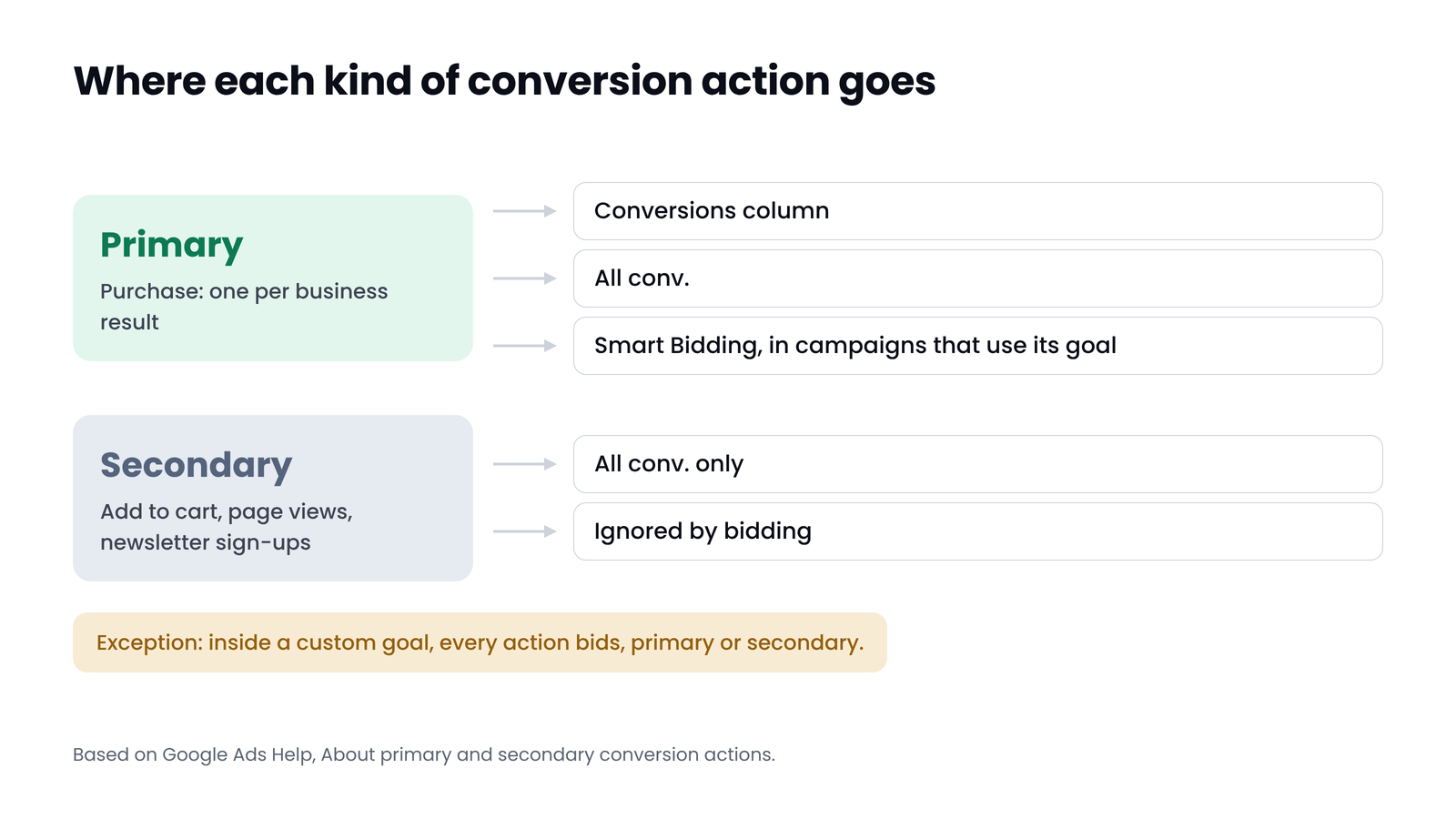
Every conversion action in Google Ads is either primary or secondary. A primary action is counted in the Conversions column and used for bidding by any campaign that bids toward its goal. A secondary action is for observation only: Google records it in the All conv. column and bidding ignores it. Google's help page calls primary actions "biddable" and secondary ones "observation-only".
There is one exception. If you build a custom goal, Google bids on every action inside it, primary or secondary. Custom goals are the only place a secondary action bids.
| Primary | Secondary | |
|---|---|---|
| Counted in the Conversions column | Yes | No |
| Counted in All conv. | Yes | Yes |
| Used by Smart Bidding | Yes, in campaigns that use its goal | No, unless it sits in a custom goal |
| Shows up in cost per conversion and ROAS | Yes | No |
| Use it for | The result the business is paid for | Steps on the way, and anything you want to watch |
One line in Google's Target CPA help page matters more than it looks: Smart Bidding learns across all conversion actions in the Conversions column, even ones set up for other goals and other bid strategies. So a bad primary action can shape what Smart Bidding learns across the whole account, not only in the campaign you had in mind.
 (opens the full-size image in a new tab)
What Google suggested in one account in October 2026
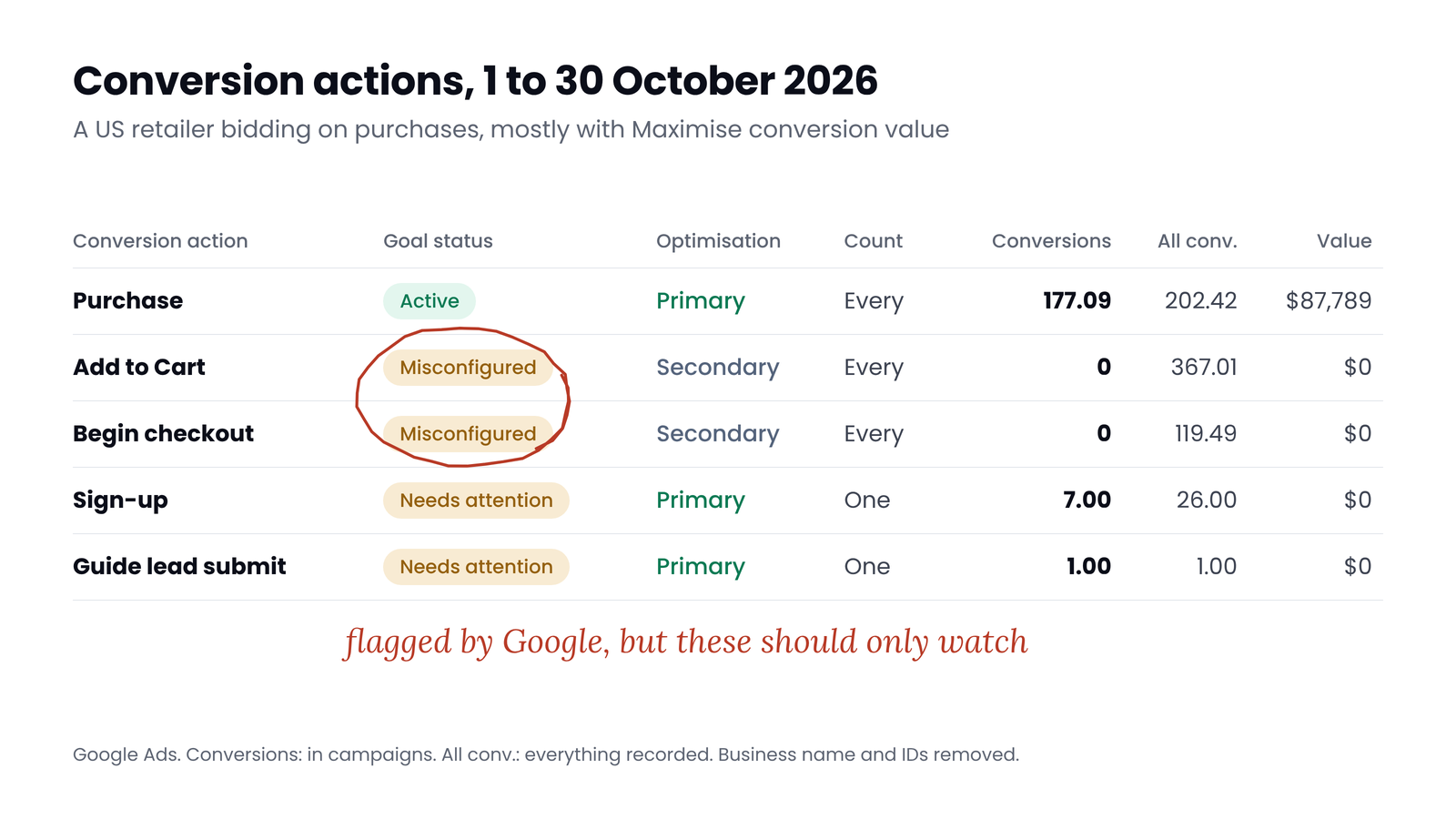
Here is the conversion setup of a US retailer we audited, for 1 to 30 October 2026. It is the same account we used in our post on Google Ads conversion tracking. The campaigns bid toward purchases, mostly with Maximise conversion value.
 (opens the full-size image in a new tab)
Purchase is the only website action with a value, and it is primary: 177 conversions worth $76,915 in campaigns that cost $6,352. Add to cart (367) and begin checkout (119) are secondary, so they are recorded but don't bid. That part is right.
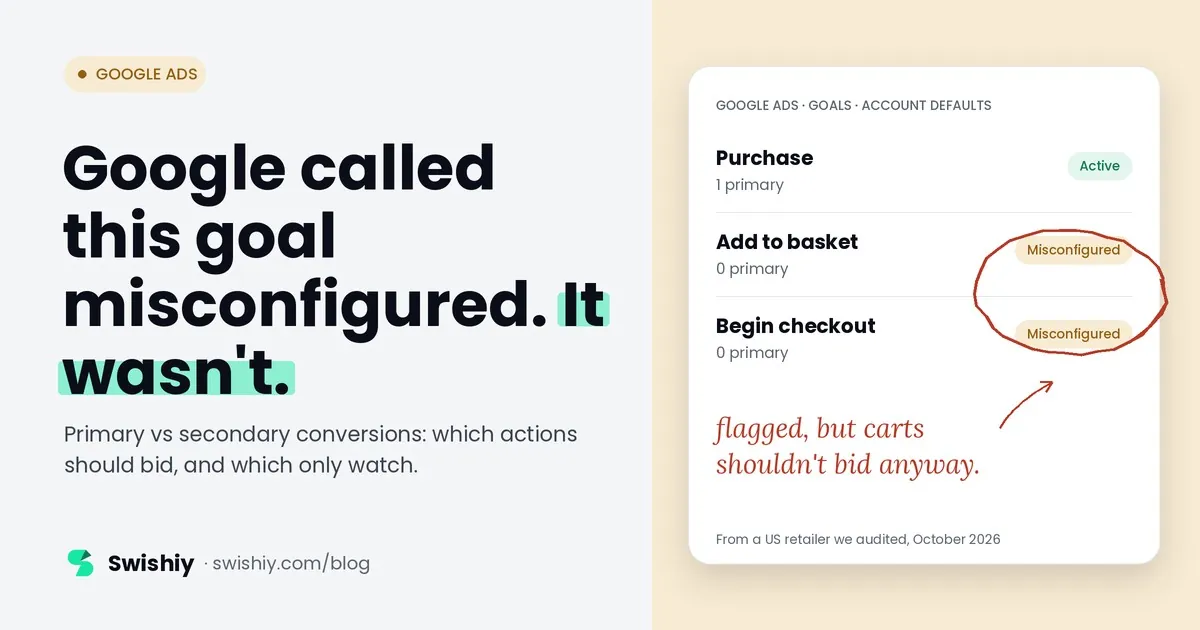
Now look at what Google asked for on the same Goals page. A banner said two goals "cannot be used for optimisation because they do not have any primary conversion actions", and offered a Fix it button. The two goals were Add to basket and Begin checkout, both marked Misconfigured. Above it, a card labelled "Recommended by Google AI" suggested creating a Page view conversion, because "your retail business will see improved results". The linked GA4 property made its own suggestion the same week: mark 4,812 weekly add_to_cart events as key events.
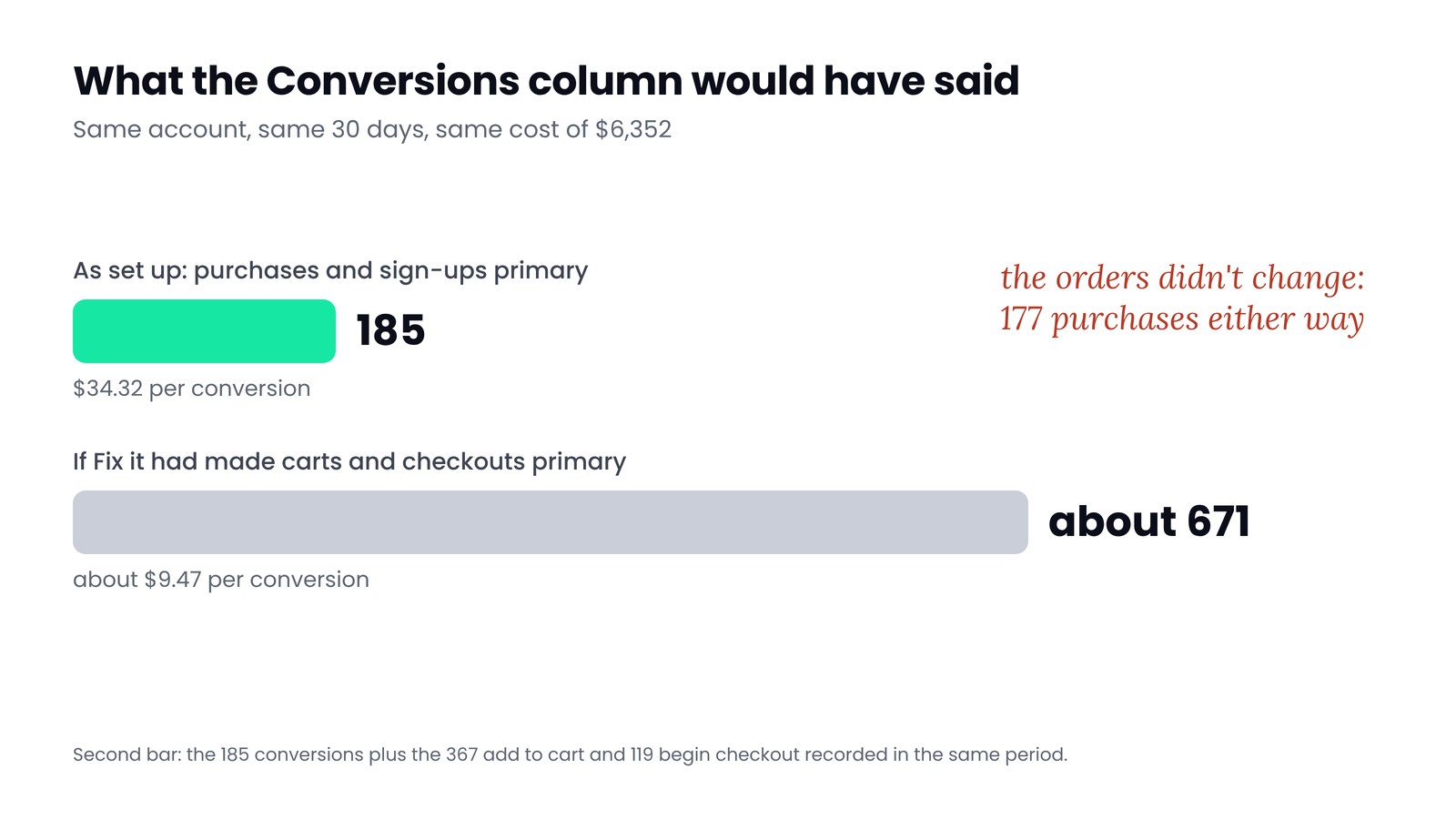
All three prompts push the same way: more actions that bid. Had we followed Fix it, the Conversions column for October would have read about 670 instead of 185, and cost per conversion about $9.50 instead of $34. Not one extra order would have arrived.
 (opens the full-size image in a new tab)
Google flags them because campaigns use them for bidding while nothing in them can bid. The clean fix is to take Add to basket and Begin checkout out of the account-default goals, so no campaign bids toward them. The actions keep recording as secondary, and the warning should clear. Check that no campaign selects either goal directly as a campaign-specific goal.
Myth
Every conversion goal needs a primary action.
Reality
Only goals your campaigns bid toward need one. A goal you only want to watch can hold secondary actions and be left out of the account defaults. Google's Misconfigured label means the goal can't be used for bidding, which for a cart goal is the point.
Which actions should be primary
The rule is one sentence: make primary the action closest to money that happens often enough for bidding to learn from. Everything else is secondary. Here is how that plays out by business type.
| Business | Primary | Count | Keep secondary |
|---|---|---|---|
| Online shop | Purchase, with the order value | Every | Add to cart, begin checkout, add payment info, sign-ups, newsletter, page views |
| Lead gen with a CRM | Qualified lead or closed deal, imported from the CRM. Form submit until the import works | One | Form starts, button clicks, page views, chat opened |
| Lead gen without a CRM | Form submit that reaches a thank-you page, and calls longer than your qualifying length | One | Clicks on phone numbers and email links, page views |
| SaaS with a free trial | Trial start, or paid subscription imported from billing once there is volume | One | Pricing page views, demo page views, account created without a trial |
| Local services | Calls from ads over your qualifying length, and booked appointments | One | Direction clicks, website visits |
Google's own guidance on counting backs this up. Every suits sales, because each purchase is worth something. One suits leads, because a second form from the same click rarely adds value.
Three ways the wrong action ends up primary
1. Following Google's prompts
The Fix it button, the Page view recommendation and GA4's key event suggestions all appear in accounts that bid on purchases. None of them asks what the campaigns bid toward. Read them as suggestions to measure more, not to bid on more.
2. Two actions for the same purchase
A Google Ads purchase tag and a GA4-imported purchase, or Shopify's Google & YouTube app and a Tag Manager tag, can both record the same order. If both are primary, every sale counts twice and ROAS doubles. Google now creates GA4-based conversions as secondary when the account already has goals from that Analytics property, to avoid exactly this, but older imports and manual changes still slip through. Keep one purchase action primary and the other secondary.
3. Account-default goals pulled into every campaign
New campaigns use every account-default goal unless you choose otherwise. In the account above, the Sign-up goal holds four primary actions with no value and is used by 31 of 36 campaigns, so sign-ups count as conversions next to purchases. That is how a newsletter form ends up in a Shopping campaign's numbers.
On the GA4 side, see which key events to mark, and for the same sale counted by two tools, double counting across GA4, Google Ads and Meta.
When a micro conversion can bid
Bidding needs volume. Google's Target ROAS page lists 15 conversions in 30 days as a requirement for Search and Shopping, and Demand Gen asks for 50 in the past 35 days, or 100 across the account. A new store with eight sales a month can't feed that, and a shallower action can carry the campaign for a while.
Google documents how to move off a shallow action. For a Target CPA campaign bidding on an upper-funnel goal such as page views, it says to make the deeper action primary without bidding on it yet, track it for at least two to three conversion cycles, then swap the goals and raise the CPA target. If you start shallow, three rules keep it safe:
- Bid on a micro action through a campaign-specific goal, never as an account default, so other campaigns aren't affected.
- Pick the step closest to the sale: begin checkout before add to cart, add to cart before page views.
- Write down the date you will switch back, and switch once the deeper action reaches the volume above.
If several actions must bid together, Google's documented alternative is values: give each action a value that reflects what it is worth to you and bid on value, so a cart is never worth as much as a sale.
How to change primary actions without breaking bidding
- Note which campaigns use which goals (Goals, then Summary shows the count for each), and save last month's Conversions, cost per conversion and ROAS.
- Make the changes in one go: one primary purchase action, everything else secondary, and goals you only watch taken out of the account defaults.
- Leave targets alone at first. Google says the Learning status never lasts more than 7 days, but performance can take up to one to two conversion cycles to settle.
- Expect reported conversions and ROAS to fall. That is the junk leaving the column, not sales leaving the account.
- After two cycles, adjust targets gradually to the new, honest numbers.
One warning: Google's own pages disagree on timing. The page on Smart Bidding learning says the Learning status lasts 7 days at most. The primary and secondary help page still mentions a 7 to 14 day learning phase. Plan for two weeks of noise and don't judge the change sooner.
Check your account in five minutes
Quick check
- Goals, then Summary: list the account-default goals. Each one should be a goal you want every campaign to bid toward.
- Open each goal and count its primary actions. A purchase goal should have one.
- Look for primary actions with no value in an account that bids on value, such as sign-ups and leads next to purchases.
- Look for two purchase actions both set to primary: a Google Ads tag and a GA4 import, or the Shopify app and a Tag Manager tag.
- Compare Conversions with All conv. for each action. Secondary actions should show only in All conv.
- Build a custom column with Conversions filtered to your purchase action. That column, not the default one, is your ROAS.
Ask yourself
The free Google Ads Auditor grades your conversion tracking before anything else: whether the main conversion is a real business result, whether anything is counted twice, and whether purchases carry values. It reads 90 days of your account in about 60 seconds, read-only. Check which actions bid in your account
Frequently asked questions
What is the difference between primary and secondary conversions in Google Ads?
Primary actions are counted in the Conversions column and used by Smart Bidding in campaigns that bid toward their goal. Secondary actions are for observation only: they appear in All conv. and don't affect bidding, unless you put them in a custom goal, where every action bids.
Should add to cart be a primary conversion?
Not in a shop that has enough purchases to bid on. Add to cart happens far more often than a sale, so as a primary action it inflates conversions and pulls bidding toward browsers. Keep it secondary. The exception is a new store with very few sales, through a campaign-specific goal and only until purchases reach bidding volume.
Why does Google say my goal is misconfigured?
Google flags a goal when campaigns use it for bidding but it has no primary action, so there is nothing to bid on. If it's a goal you only want to watch, such as Add to basket, take it out of the account-default goals instead of making an action primary, and check that no campaign selects it directly.
Should a GA4-imported purchase be primary?
Only if it's your only purchase action. If you also have a Google Ads purchase tag or Shopify's Google app sending purchases, keep one primary and the other secondary, or each sale counts twice. Google creates GA4-based conversions as secondary when the account already has goals from that Analytics property, for this reason.
Will changing primary conversions reset Smart Bidding?
It starts a short learning period. Google says the Learning status never lasts more than 7 days, but performance can take up to one to two conversion cycles to settle. Make all your changes at once, hold targets steady at first, and judge the result after two weeks.
Sources
- Google Ads Help: About primary and secondary conversion actions: https://support.google.com/google-ads/answer/11461796
- Google Ads Help: About Target CPA bidding: https://support.google.com/google-ads/answer/6268632
- Google Ads Help: About Target ROAS bidding: https://support.google.com/google-ads/answer/6268637
- Google Ads Help: About conversion goals: https://support.google.com/google-ads/answer/10995103
- Google Ads Help: The conversions Summary page: https://support.google.com/google-ads/answer/10993988
- Google Ads Help: About campaign-specific conversion goals: https://support.google.com/google-ads/answer/9143218
- Google Ads Help: About Smart Bidding learning: https://support.google.com/google-ads/answer/13020501
- Google Ads Help: About conversion counting options: https://support.google.com/google-ads/answer/3438531
- Google Ads Help: Create conversions based on Google Analytics key events: https://support.google.com/google-ads/answer/10632359
- Google Ads Help: Stay on Target CPA and change from an upper to a lower funnel goal: https://support.google.com/google-ads/answer/15815830
- r/googleads: question about the Goals summary section: https://www.reddit.com/r/googleads/comments/1rqbk0d/technical_query_about_goals_summary_section_in/

Qudees Kiani
Founder of Swishiy. Five years of marketing measurement work across Google Ads, Meta and GA4, for ecommerce and lead-gen businesses.
Book a 30-minute callIs your Google Ads data telling the truth?
The free auditor checks tracking, brand vs non-brand and wasted spend. Automated, Google Ads only, 60 seconds.