The Search Terms Report: How to Find the Terms Wasting Your Budget

Qudees Kiani, founder · · 10 min read
Short answer
The search terms report lists what people typed before your ads showed. To find waste, filter to terms with no conversions and sort by cost. Our rule: a term is waste once it has spent twice your cost per conversion, or had enough clicks that zero is unlikely to be luck. Below that, it's too early to judge.
On this page
Your search terms report already shows where the budget went. Most people sort it by the wrong column, then stop before the row at the bottom. In an October audit, we went through the report of a US retailer: 36,271 search terms in an account that spent $6,352. Sorted by cost, not one term had spent enough to cut on the numbers alone. More than half of what the report covered sat in a single row Google doesn't open. This is the routine we use, the thresholds behind it, and what it found.
What the report shows, and what it leaves out
The search terms report lists the searches that triggered your ads, with the clicks, cost and conversions each one brought. You'll find it under Insights and reports, then Search terms. Three columns do most of the work:
- Match type says how the search matched your keyword: exact, phrase or broad, with close variants of exact and phrase marked as such. Terms from Performance Max and AI Max for Search now show up here too, labelled as such.
- Added/Excluded says whether the term is already one of your keywords (Added), already a negative keyword (Excluded), or neither (None).
- Keyword shows which keyword the search matched. It is hidden by default: add it under Columns, then Attributes.
What the report leaves out matters as much. Google only lists terms searched by "a significant number of people", for privacy. Everything below that threshold is added up in a row at the bottom called Other search terms, with its cost and conversions but no terms. And anything that wasn't a search, such as YouTube or Display placements inside Performance Max, never appears at all.
 (opens the full-size image in a new tab)
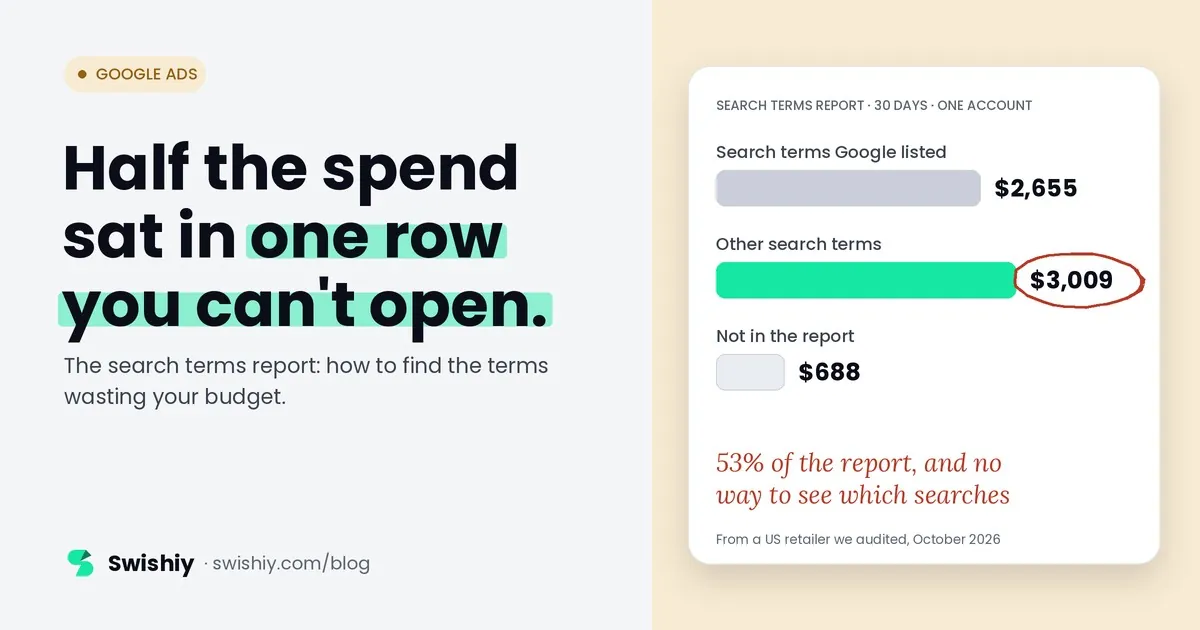
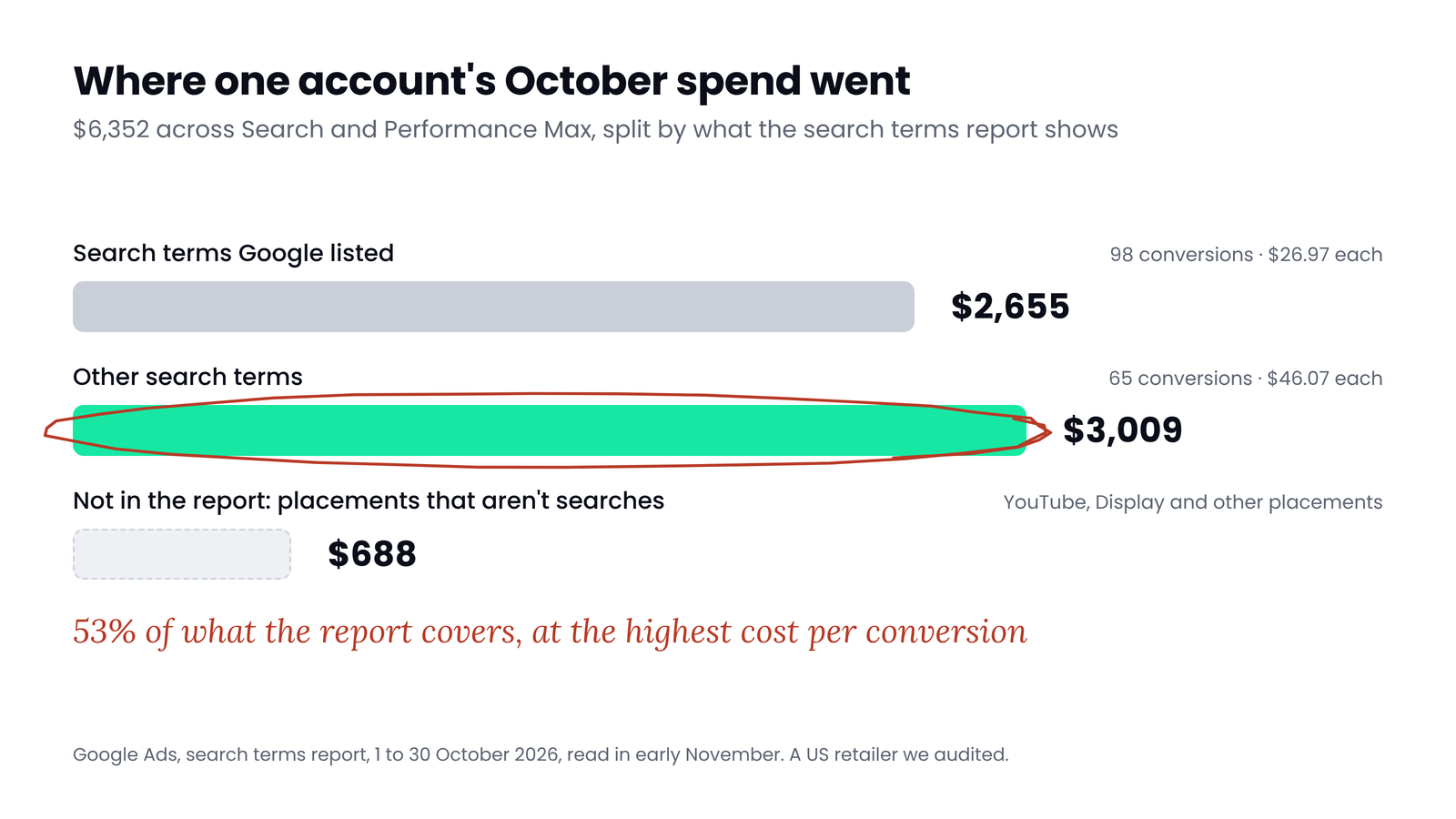
In the retailer's account, the terms Google listed cost $2,655. Other search terms cost $3,009, which is 53% of the $5,664 the report covers. Those hidden searches also cost more per conversion: $46.07, against $26.97 for the ones Google showed. Third-party studies have put the hidden share at anywhere from about a quarter to half of spend, so this account is not unusual. In this account, a routine that only reads the visible rows works on less than half the budget.
Where to look
The 10-minute routine
- Check tracking first. If a cart is counted as a sale, or one purchase counts twice, a term's conversions mean nothing in either direction. Our guide to primary and secondary conversions covers the usual causes.
- Pick a long enough date range. We use 30 days for a busy account and 90 for a small one. Short ranges make every term look like it hasn't had a chance yet.
- Filter to Conversions = 0 and sort by Cost, highest first. Not by clicks or impressions. Cost is what you lose, and it is the number your threshold is written in.
- Show Keyword and Added/Excluded, and filter Added/Excluded to None. That hides terms you have already made keywords or negatives.
- Sort each term into three piles: exclude, watch, or too early to judge. The thresholds are in the table below.
- Group by word. Use the filter Search term contains, which takes several values, one per line, and read the total row. A word that wastes money across 500 cheap searches never shows up one term at a time.
- Read the Other search terms row. Compare its cost per conversion with the visible terms, then open search terms insights on the Insights page to see the themes behind it.
- Add negatives at the right level, as described further down, and note the date so you can check the effect.
| Pile | Rule we use | What to do |
|---|---|---|
| Exclude | No conversions and spend at least 2× your cost per conversion, or enough clicks that zero is unlikely to be chance, or a search that can't buy what you sell | Add a negative, at the right match type and level |
| Watch | No conversions and spend between 1× and 2× your cost per conversion | Check again next cycle. Look at the landing page and the ad |
| Too early to judge | Less than 1× your cost per conversion, and too few clicks to tell | Leave it, unless the intent is clearly wrong. Group by word instead |
Use your own cost per conversion, not a benchmark, and use the campaign's own figure when the campaign has enough conversions to be reliable. We use 30 conversions as the cut-off and fall back to the account's figure below it. These thresholds are our rules, not Google's, and the next section explains where they come from.
When zero conversions means something
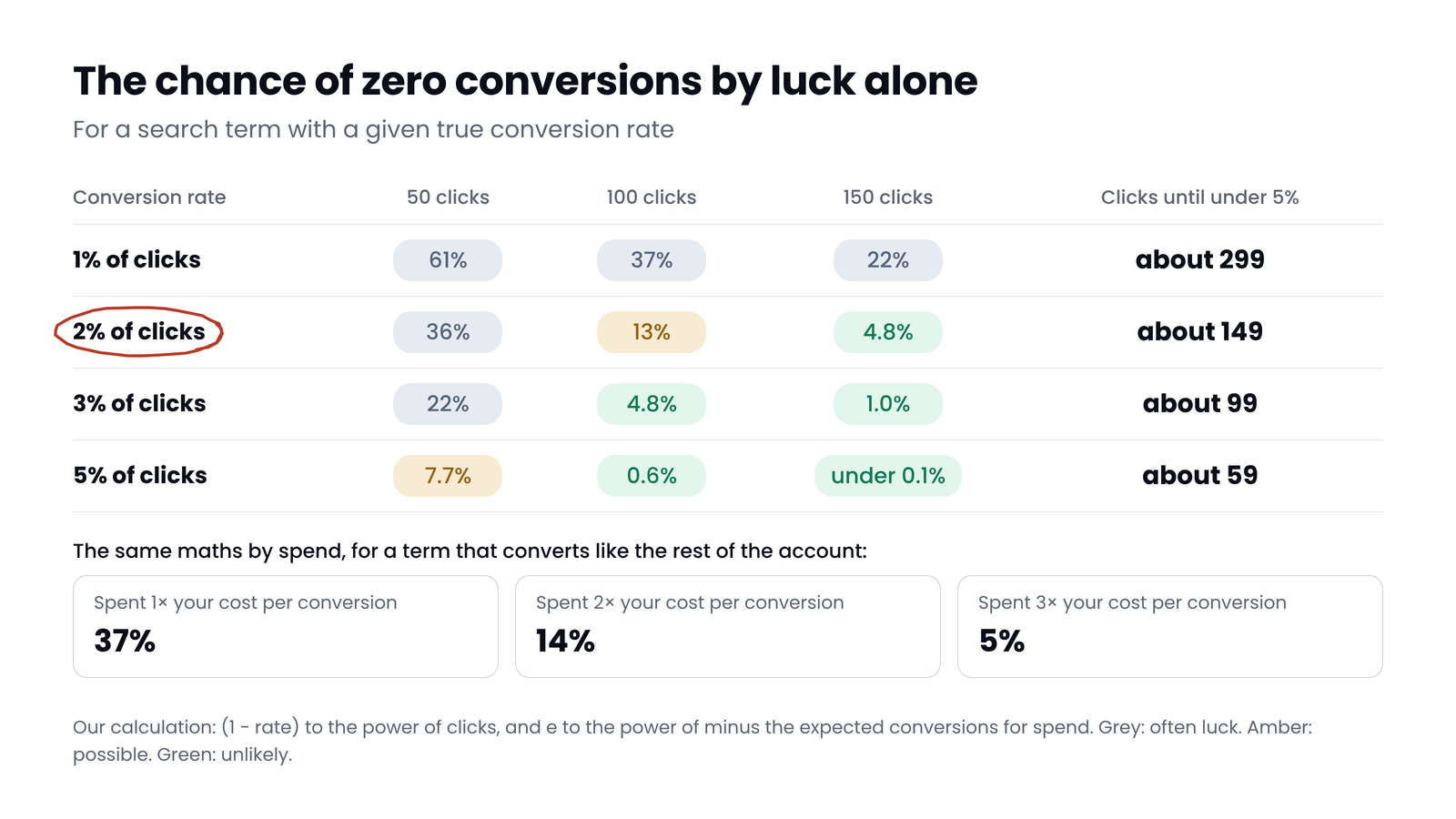
A term with no conversions isn't automatically wasting money. If it converts like the rest of your account, chance alone will give it a run of zeros. The table shows how likely that is, for a term with a given conversion rate and number of clicks.
 (opens the full-size image in a new tab)
Read it like this: a term that truly converts 2% of its clicks will show zero conversions after 100 clicks about 13% of the time, roughly 1 in 7. Only after about 150 clicks does that drop under 5%. A useful shortcut: zero becomes suspicious once a term has had enough clicks to expect about three conversions.
The same logic is behind the cost rule. If a term converts at your average rate and costs your average per click, spending twice your cost per conversion should have brought about two conversions. The chance of getting none by luck is about 14%, roughly 1 in 7. At three times your cost per conversion it is about 5%. So 2× is a sensible point to act, not proof. In the retailer's account, with about 2.5 conversions per 100 clicks, a term needs about 120 clicks with no conversion before zero is unlikely to be luck.
Myth
A search term with no conversions is wasting money.
Reality
Only once it has had enough spend or clicks to expect a few conversions. Before that, zero is often just luck, and excluding it can cut a term that would have sold next week.
Three things that bend the maths
What the routine found in one account
When we sorted the retailer's report by cost on 31 October, 84 of the 102 most expensive terms had no conversions, together $618.63. But the most expensive of them had cost $30.79, under the account's $33.42 per conversion ($35.87 counting purchases only, which changes nothing here). On the cost and click rules, no single term qualified for exclusion, and none reached the watch list. The waste was spread thin.
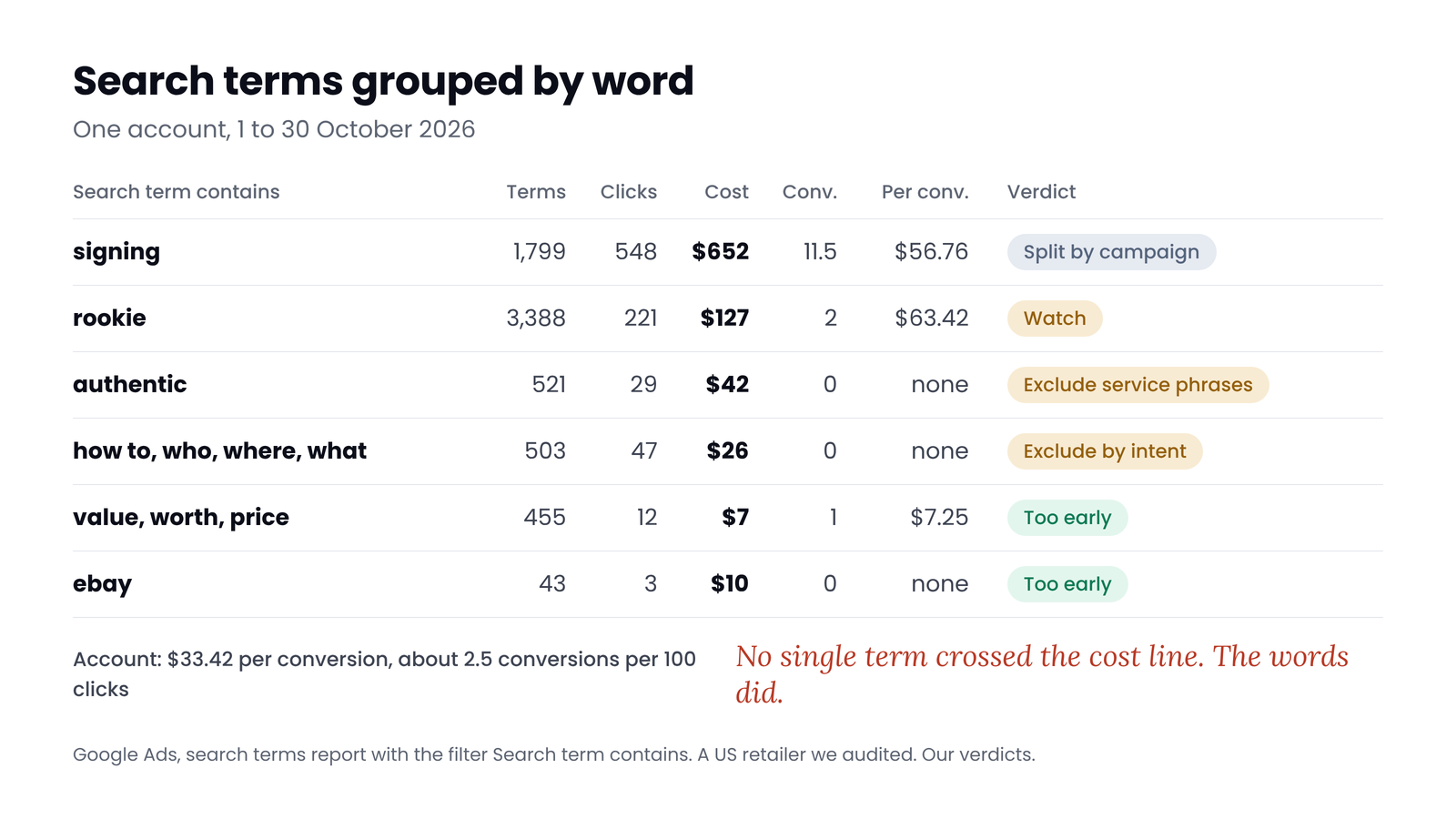
Grouping by word told a different story:
 (opens the full-size image in a new tab)
- "signing": 1,799 terms, $652, 11.5 conversions, $56.76 each. 1.7× the account's cost per conversion. Mixed: the store sells signing events, and searches for competitors' signings come in through the same word. Split it by campaign before excluding anything.
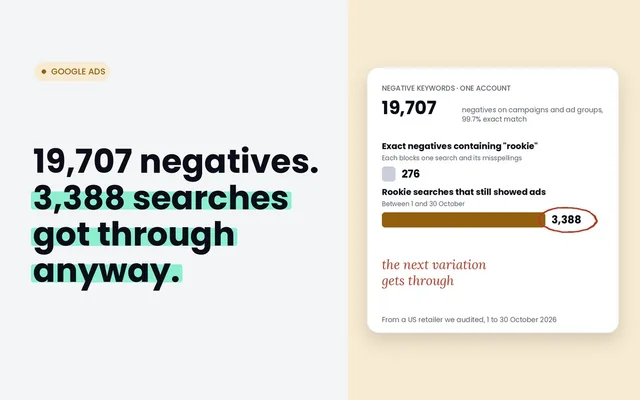
- "rookie": 3,388 terms, $127, 2 conversions, $63.42 each. Mostly card searches, and the expensive ones came from Performance Max. Not proven waste, but on the watch list.
- "authentic": 521 terms, $42, no conversions, and question words (how to, who, where, what): 503 terms, $26, no conversions. On clicks they are too early to judge, with 29 and 47 clicks, and by cost "authentic" is on the watch list at 1.3× the cost per conversion. The intent is clearer: "who authenticates sports memorabilia" is someone looking for an authentication service, not a signed jersey. Exclude the service phrases, not the word "authentic", which buyers use too.
One more lesson from the same list: the most expensive term with no conversions was a version of the store's own name. Never exclude your brand on numbers alone. Check where those clicks land, and whether those people buy through another route. Our post on brand and non-brand campaigns explains why brand needs its own yardstick.
Performance Max and AI Max terms
Since 2025, Performance Max search terms appear in the same report, and in this account many of the expensive zero-conversion terms came from Performance Max and AI Max rather than from your own keyword matches. They need different handling:
- Performance Max: campaign-level negative keywords, and account-level ones, apply to its Search and Shopping inventory only. For your own brand, Performance Max has brand exclusions, which are built for this. Use those rather than negatives.
- AI Max for Search: Google recommends waiting at least two weeks after turning it on before adding negatives, and using them sparingly. Google suggests adding the Source column, which shows where a match came from.
- One filter trap: filtering the match type to AI Max leaves out the Other search terms row, so the totals look smaller than they are.
Adding negatives without blocking buyers
- Check the match type. Negatives added from the report are exact match by default, which blocks only that exact search. For a pattern, add a phrase negative for the words that carry the problem.
- Add the variants yourself. Negative keywords don't match close variants, so plurals and synonyms need their own entries.
- Pick the level. A campaign's own negatives for its own problem, a shared list for patterns several campaigns share, and account-level negatives, up to 1,000, for searches no campaign should ever show for.
- Watch the ratio. If you find yourself excluding a large share of your terms every week, the keywords or match types are the problem, not the searches.
For the other places budget leaks, from brand traffic to targeting settings, see where Google Ads wasted spend hides.
For match types, starter lists by business type and the words never to exclude, see how to build a negative keyword list.
Quick check
Quick check
- Tracking checked first: one purchase action bids, and nothing counts twice.
- Date range of 30 days or more, filtered to Conversions = 0 and sorted by cost.
- Every term judged against your own cost per conversion, not a benchmark.
- Terms under 1× your cost per conversion left alone unless the intent is clearly wrong.
- Words grouped with the Search term contains filter, and the total row read.
- Other search terms compared with the visible terms, and search terms insights opened.
- Your brand never excluded on numbers alone.
Ask yourself
The free Google Ads Auditor runs this routine on 90 days of your account in about 60 seconds: tracking graded first, every zero-conversion term judged against your own cost per conversion, words that waste money across many searches, and Performance Max and AI Max terms in their own section. Read-only. Find my wasted search terms
Frequently asked questions
What is "Other search terms" in Google Ads?
It is the row at the bottom of the search terms report that adds up every search Google doesn't list individually, because too few people searched it. It shows cost, clicks and conversions but not the searches. Search terms insights shows the themes inside it.
How many clicks before adding a negative keyword?
Enough that zero conversions is unlikely to be luck: roughly three divided by your conversion rate. At a 2% conversion rate that is about 150 clicks. By cost, we act at twice your cost per conversion and watch between one and two times.
How often should I check the search terms report?
We check weekly for most accounts, and every few days after launching a campaign or changing match types. Use a 30 to 90 day range for decisions, so each term has had a fair chance.
Can I see search terms for Performance Max?
Yes. Since 2025, Performance Max search terms appear in the search terms report. In the accounts we've checked, their match type shows as Performance Max. Negative keywords for Performance Max apply to its Search and Shopping inventory only.
Why are search terms missing from my report?
Google hides searches that too few people made, for privacy, and adds them up in the Other search terms row. Placements that aren't searches, such as YouTube and Display inside Performance Max, never appear in the report.
What is the difference between a keyword and a search term?
A keyword is what you bid on. A search term is what someone typed. With broad match, phrase match, close variants and AI Max, one keyword can match thousands of different search terms.
Sources
- Google Ads Help: About the search terms report: https://support.google.com/google-ads/answer/2472708
- Google Ads Help: Add negative keywords from the search terms report: https://support.google.com/google-ads/answer/7102466
- Google Ads Help: About search terms insights: https://support.google.com/google-ads/answer/11386930
- Google Ads Help: About negative keywords: https://support.google.com/google-ads/answer/2453972
- Google Ads Help: Account-level negative keywords: https://support.google.com/google-ads/answer/11396330
- Google Ads Help: Search terms reporting for Performance Max: https://support.google.com/google-ads/answer/16451273
- Google Ads Help: Negative keywords in Performance Max: https://support.google.com/google-ads/answer/15726455
- Google Ads Help: AI Max for Search reporting: https://support.google.com/google-ads/answer/16470459
- Seer Interactive: Google removes search terms for 28% of budgets (2020): https://www.seerinteractive.com/insights/google-ads-removes-search-terms-for-28-percent-of-paid-search-budgets
- Adthena: How hidden search terms are impacting your Google Ads (2024): https://www.adthena.com/resources/blog/how-hidden-search-terms-are-impacting-your-google-ads/
- Statology: The rule of three: https://www.statology.org/a-concise-guide-to-the-statistical-rule-of-three/
- Search Engine Journal: Google Ads Liaison explains Other search terms (2024): https://www.searchenginejournal.com/google-ads-liaison-explains-other-search-terms-issue/506349/

Qudees Kiani
Founder of Swishiy. Five years of marketing measurement work across Google Ads, Meta and GA4, for ecommerce and lead-gen businesses.
Book a 30-minute callIs your Google Ads data telling the truth?
The free auditor checks tracking, brand vs non-brand and wasted spend. Automated, Google Ads only, 60 seconds.