GA4 Key Events: Which to Mark, Which to Unmark

Qudees Kiani, founder · · 8 min read
Short answer
Mark only business results as key events: purchase for a shop, a qualified lead or a real form submission for lead gen, a trial or sign-up for software. Leave add_to_cart, page views and the automatic form_submit as plain events. A key event doesn't bid by itself, but it's one click from a Google Ads conversion that can.
On this page
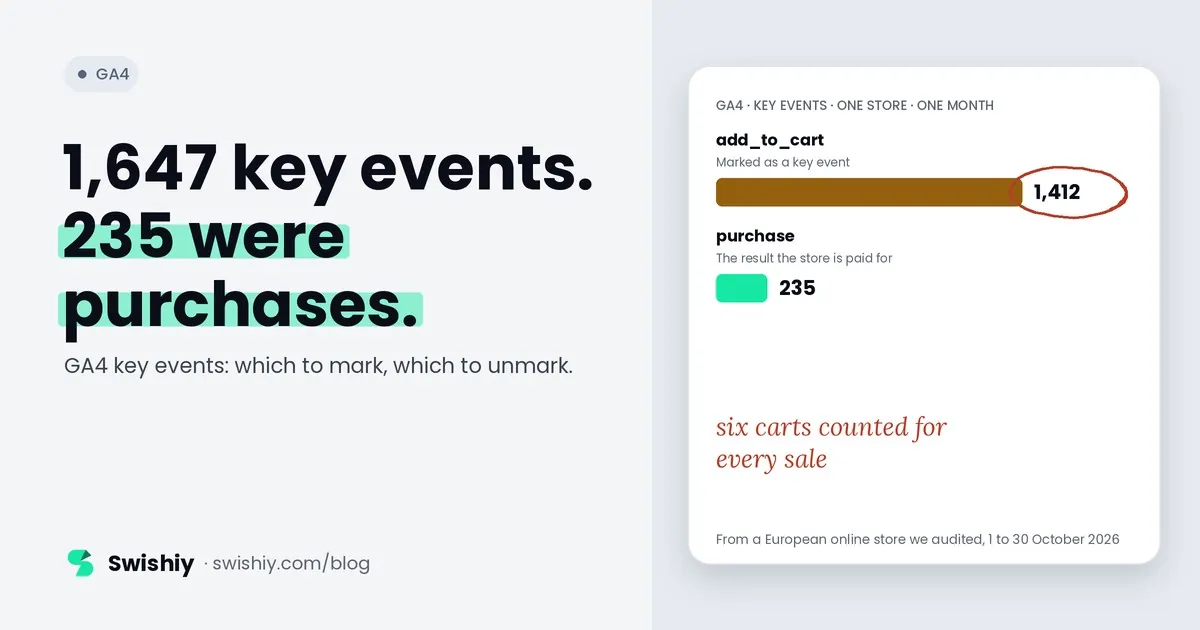
Marking add_to_cart as a key event looks harmless until Google Ads starts bidding on it. GA4 makes it easy: a US retailer we audited sees a card on its GA4 home page suggesting it mark 4,812 weekly add-to-cart events as key events. A European online store we audited had already marked it: between 1 and 30 October, 1,412 of its 1,647 key events were add-to-carts, and 235 were purchases. This guide covers what key events do and don't do, which to mark for your kind of business, how one ends up bidding in Google Ads, and how to clean up the list.
What a key event does, and doesn't
In March 2024 Google renamed GA4's conversions to key events, so that conversion means the same thing in GA4 and Google Ads: an event you use with your ad campaigns. Marking an event as a key event changes what GA4 reports. It doesn't change what Google Ads bids on, at least not directly.
| A key event | A key event doesn't |
|---|---|
| Counts in the Key events column of reports such as Landing pages and User acquisition | Bid in Google Ads on its own. Google: key event metrics "are not directly eligible for bidding" |
| Can be credited to channels in GA4's Attribution reports | Change past data. Marking and unmarking apply from that day on |
| Counts toward engaged sessions: a session with a key event is engaged | Appear as a Google Ads conversion until someone creates one from it |
| Can become a Google Ads conversion in a few clicks | Show up at once. Google says to allow up to 24 hours for standard reports |
The engaged session point matters more than it looks. GA4 counts a session as engaged if it lasts more than 10 seconds, has two or more page views, or has a key event. Each low-value event you mark can turn short, one-page sessions into engaged ones.
How a key event ends up bidding
 (opens the full-size image in a new tab)
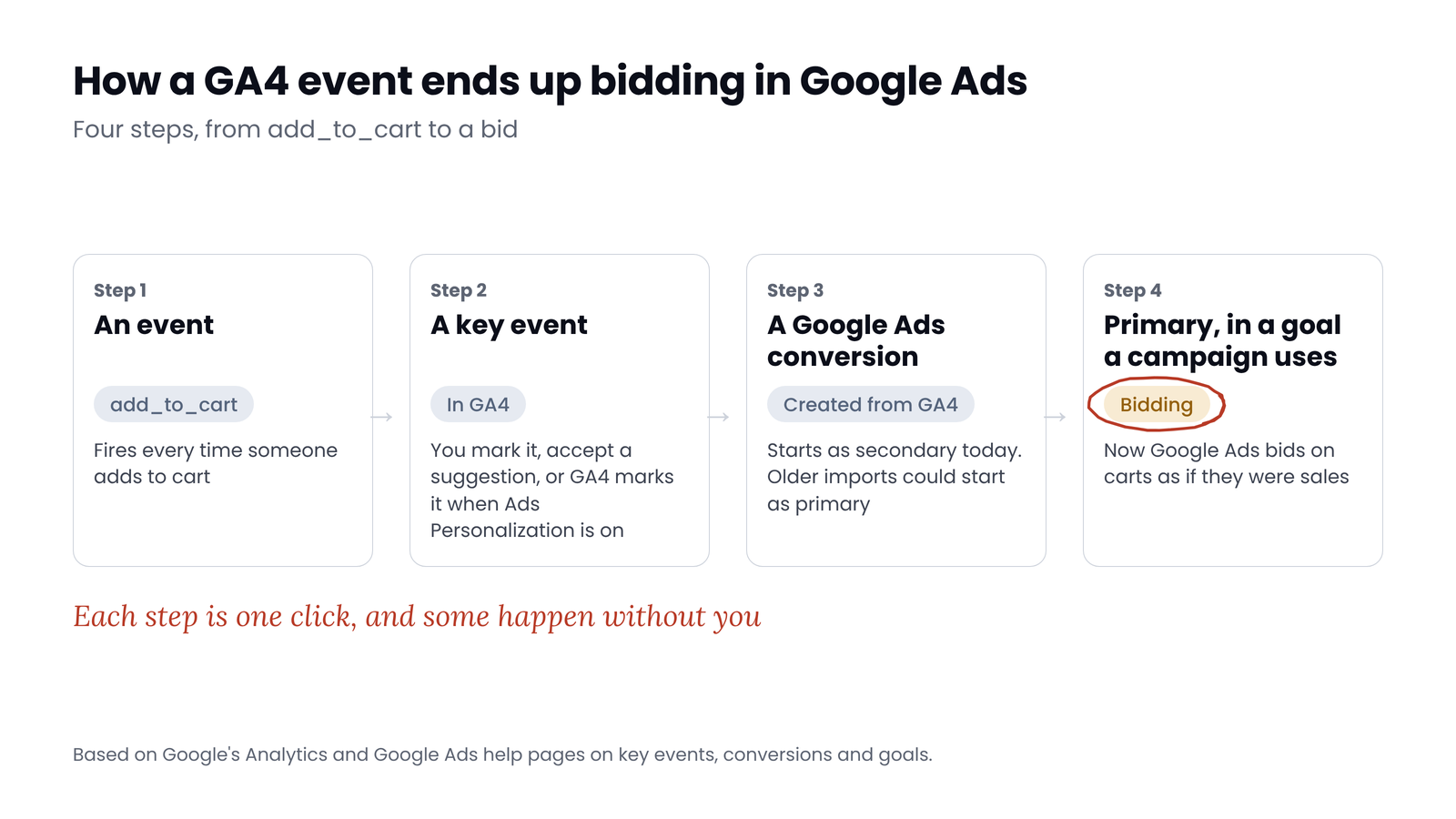
- The event becomes a key event. You mark it, you accept one of GA4's suggestions, or GA4 marks it for you: Google says that with Ads Personalization on and Google Ads linked, add_to_cart, add_to_wishlist, begin_checkout, session_start, view_item, view_item_list and view_search_results are also marked as key events.
- Someone creates a Google Ads conversion from it, in GA4's Conversion management or under Goals in Google Ads. It works the other way too: Google says an event used to create a conversion automatically becomes a key event.
- The conversion is primary. Conversions created in GA4's interface start as secondary today. Older imports could start as primary, and a custom goal can bid on secondary actions too.
- A campaign uses its goal. Campaigns use the account-default goals unless you choose others for that campaign.
A US store we audited shows how quietly it happens. Its Google Ads account still lists a conversion action called Shopping Cart, imported from GA4 and set to primary. It's removed now and recorded nothing between 1 and 30 October. But while it was live, any campaign bidding on its goal would have counted a cart as a conversion, the same as a sale. Our post on primary and secondary conversions covers the Google Ads side in detail.
Which events to mark, by business type
Our rule: mark the result the business is paid for, and the step just before it if you need to see it in reports. Import into Google Ads only what you want to bid on, and only once.
| Event | Online shop | Lead gen | Software | Content site |
|---|---|---|---|---|
| purchase | Key event. Import only if no Google Ads tag already tracks purchases | Not used | Key event if plans are bought online | Not used |
| generate_lead, from a real success | Key event if you have a B2B form | Key event, and import as primary if it's the stage you bid on | Key event for demo requests | Key event for sponsor or lead forms |
| qualify_lead, close_convert_lead | Not used | Key events, sent from your CRM. The best bid signal once there's volume | Key events | Not used |
| sign_up | Plain event | Plain event | Key event, import as primary | Key event if there's a registration wall |
| add_to_cart, begin_checkout | Plain events. Import as secondary if you want to watch them in Google Ads | Not used | Not used | Not used |
| form_submit, from enhanced measurement | Plain event | Plain event. Replace with your own generate_lead | Plain event | Plain event |
| page_view, scroll, view_item, session_start | Plain events | Plain events | Plain events | Plain events |
Watch the automatic form_submit
What we found in three audits
 (opens the full-size image in a new tab)
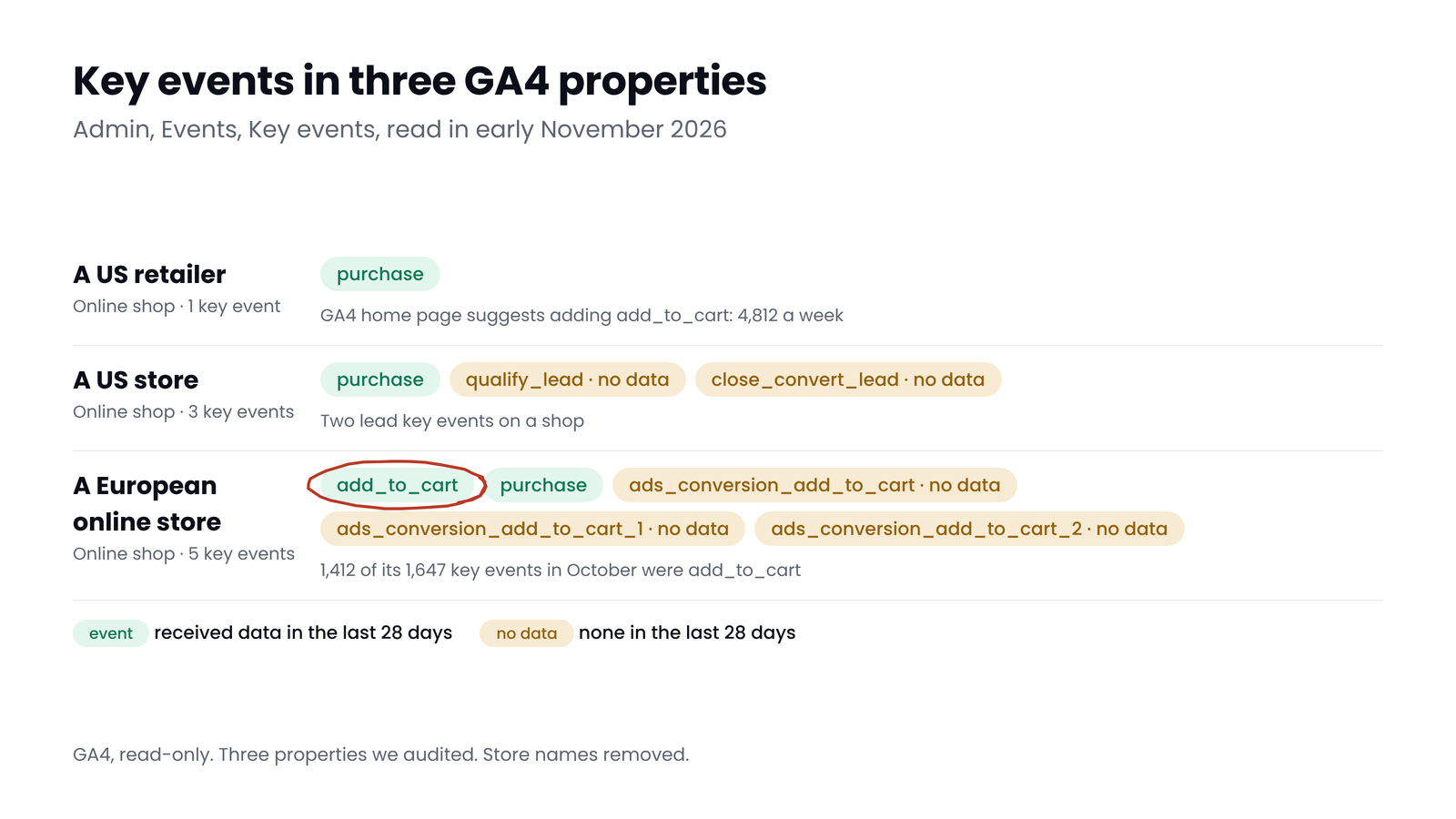
- A US retailer: one key event, purchase. That's the right list for a shop. GA4's home page suggests adding add_to_cart, which would be the wrong one.
- A US store: purchase plus two lead key events, qualify_lead and close_convert_lead, that received no data in the last 28 days. A store has no leads to qualify, so they're clutter at best.
- A European online store: add_to_cart and purchase, plus three copies named ads_conversion_add_to_cart that received no data in the last 28 days. Between 1 and 30 October, add_to_cart made up 1,412 of its 1,647 key events, so every report with a Key events column mostly counted carts. Paid search sessions showed 194 key events and 36 purchases. In the Google Ads account we checked, the add-to-basket goal recorded nothing, so the damage stayed in GA4's reports.
Myth
More key events give GA4 and Google Ads more to learn from.
Reality
Key events don't feed bidding until they become Google Ads conversions in a goal a campaign bids on. Then each extra one teaches bidding to chase something that isn't a sale. A short list of real results is easier to read and safer to import.
Counting method and value
- Counting method. Once per event, the recommended default, counts every time the event fires. Once per session, which Google labels Legacy, counts it once per session. It's the default for key events that were created from Universal Analytics goals. Many practitioners use once per session for leads, so a refreshed thank-you page doesn't count twice, and once per event for purchases.
- Match it in Google Ads. Google Ads has its own setting: One counts one conversion per ad click, Every counts all of them. For leads, use One.
- Default value. You can give a key event a default value, which only applies when the event has none. We use it for leads and sign-ups, not purchases, which should carry the real order value.
- Neither change is retroactive. Both apply from the day you make them.
How to clean up your key events
- List them. In GA4, go to Admin, Data display, Events, then the Key events tab. Note which have received data in the last 28 days.
- Check Google Ads before you unmark anything. In GA4's Conversion management and in Google Ads' Goals, see which key events have a Google Ads conversion, and whether it's primary.
- Unmark what isn't a business result: micro steps, page views, scrolls, the automatic form_submit and any event GA4 marked for you that you don't need.
- Remove duplicates: two events for one lead, or a thank-you page event next to the lead event it already fires.
- Set the counting method for each remaining key event.
- Write down the date. Reports change from that day, so compare periods before and after with care.
Quick check
Quick check
- Every key event is a business result or the step just before one.
- No key event has gone 28 days without data unless you expect that.
- add_to_cart, page_view and the automatic form_submit aren't key events.
- No two key events count the same lead or sale.
- Leads count once per session in GA4 and One in Google Ads.
- Every key event imported into Google Ads is primary only if you want to bid on it.
Ask yourself
The free GA4 Auditor checks your key events against whether you sell online or collect leads, and flags micro steps marked as key events, key events that haven't fired in 30 days and each one's counting method. It also checks purchases for repeated transaction IDs and missing values. Read-only. Audit my GA4
Frequently asked questions
What is the difference between key events and conversions in GA4?
Since March 2024, GA4 calls the actions you mark as important key events. Conversions now means Google Ads conversions, which you can create from key events. A key event shows in GA4's reports but doesn't bid in Google Ads on its own.
How many key events can I have in GA4?
Up to 30 on a standard property and 50 on Analytics 360. Most businesses need far fewer: the actions they're paid for and maybe the step before.
Should add_to_cart be a key event?
Not for a shop with enough purchases. It can inflate engaged sessions, and if it becomes a primary Google Ads conversion, bidding chases carts instead of sales. Keep it as a plain event, or import it as secondary to watch it in Google Ads.
Does marking a key event change past data?
No. Marking, unmarking, the counting method and the default value all apply from the day you change them. Past data keeps its old settings.
Why does GA4 mark events as key events automatically?
Google says that when Ads Personalization is on with a linked Google Ads account, GA4 also marks events such as add_to_cart, begin_checkout, view_item and session_start as key events. GA4 also suggests events to mark on its home page. Review both.
Should I use once per event or once per session?
Google recommends once per event, which suits purchases. Many practitioners use once per session for leads and sign-ups, so a refreshed thank-you page or a double submission doesn't count twice.
Sources
- Analytics Help: About key events: https://support.google.com/analytics/answer/9267568
- Analytics Help: Mark events as key events: https://support.google.com/analytics/answer/13128484
- Analytics Help: Key events and conversions (video): https://support.google.com/analytics/answer/14748670
- Analytics Help: Conversions and key events, what changed: https://support.google.com/analytics/answer/13965727
- Analytics Help: Key event counting method: https://support.google.com/analytics/answer/13366706
- Analytics Help: Default key event value: https://support.google.com/analytics/answer/13749237
- Analytics Help: Engaged sessions: https://support.google.com/analytics/answer/12195621
- Google Ads Help: Create conversions from Google Analytics key events: https://support.google.com/google-ads/answer/10632359
- Google Ads Help: Import Google Analytics conversions: https://support.google.com/google-ads/answer/2375435
- Google Ads Help: About conversion goals: https://support.google.com/google-ads/answer/10995103
- Google Ads Help: Primary and secondary conversion actions: https://support.google.com/google-ads/answer/11461796
- Search Engine Land: GA4 renames conversions to key events (2024): https://searchengineland.com/google-analytics-4-ads-report-conversion-key-events-438613
- Search Engine Journal: One-click key event suggestions in GA4 (2024): https://searchenginejournal.com/google-rolls-out-one-click-event-tracking-in-ga4/534688
- MeasureSchool: Form tracking in GA4: https://measureschool.com/form-tracking-in-google-analytics-4/

Qudees Kiani
Founder of Swishiy. Five years of marketing measurement work across Google Ads, Meta and GA4, for ecommerce and lead-gen businesses.
Book a 30-minute callIs your Google Ads data telling the truth?
The free auditor checks tracking, brand vs non-brand and wasted spend. Automated, Google Ads only, 60 seconds.