Why GA4 Revenue Doesn't Match Shopify, and How Big a Gap Is Normal

Qudees Kiani, founder · · 10 min read
Short answer
GA4 never matches Shopify exactly: GA4 counts purchase events from browsers, Shopify counts orders. Compare like for like first: the same time zone, online orders only, and GA4's purchase value against gross sales minus discounts. Then we treat a gap under 5% as healthy, over 10% as broken, and GA4 above Shopify as a double counting check.
On this page
GA4 will never match your Shopify orders exactly. The question is whether the gap is 3% or 30%, and whether you're comparing the same thing. Many gaps shrink once both sides use the same time zone, the same orders and the same definition of revenue. The rest have a cause you can find. This guide covers what to line up first, what usually makes up a real gap, what changed in 2026, and a check you can run in 15 minutes.
Why the two numbers can't match
Shopify records an order when a customer pays. GA4 records a purchase when a tag reports one, and that tag has to load in the buyer's browser, after the buyer allowed it, without an ad blocker in the way, on a page the buyer reached. Every one of those conditions loses a few orders. Since 2026 there is a second route: Shopify's Google & YouTube app can also send purchases to GA4 from Shopify's servers, which recovers many of them (more on that below).
So a gap is expected. What matters is its size and its direction. GA4 a little below Shopify is normal. GA4 far below Shopify means purchases are being lost. GA4 above Shopify means something counts twice.
Line up the two reports first
Before you look for a tracking problem, make sure the two reports measure the same thing. Five settings differ by default, and none of them is an error.
| What differs | GA4 | Shopify | Compare like this |
|---|---|---|---|
| Time zone | The property's reporting time zone | The store's time zone | Check both. A two-hour difference moves orders between days, so compare weekly totals, not single days |
| Which orders | Purchases on your website | Every order, including draft orders once converted to orders, POS and subscription renewals | Filter Shopify to the Online Store sales channel |
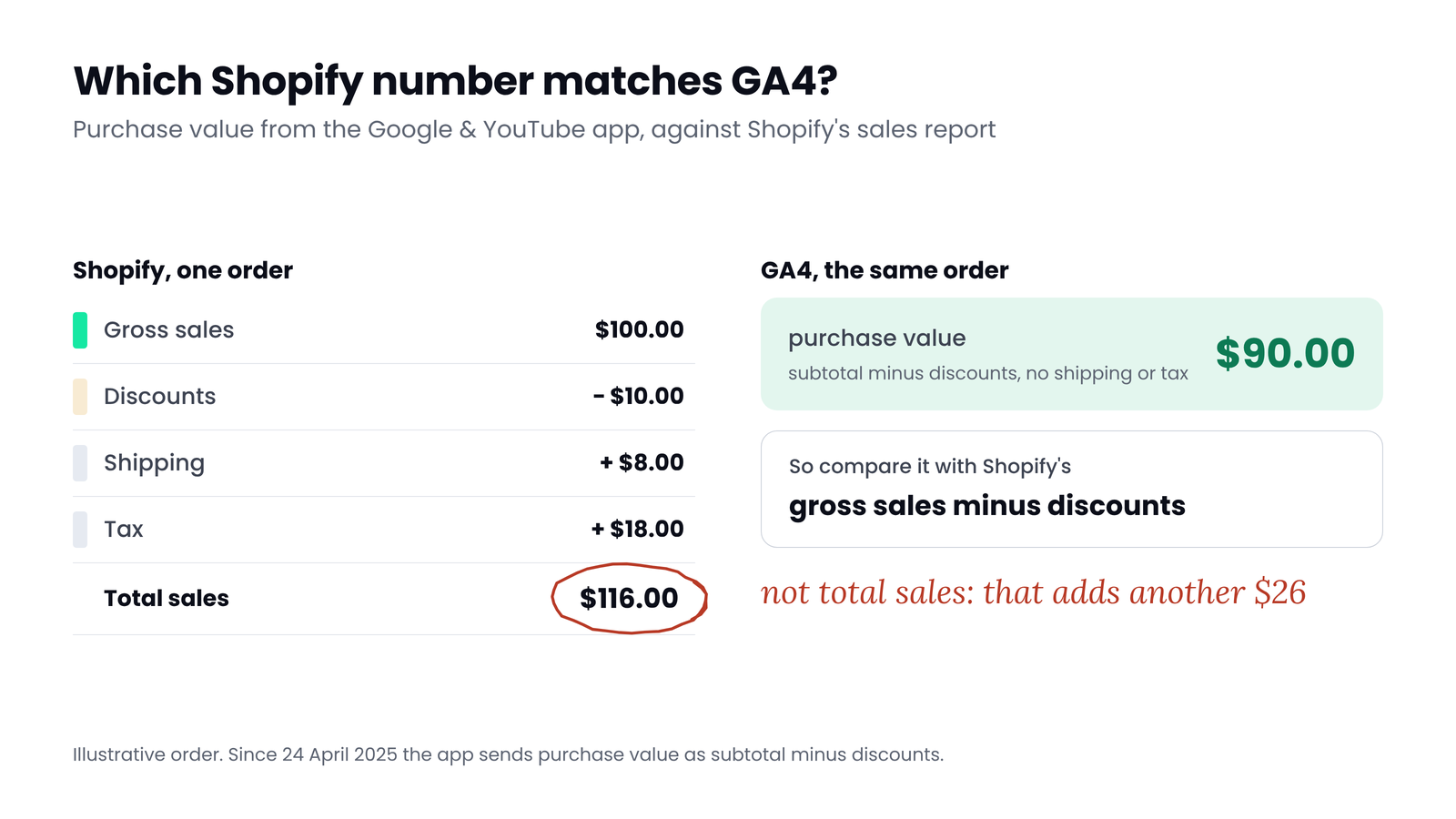
| What revenue means | The app sends subtotal minus discounts, without shipping or tax | Total sales includes shipping, taxes, duties and fees | Compare GA4 purchase revenue with Shopify gross sales minus discounts, not total sales |
| Refunds | The app sends no refund event | Returns are subtracted on the day they're processed | Use gross figures before returns on both sides |
| Currency | Converted to the property currency at the prior day's rate | Shown in the store currency | Use one currency, and expect small differences on multi-currency stores |
The revenue row catches most people. Since 24 April 2025, the Google & YouTube app sends purchase value as subtotal minus discounts, without shipping or tax. Set against Shopify's Total sales, which includes both, GA4 can look 10% or more short, depending on how much shipping and tax you charge, with nothing broken at all.
 (opens the full-size image in a new tab)
What a real gap is made of
Once the reports line up, a remaining gap comes from purchases that never reached GA4, or purchases that reached it twice. These are the causes in the order they usually matter.
1. The purchase event never fired
Shopify's checkout_completed event, which the app turns into GA4's purchase, fires once per checkout, usually on the thank-you page. With a post-purchase upsell it fires on the first upsell page instead. If that page doesn't load, the event doesn't fire. Payment methods that redirect the buyer elsewhere and never bring them back, buyers who close the tab, and pages that redirect too quickly all lose the event in the browser.
2. The buyer declined cookies
In markets where the store requires consent, Shopify's pixels only run after the visitor allows them. If Consent Mode runs in basic mode, a declined visitor sends Google nothing at all. Behavioural modelling needs advanced mode, and even then it estimates users and sessions, not purchases or revenue. Stores with a large European audience feel this most.
3. Ad blockers and browser limits
Ad blockers stop Google's tags from loading at all, and Shopify's own help pages list them as a reason GA4 misses purchases. The server-to-server route below is the main fix on Shopify.
4. Something counts twice
If GA4 is above Shopify, two setups are usually sending the same purchase: the Google & YouTube app plus a Tag Manager tag, or the app plus a theme snippet left from an old setup. GA4 removes repeated purchases that share a transaction ID, but only in web streams, and only if both copies carry the same ID. A tag that sends a different ID counts every order again, and an empty ID makes GA4 merge unrelated orders into one.
5. A setup change nobody re-checked
Shopify made Additional scripts read-only in August 2025, and non-Plus stores had to upgrade their thank-you and order status pages by 26 August 2026. Any purchase tracking that lived in those scripts stopped when the store upgraded. If your gap changed in late August or September 2026, start here.
What changed in 2026: purchases now arrive from Shopify's server
Google now runs a server-to-server integration for stores using the Google & YouTube app. Shopify sends the purchase to GA4 directly from its servers, and GA4 removes the copy that also arrives from the browser. It turns on automatically for stores whose app and tagging are already set up, and GA4 shows a notice when it does. Only the checkout completed event is supported, and it arrives as purchase.
Two consequences. Stores using the app should see the gap shrink from mid-2026, so compare before and after with care. And stores that track purchases only through Tag Manager or a custom pixel don't get this route, so their gap stays where it was.
Myth
Server-side tracking means GA4 will match Shopify.
Reality
It closes most of the gap from blockers and closed tabs, not all of it. Google hasn't documented how consent choices apply to the server events, and the like-for-like differences above never go away. A small, steady gap is still the healthy result.
To list every purchase sender on your store, see the Shopify tracking audit.
One store, three numbers
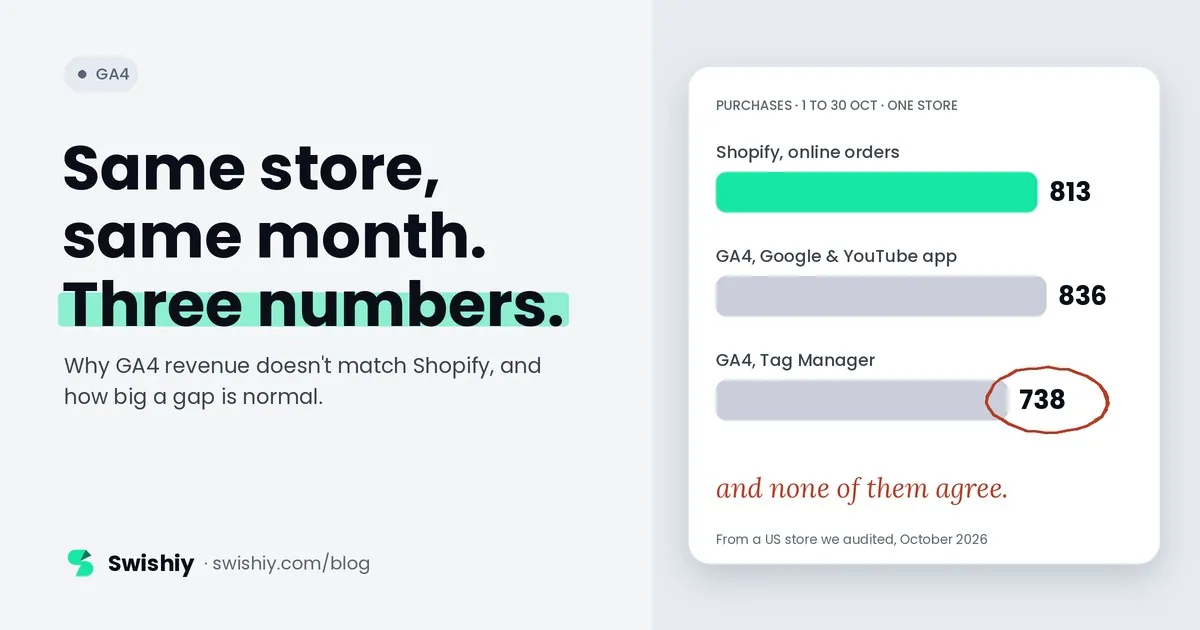
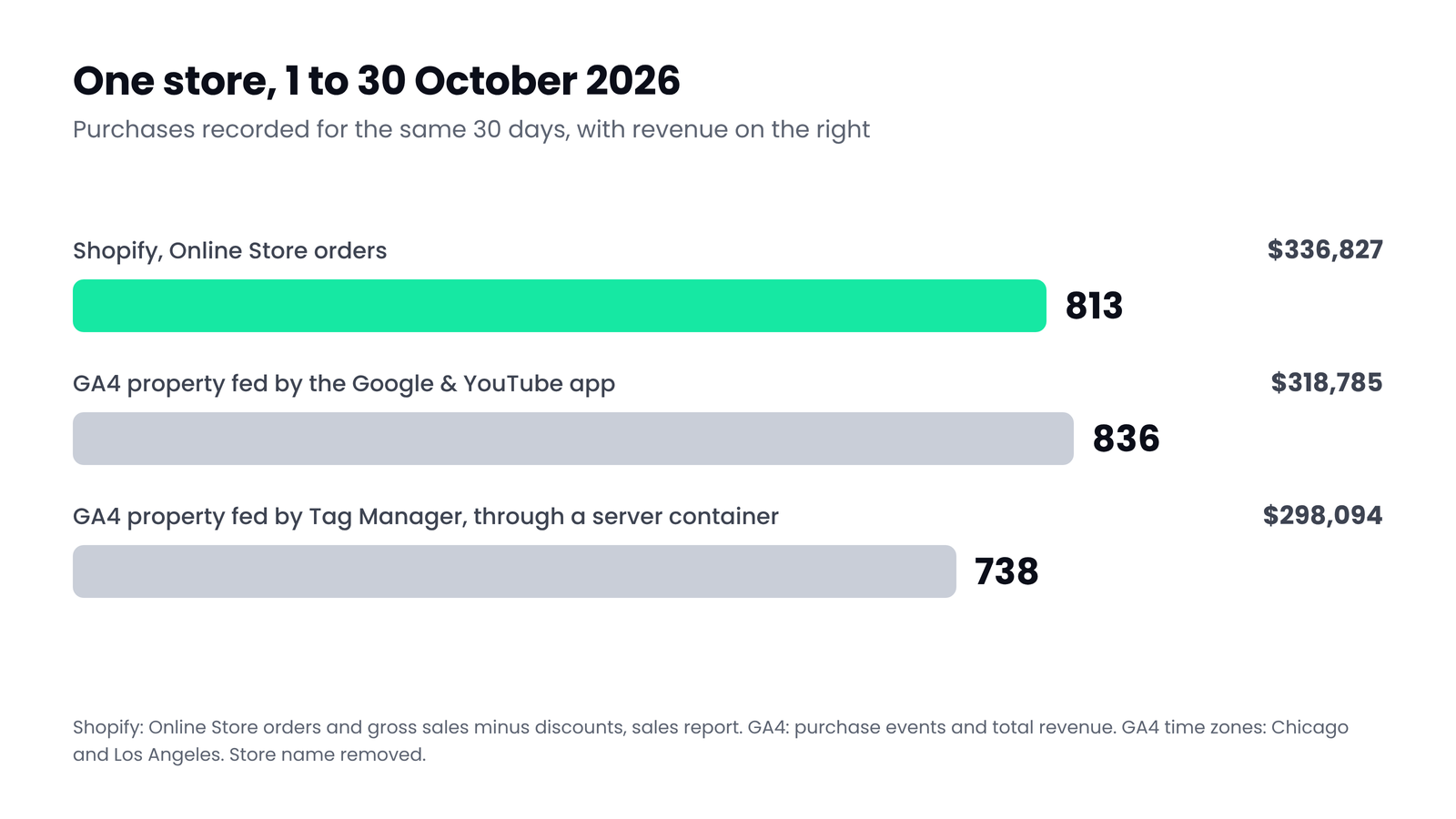
Here is a US retailer we audited, for 1 to 30 October 2026. The store sends data to two GA4 properties: one connected to the Google & YouTube app, where GA4 shows the new Shopify integration as active, and one fed by a Tag Manager setup through a server container. The two properties use different time zones, two hours apart.
 (opens the full-size image in a new tab)
The app-fed property recorded 836 purchase events and $318,785 of revenue. The Tag Manager property recorded 738 purchase events and $298,094. That is 98 purchase events and $20,691 apart before Shopify even enters the picture. Shopify's Online Store channel recorded 813 orders worth $336,827 after discounts. Against that, the app-fed property was 23 purchases over and 5.4% under on revenue, and the Tag Manager property was 75 purchases (9.2%) and 11.5% under. The app-fed property had no repeated transaction IDs, so its extra purchases are most likely orders from other channels that still finish on the store's checkout, such as draft orders paid by invoice. The store had 93 of those that month. When the order count and the revenue miss in opposite directions, matching order IDs is the only way to see which orders differ.
The lesson is not that one property is right. It is that each number answers a slightly different question, and the only number that settles it is your own order list.
How big a gap is normal
There is no official benchmark. Neither Google nor Shopify publishes one, and the percentages you'll find online are rarely backed by a method. These are the thresholds we use, after lining the reports up as above, on weekly or monthly totals:
| GA4 purchases vs Shopify online orders | What it usually means | What to do |
|---|---|---|
| 0 to 5% below | Healthy. Consent, blockers and the odd closed tab | Nothing, beyond watching the trend |
| 5 to 10% below | Something specific is leaking | Check payment methods that redirect, upsell pages and consent settings |
| More than 10% below | Broken until proven otherwise | Match order IDs to find which orders are missing |
| Above Shopify | Double counting, or orders from other channels | Look for repeated transaction IDs first. If there are none, check which channels' orders finish on your checkout, such as draft orders paid by invoice |
Payment methods that redirect can also move sales to the wrong source. See payment pages taking credit in GA4. If GA4 is above your orders, check for repeated order IDs first: how to find duplicate transactions in GA4.
The trend matters more than the level. A gap that holds at 6% for a year is a known cost. A gap that moves from 3% to 15% in a week is a broken release.
The 15-minute check
- Pick a closed period. The last full 4 weeks, ending at least 3 days ago, so GA4 has finished processing.
- Check time zones. GA4: Admin, Property details. Shopify: Settings, General. If they differ, compare weekly totals only.
- Pull Shopify. Analytics, Reports, Sales over time, filtered to the Online Store sales channel. Note orders, gross sales and discounts.
- Pull GA4. Build an Exploration with Date as the dimension and Transactions and Purchase revenue as the metrics.
- Compare like for like. GA4 transactions against Shopify orders, and GA4 purchase revenue against gross sales minus discounts. Work out the gap as a percentage of Shopify.
- Look at the days. A steady gap is a leak. A sudden step is a release, an app install or a setup change on that date.
- Match order IDs if the gap is over 10%. Export Transaction ID from a GA4 Exploration and order numbers from Shopify, and list the orders GA4 never saw. Their payment method and country usually point straight at the cause.
Watch for
Quick check
Quick check
- GA4 and Shopify use the same time zone, or you only compare weekly totals.
- You compare GA4 purchase revenue with Shopify gross sales minus discounts, online orders only.
- Exactly one setup sends purchase to each GA4 property.
- The transaction ID in GA4 is the Shopify order number.
- The gap is under 10% and has held steady for the last 8 weeks.
- GA4 shows the Shopify integration as active, if you use the Google & YouTube app.
Ask yourself
The free GA4 Auditor checks your purchase data for duplicates, missing transaction IDs and missing values. Add a Shopify orders export and it compares GA4 with your orders day by day. The export is read in your browser, and only daily totals are sent. Compare GA4 with your orders
Frequently asked questions
How much difference between GA4 and Shopify is normal?
Once both use the same time zone, online orders only and the same revenue definition, we treat GA4 within 5% below Shopify as healthy, 5 to 10% as worth checking, and more than 10% as broken. GA4 above Shopify usually means double counting, unless orders from other channels, such as paid draft orders, also reach GA4.
Why is GA4 revenue lower than Shopify's total sales?
Usually because they measure different things. The Google & YouTube app sends subtotal minus discounts, without shipping or tax, while Shopify's total sales includes shipping, taxes, duties and fees. Compare GA4 purchase revenue with Shopify gross sales minus discounts instead.
Why does GA4 show more purchases than Shopify?
Something is sending the purchase twice, most often the Google & YouTube app plus a Tag Manager tag or an old theme snippet. GA4 only removes the duplicate if both copies carry the same transaction ID in a web stream. Remove one of the setups.
Does the Google & YouTube app send purchases server-side to GA4?
Yes. Google's integration sends Shopify's checkout completed event to GA4 from Shopify's servers and removes the duplicate that arrives from the browser. It turns on automatically for stores already set up with the app, and GA4 shows a notice when it's active.
Does GA4 subtract Shopify refunds?
Not through the Google & YouTube app, which sends no refund event. GA4 only subtracts refunds sent as refund events with the original transaction ID. Compare gross figures before returns on both sides.
Will server-side tracking make GA4 match Shopify exactly?
No. It recovers most purchases lost to ad blockers and closed tabs, but Google hasn't documented how consent choices apply to those server events, and the like-for-like differences remain. Expect a smaller, steadier gap, not zero.
Sources
- Analytics Help: Google & YouTube app on Shopify in Google Analytics: https://support.google.com/analytics/answer/16947140
- Google Tag Platform: Shopify event parameters: https://developers.google.com/tag-platform/gtagjs/reference/shopify-event-parameters
- Analytics Help: Minimize duplicate key events with transaction IDs: https://support.google.com/analytics/answer/12313109
- Shopify: checkout_completed standard event: https://shopify.dev/docs/api/web-pixels-api/standard-events/checkout_completed
- Shopify Help: Sales reports: https://help.shopify.com/manual/reports-and-analytics/shopify-reports/report-types/order-sales
- Shopify Help: Non-Plus, upgrading your Thank you and Order status pages: https://help.shopify.com/en/manual/checkout-settings/checkout-extensibility/checkout-upgrade
- Shopify Help: Analytics discrepancies: https://help.shopify.com/en/manual/reports-and-analytics/discrepancies
- Analytics Help: Currency reference: https://support.google.com/analytics/answer/9796179
- Analytics Help: Behavioral modeling for consent mode: https://support.google.com/analytics/answer/11161109

Qudees Kiani
Founder of Swishiy. Five years of marketing measurement work across Google Ads, Meta and GA4, for ecommerce and lead-gen businesses.
Book a 30-minute callIs your Google Ads data telling the truth?
The free auditor checks tracking, brand vs non-brand and wasted spend. Automated, Google Ads only, 60 seconds.