Stripe, PayPal, Klarna: Stop Payment Pages Taking Credit in GA4

Qudees Kiani, founder · · 8 min read
Short answer
When a buyer pays on a provider's page, such as Stripe, PayPal, Klarna or Mollie, and comes back to your site, GA4 can record that page as a referral and give it credit your marketing earned. Add those domains under List unwanted referrals in your web stream's tag settings. The fix only applies from that day on.
On this page
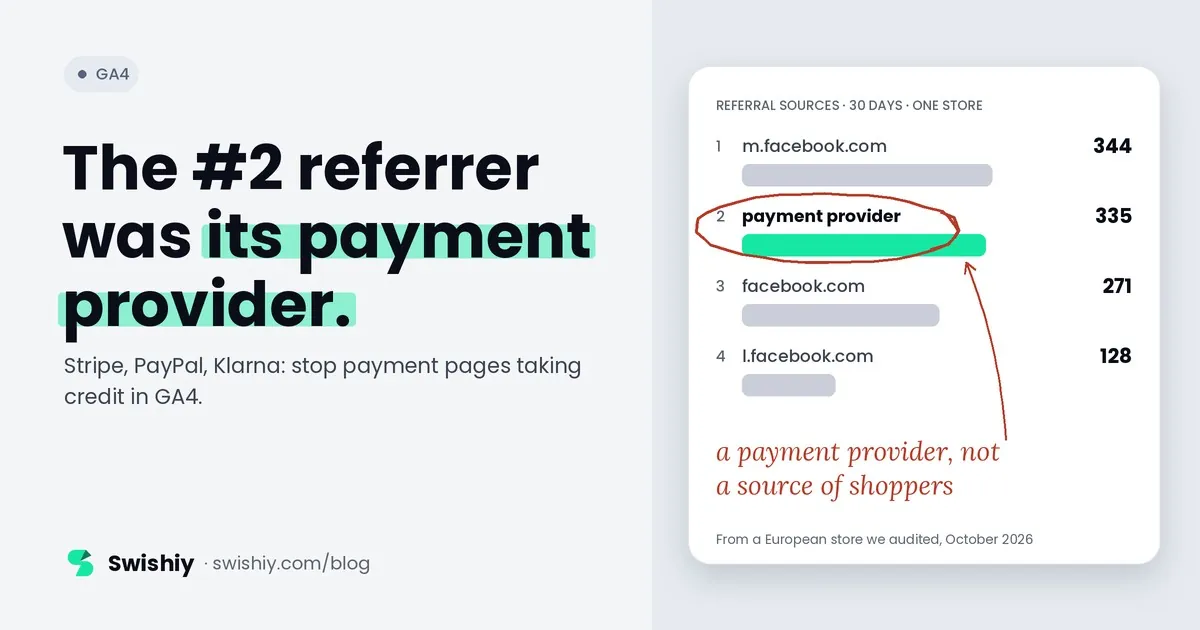
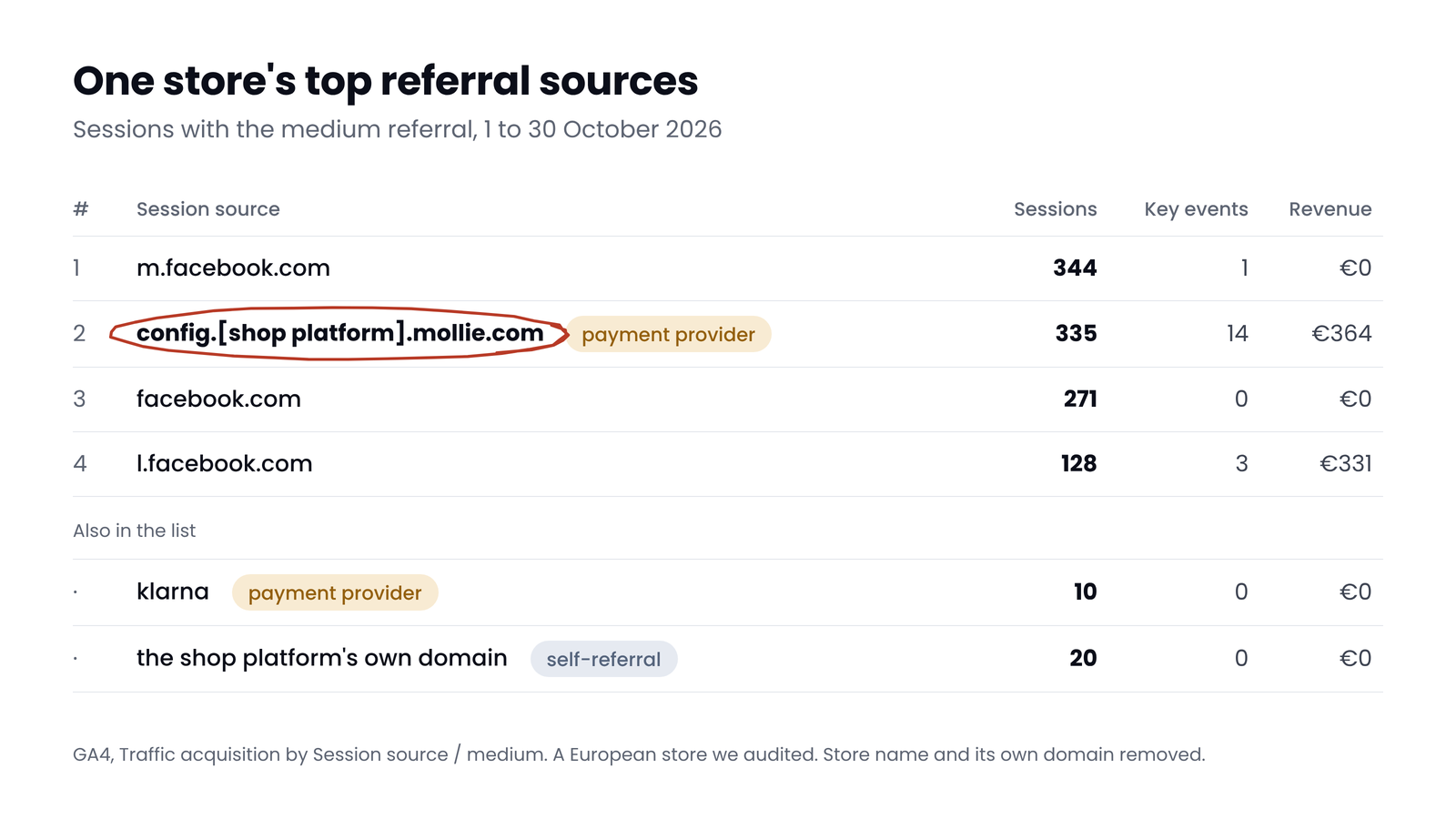
If a payment provider shows up as a referral in GA4, it can be taking credit that belongs to the ad, email or search that brought the buyer. In October, the second-biggest referral source of a European online store we audited was its payment provider: 335 sessions. Only Facebook's mobile site sent more referral sessions. This guide covers why it happens, which domains to exclude for your payment methods, where the setting lives, and how to check the fix worked.
Why payment pages show up as referrals
Many payment methods send the buyer to another site to pay: a hosted checkout, a wallet, a buy-now-pay-later provider or their bank. When the buyer comes back, the browser tells GA4 which page they came from, and that page belongs to the payment provider. A visit that arrives from another site is a referral.
Whether that costs you anything depends on GA4's session rules. A session starts when someone views a page without an active session, and ends after 30 minutes without activity by default. GA4 doesn't start a new session just because a visit brings new campaign details. That gives four cases:
- Back within 30 minutes, same browser. The session keeps its original source, so the traffic reports look fine. GA4's attribution reports work per event, though, so it is worth checking whether the purchase is still credited to the payment page there.
- Back after more than 30 minutes. A banking app, a security check with the card issuer or a slow wallet can take longer than the timeout. The return starts a new session, and its source is the payment page.
- Back in a different browser. On a phone, a payment that hops to a banking app can return in the phone's default browser rather than the one the buyer started in. GA4 has no cookie there, so it sees a new visitor whose first session came from the payment page.
- Back to the shop without paying. Buyers who cancel, or who click the shop's name on the payment page, land back on your site with the payment page as the referrer.
There is a tail as well. GA4 credits later direct visits, for up to 90 days by default, to the last source that wasn't direct, so a buyer whose session came from the payment page can keep crediting it when they come back on their own.
What it looked like in one store
 (opens the full-size image in a new tab)
335 sessions came from a domain in the payment flow of the store's provider, Mollie: config.[shop platform].mollie.com. That made it the second-biggest referral source in the property, with 14 key events and €364 of revenue. A source called klarna added 10 more sessions, and the shop platform's own domain another 20.
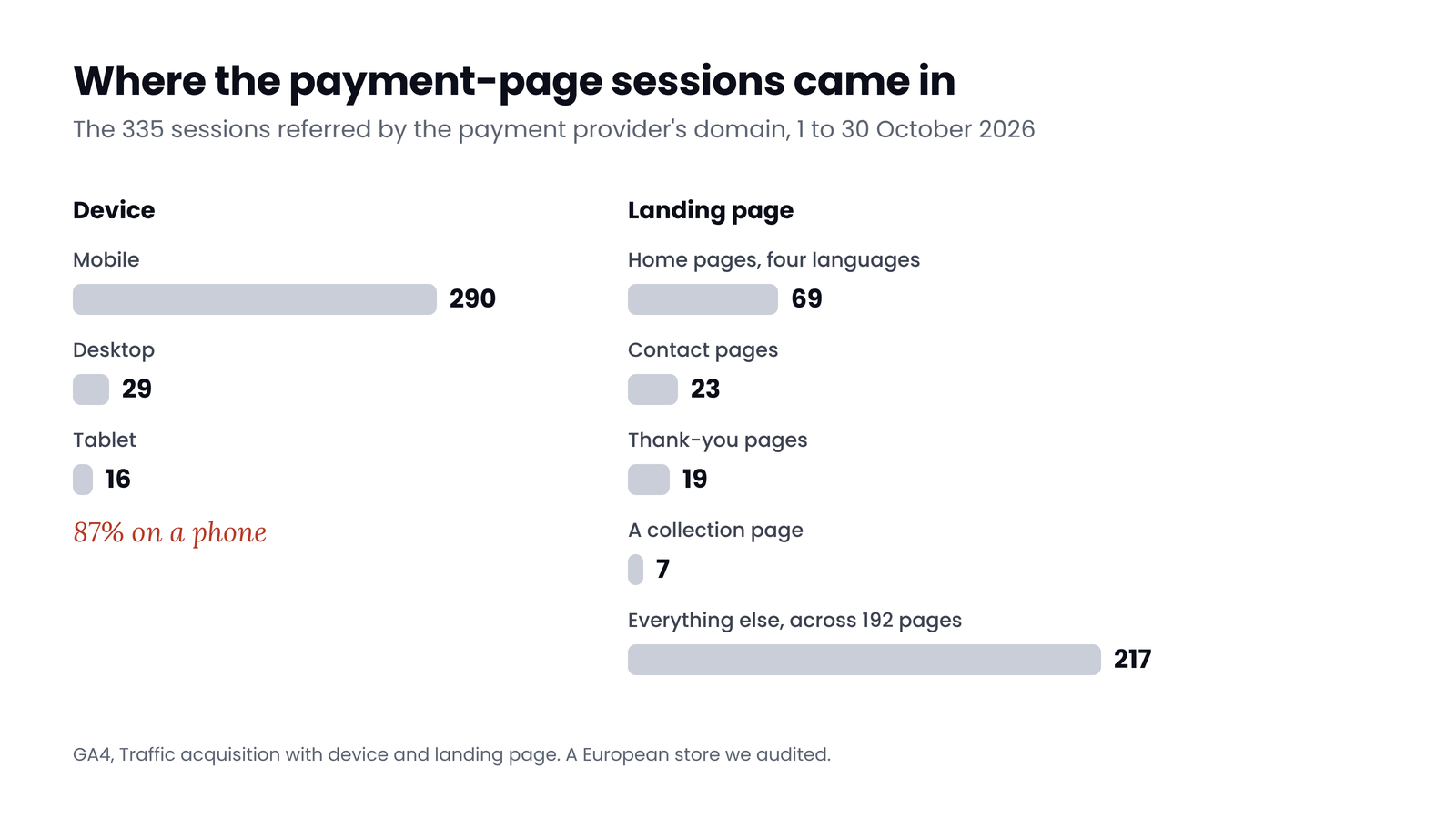
Two details point to why. 87% of those sessions were on a phone. And they started on 201 different pages. Among the ten most common, four language home pages had 69 sessions, the contact pages 23 and the thank-you pages 19. That fits buyers coming back from the payment step in a fresh session, and shoppers going back to the store after a payment that didn't go through.
 (opens the full-size image in a new tab)
In this store the revenue at stake was small: GA4 credited only €364 of €50,337 to the payment domain, so most purchases seem to have kept their original source. The sessions still distort the reports. They inflate the Referral channel, they can count returning buyers as new users when the return opens in another browser, and they put sessions on your home and contact pages that didn't start there. In a store whose buyers return to the thank-you page in a new session, the sale itself moves to the payment provider, and the campaign that earned it loses it.
Which domains to exclude
Exclude the domains your own payment methods use, and only those. The list below shows the usual ones, and how sure we are of each. The safest source is your own report: whatever appears as a payment or checkout domain with the medium referral is what to add.
| Payment method | Domain to add | Source |
|---|---|---|
| Stripe Checkout | checkout.stripe.com | Named in Stripe's docs |
| Stripe card checks by redirect | hooks.stripe.com | Used in Stripe's redirect flow |
| PayPal | paypal.com | Named in Shopify's help |
| Shop Pay | shop.com, as Shopify's help writes it. Merchants also report shop.app | Shopify's help, and merchant reports |
| Klarna | klarna.com | Reported by practitioners. In our data it showed as "klarna", which points to a tagged return link: check the landing URL for utm parameters, because an unwanted referral won't remove those |
| Mollie | the Mollie domain in your report, such as config.[shop platform].mollie.com | Seen in an audit we ran |
| Affirm, in redirect mode | affirm.com | Named in Affirm's analytics docs |
| Adyen hosted pages | adyen.com | Reported by practitioners |
| Card checks by your customer's bank | Varies by bank, for example cardinalcommerce.com | Reported by practitioners |
| Apple Pay and Google Pay in a payment sheet | Usually none: the buyer doesn't leave your page | Reported by practitioners |
Don't copy a list blindly
Where to add them
- In GA4, go to Admin, then Data collection and modification, then Data streams, and open your web stream.
- Choose Configure tag settings. Under Settings, choose Show all, then List unwanted referrals.
- Add one condition per domain, exactly as it appears in your report. You can add up to 50 per stream, and a referral matching any of them is ignored.
- Save. You need the Editor role or higher.
From then on, GA4 adds a parameter called ignore_referrer, set to true, to events that arrive from those domains, so the visit isn't credited to them.
Not cross-domain
utm_nooverride to return links dates from Universal Analytics. We found no mention of it in GA4's documentation.On Shopify and other platforms
- Shopify has run checkout on the store's own domain since 2017, so checkout itself isn't a referral. Payment methods that redirect, such as PayPal and some buy-now-pay-later providers, still return from another domain. Shopify's help page on excluding referrer domains names your own domain, checkout.shopify.com, Shop Pay's domain and PayPal as an example.
- WooCommerce with PayPal Payments sends buyers to PayPal's site when the PayPal redirect option is on, and then paypal.com is the usual entry. Check your report either way.
- Hosted shop platforms can also show their own domain as a referral. In the store above, the platform's shop domain sent 20 sessions. That is a self-referral. If that domain runs your tag, add it to your cross-domain list. If not, list it as an unwanted referral.
Payment returns are one of the causes behind GA4 and your store disagreeing, which our guide to GA4 revenue not matching Shopify covers. If sessions disappear into Direct or Unassigned rather than Referral, see why GA4 traffic says Direct or Unassigned.
How to check it worked
- Write down the date and time of the change.
- Wait a day, then make a test purchase with a payment method that redirects, from a fresh browser window.
- In Traffic acquisition, set the dimension to Session source / medium, and compare a period that starts after the change with one of the same length before it. The payment domain should fall close to zero.
- Don't expect zero at once. Buyers who came from the payment page before the change keep that source on later direct visits for a while.
- In an exploration, also check key events by the event-level Source / medium, to see whether purchases were still being credited to the payment page.
Myth
Adding a referral exclusion fixes last month's reports.
Reality
It doesn't. GA4 only ignores those referrers from the day you add them. Past sessions keep their source, so compare periods that start after the change.
Quick check
Quick check
- No payment, wallet or bank domain in your top referral sources.
- Every payment method that redirects has its domain on the unwanted referrals list.
- No self-referrals: your own domains and your shop platform's domain aren't listed as referrals.
- Nothing on the list that sends real visitors.
- A test purchase with a redirecting payment method keeps its original source.
Ask yourself
The free GA4 Auditor reads 30 days of your traffic sources and flags payment and checkout domains taking sessions and revenue as referrals, along with self-referrals and Unassigned traffic. Read-only. Audit my GA4
Frequently asked questions
Why does PayPal show as a referral in GA4?
Because buyers who pay with PayPal leave your site and come back from paypal.com. When the return starts a new session, GA4 credits it to PayPal. Add paypal.com to List unwanted referrals in your web stream's tag settings.
Is referral exclusion retroactive in GA4?
No. GA4 only ignores the listed referrers from the day you add them. Sessions recorded before keep their source, and buyers who came from the payment page earlier can keep crediting it on later direct visits for a while.
How many unwanted referrals can I add in GA4?
Up to 50 per data stream. A referral that matches any of them is ignored. You need the Editor role or higher to change the list.
Should I use cross-domain tracking for Stripe or PayPal?
No. Cross-domain measurement only works between sites that run your Google tag, and you can't add it to a payment provider's pages. Use List unwanted referrals instead.
Do Apple Pay and Google Pay cause referrals?
Usually not. When they open as a payment sheet in the browser, the buyer never leaves your page, so there is no referrer. Check your own report to be sure.
What does ignore_referrer do in GA4?
It tells GA4 not to treat the referring site as a new traffic source for that event. GA4 adds it automatically to events from domains on your unwanted referrals list, so you rarely need to set it yourself.
Sources
- Analytics Help: Identify unwanted referrals: https://support.google.com/analytics/answer/10327750
- Analytics Help: About Analytics sessions: https://support.google.com/analytics/answer/9191807
- Analytics Help: Comparing metrics between Universal Analytics and GA4: https://support.google.com/analytics/answer/11986666
- Analytics Help: Set up cross-domain measurement: https://support.google.com/analytics/answer/10071811
- Analytics Help: Traffic acquisition report: https://support.google.com/analytics/answer/12923437
- Stripe Docs: Analyze your conversion funnel: https://docs.stripe.com/payments/checkout/analyze-conversion-funnel?payment-ui=stripe-hosted
- Stripe Docs: 3D Secure authentication flow: https://docs.stripe.com/payments/3d-secure/authentication-flow
- Shopify Help: Excluding referrer domains: https://help.shopify.com/en/manual/reports-and-analytics/google-analytics/exclude-referrer-domains
- Shopify changelog: Checkouts at the shop domain (2017): https://shopify.dev/changelog/checkouts-will-occur-at-the-shop-domain-instead-of-checkout-shopify-com
- Affirm Docs: Modal vs redirect checkout: https://docs.affirm.com/payments/docs/modal-vs-redirect-checkout
- Affirm Docs: User analytics: https://docs.affirm.com/developers/docs/user-analytics
- WooCommerce: PayPal Payments user experience: https://woocommerce.com/document/woocommerce-paypal-payments/user-experience/

Qudees Kiani
Founder of Swishiy. Five years of marketing measurement work across Google Ads, Meta and GA4, for ecommerce and lead-gen businesses.
Book a 30-minute callIs your Google Ads data telling the truth?
The free auditor checks tracking, brand vs non-brand and wasted spend. Automated, Google Ads only, 60 seconds.