Duplicate Transactions in GA4: How to Find Them and Stop Them

Qudees Kiani, founder · · 8 min read
Short answer
GA4 removes a repeated purchase with the same transaction ID, on web streams only. Google frames it as removing one user's repeats and gives no time window. To find duplicates, open the Transactions report and sort by E-commerce purchases: any order ID above 1 was counted more than once. The fix is in your tags, not in GA4.
On this page
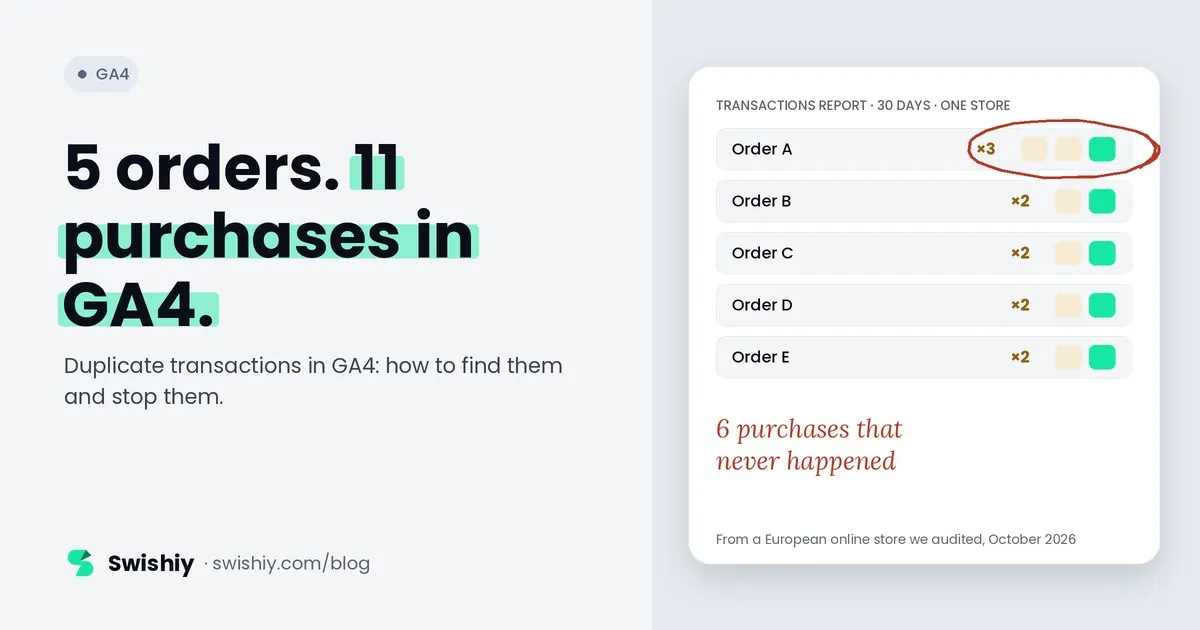
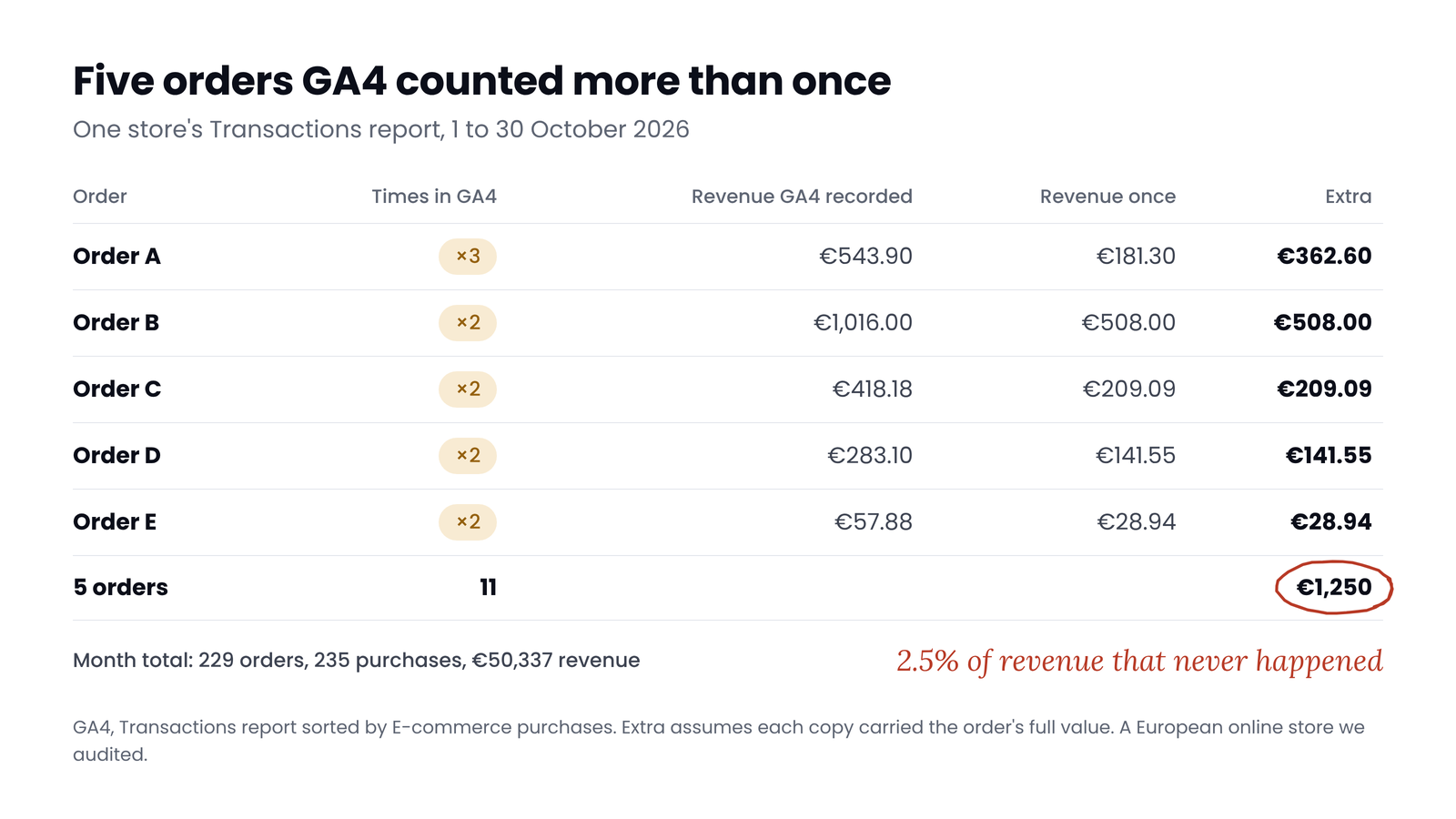
Google says GA4 removes duplicate purchases that share a transaction ID. Between 1 and 30 October, a European online store we audited had 229 orders in GA4 and 235 purchases. Five orders were counted 11 times between them, adding about €1,250 of revenue that never happened, if each copy carried the full order value. Google's rule has conditions, and most duplicates slip past at least one of them. This guide covers what GA4 removes and what it doesn't, how to find duplicates in two minutes, the usual causes and how to stop them.
What GA4 does with a repeated transaction ID
Google's help page is short: GA4 "deduplicates purchase events with the same transaction ID", and Google gives the purpose as removing "transactions from the same user". In practice:
- Same transaction ID. If a second tag sends the order number while the first sends a checkout ID, GA4 sees two different purchases.
- Probably the same user. Google frames the rule around one user's repeats and doesn't say whether a copy from another browser or device is removed. Our reading: don't count on it.
- Web streams only. Google says the deduplication doesn't apply to app streams.
Google doesn't say within what time a repeat is removed, or whether the Event count metric and the BigQuery export keep the repeats. Any window you read elsewhere, 30 seconds or a day, doesn't come from Google. For server copies sent through Google's Data Manager API, Google says GA4 keeps the first copy it receives. One rule is clear and easy to break: never send an empty transaction ID. Google says it "will deduplicate all purchase events that have transaction_id=\"\"", so real orders collapse into one.
Pick the right metric
What it looked like in one store
 (opens the full-size image in a new tab)
The store's GA4 property recorded 235 purchases and €50,337 of revenue for 229 order IDs. One order appeared three times and four appeared twice: 6 purchases and about €1,250 that didn't happen, assuming each copy carried the order's full value. That is 2.5% of the period's revenue, and every purchase-based number inherits it: purchases, revenue, conversion rate and any return on ad spend calculated from GA4.
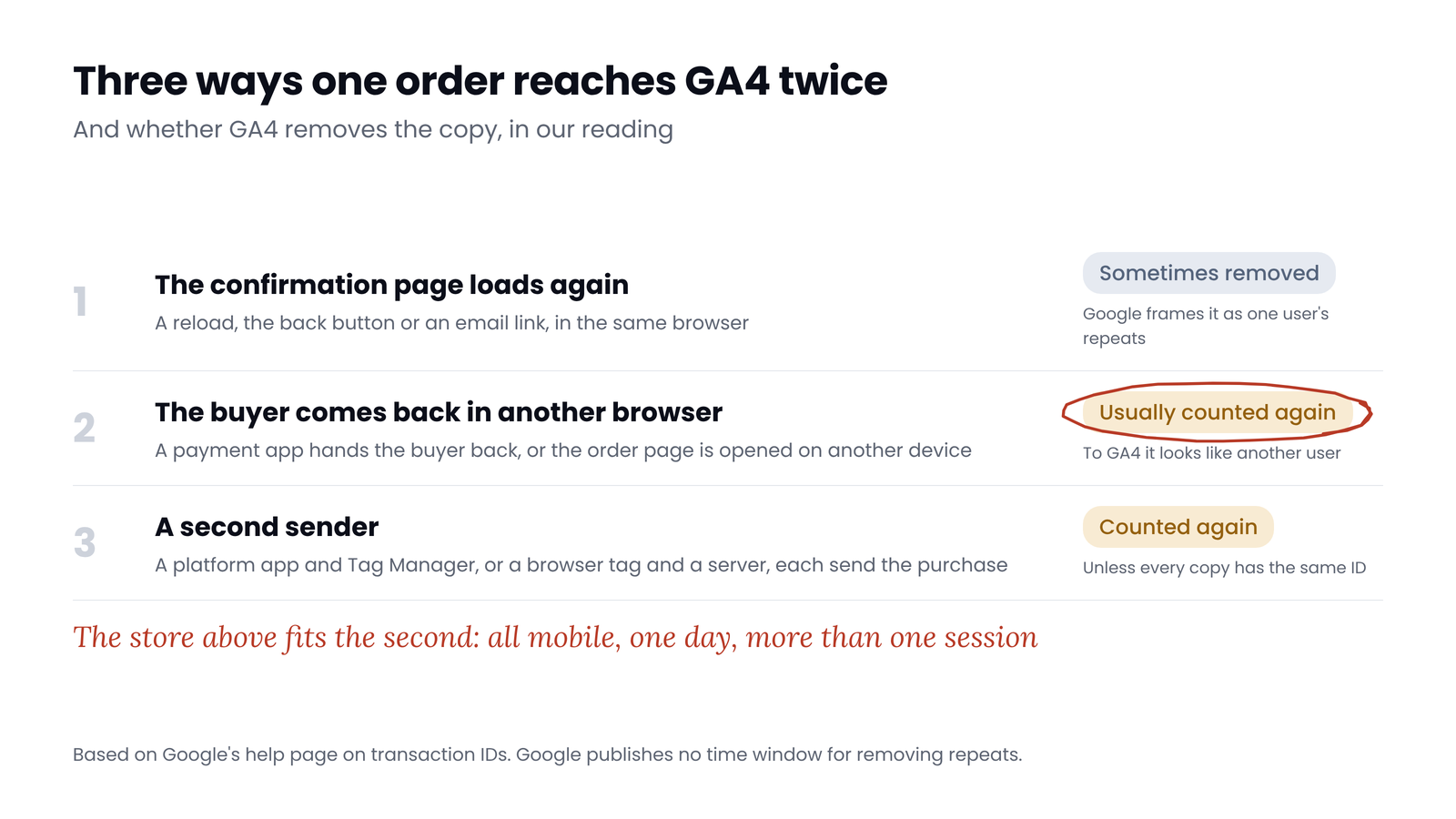
The details point to where they came from. All three copies of the worst order arrived on the same day, all on mobile, in at least two different sessions. GA4 didn't remove them, so either it didn't treat them as one user's repeat, or its rule has limits Google doesn't describe. That pattern fits a confirmation page loaded more than once, for example after a payment app hands the buyer back to the store.
How to find duplicates in two minutes
- Open the Transactions report: Reports, then Monetization, then Transactions. If it isn't there, add it from the Library.
- Set a date range of 30 to 90 days and sort by E-commerce purchases, highest first.
- Read the top rows. Any transaction ID with a count above 1 was counted more than once. Add up the extra copies and their revenue.
- Look for a (not set) row. Purchases without a transaction ID can't be deduplicated at all, and shouldn't exist.
- Add a second dimension, such as Device category or Session source / medium, to see whether the copies came from the same device or session.
- For a big store, build an exploration: Free form, rows Transaction ID, values E-commerce purchases and Purchase revenue, filtered to the purchase event, with the maximum number of rows.
Two things can hide repeats. With many order IDs, GA4 can lump rare values into an (other) row, more often when you add a secondary dimension. If you see one, remove the extra dimension or shorten the date range. And explorations only reach back as far as your data retention setting: two or fourteen months on a standard property, longer on Analytics 360.
 (opens the full-size image in a new tab)
The usual causes
| Cause | How to spot it | Will GA4 remove the copy? (our reading) |
|---|---|---|
| The confirmation page loads again: a reload, the back button, an email link | Same ID, same device, minutes or hours apart | Sometimes, if it's the same user |
| The buyer comes back from a payment app in another browser | Same ID, mobile, a new session | Usually not: it looks like another user |
| Two setups send the purchase, such as a platform app and Tag Manager | Two ID formats for one order, or two purchases a few seconds apart | No, if the IDs differ |
| A browser tag and a server send the same purchase | Copies with different sources or no session data | Only if the ID matches exactly |
| A trigger fires twice, such as on a page view and a data layer event | Two copies with the same timestamp | Sometimes, if it's the same user |
| Random or session-based IDs | IDs that don't match your order numbers | No: every copy looks new |
On Shopify, the thank-you page is now a one-time page, while customers can revisit the order status page as often as they like. A purchase tag that fires on page views there will count again. Shopify's own checkout_completed event fires once per checkout, so a custom pixel that sends purchase only from that event shouldn't repeat. Since July 2026, the Google & YouTube app also sends the purchase from Shopify's server, and Google says it deduplicates that copy against browser events. It doesn't say that covers a purchase tag of your own, so a second tag can still double count. Our guide to GA4 against Shopify covers the rest of that comparison.
Myth
GA4 removes duplicate transactions automatically.
Reality
Only for repeats with the same ID on a web stream, which Google describes as coming from the same user, with no time window. In the store above, 5 orders were still counted 11 times.
How to stop them
- Use one stable order ID everywhere. The same value, in the same format, from every tag and every server that sends the purchase. Never an empty string, a timestamp or a random number.
- Keep one sender per destination. Choose either the platform's app or your own tags for GA4's purchase, then remove the other, including old scripts left in checkout settings.
- Fire on the order, not the page. Trigger the purchase tag on the real confirmation event, such as a data layer purchase push or Shopify's
checkout_completed, with a condition that the transaction ID isn't empty. - Block repeats in the browser. Store each transaction ID after the tag fires, in a cookie or local storage, and block the tag if the ID is already there. Simo Ahava's free Transaction ID Logger and Reader templates do this in Tag Manager. It won't catch a different device.
- Block repeats on the server, if you run a server container: a duplicate transaction check that remembers recent IDs catches copies from any device.
- Check it with a test order, then reload the confirmation page and open it on your phone. GA4 should still show one purchase.
What you can't fix
Quick check
Quick check
- No transaction ID with more than one E-commerce purchase in the last 30 days.
- No (not set) or empty transaction IDs.
- Every transaction ID matches an order number in your store.
- Only one setup sends the purchase to each GA4 property.
- The purchase tag fires on the order event, not on a page view.
- A reload of the confirmation page doesn't add a purchase.
Ask yourself
The free GA4 Auditor checks 30 days of your purchases for repeated transaction IDs, missing IDs and purchases without a value, and shows the count and revenue of every duplicate. Add an orders export and it compares GA4's revenue with your real sales. Read-only. Check my GA4 purchases
Frequently asked questions
Does GA4 deduplicate transactions?
Partly. Google says GA4 removes purchase events with the same transaction ID, on web streams only, and describes them as repeats from the same user. It doesn't publish a time window. Repeats with a different ID are counted again, and in our data repeats arriving in other sessions were too.
Why does GA4 show more purchases than orders?
Usually duplicates: the confirmation page loading twice, two setups sending the purchase, or a browser and a server copy with different IDs. Orders from other channels that end on your checkout can also appear. Check the Transactions report for IDs counted more than once.
How do I remove duplicate transactions from GA4?
You can't remove them from past data. Data deletion requests keep the events counted and don't delete numeric values. Fix the tags, annotate the date, and deduplicate history in BigQuery or your own reports.
What is the difference between Transactions and E-commerce purchases in GA4?
E-commerce purchases counts only the purchase event. Transactions also counts refunds and app subscription events. Use E-commerce purchases per transaction ID to spot duplicates.
Can an empty transaction ID cause problems?
Yes. Google says GA4 deduplicates all purchase events with an empty transaction ID, so different orders collapse into one and you undercount. If you don't have the order ID, fix the data layer rather than sending a placeholder.
Does Shopify's thank-you page fire the purchase twice?
The new thank-you page is a one-time page, and Shopify's checkout_completed event fires once per checkout. The order status page can be revisited, so tags that send a purchase on page views there can count again.
Sources
- Analytics Help: Minimize duplicate key events with transaction IDs: https://support.google.com/analytics/answer/12313109
- Analytics Help: About ecommerce metrics: https://support.google.com/analytics/answer/13428834
- Analytics Help: Transactions report: https://support.google.com/analytics/answer/15227167
- Analytics Help: The (other) row: https://support.google.com/analytics/answer/13331684
- Analytics Help: Data retention: https://support.google.com/analytics/answer/7667196
- Analytics Help: Data deletion requests: https://support.google.com/analytics/answer/9940393
- Google Developers: Data Manager API, send events to Analytics: https://developers.google.com/data-manager/api/devguides/events/analytics/online/send-events
- Shopify Help: Thank you and order status pages: https://help.shopify.com/en/manual/checkout-settings/customize-checkout-configurations/upgrade-thank-you-order-status
- Shopify Dev: checkout_completed event: https://shopify.dev/docs/api/web-pixels-api/standard-events/checkout_completed
- Simo Ahava: Transaction ID Logger template: https://www.simoahava.com/custom-templates/transaction-id-logger/
- Simo Ahava: Transaction ID Reader template: https://www.simoahava.com/custom-templates/transaction-id-reader/
- PPC Land: Shopify purchases sent server to server (2026): https://ppc.land/google-silently-routes-shopify-purchases-into-ga4-attribution-gaps-remain/

Qudees Kiani
Founder of Swishiy. Five years of marketing measurement work across Google Ads, Meta and GA4, for ecommerce and lead-gen businesses.
Book a 30-minute callIs your Google Ads data telling the truth?
The free auditor checks tracking, brand vs non-brand and wasted spend. Automated, Google Ads only, 60 seconds.