Consent Mode v2 in Google Tag Manager: How to Check It Works

Qudees Kiani, founder · · 10 min read
Short answer
Consent Mode v2 tells Google's tags what a visitor chose, through four signals: ad_storage, analytics_storage, ad_user_data and ad_personalization. It doesn't control Meta, TikTok or most other tags. To check it works, test the live site three times, before a choice, after accepting and after rejecting, and watch every tag, not only Google's.
On this page
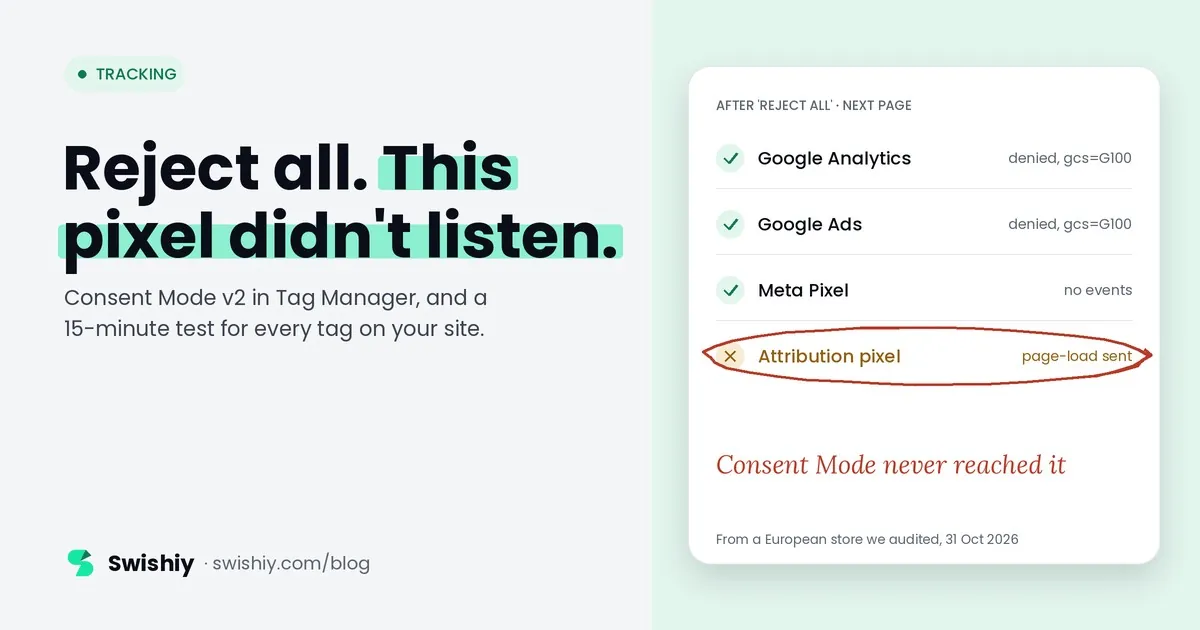
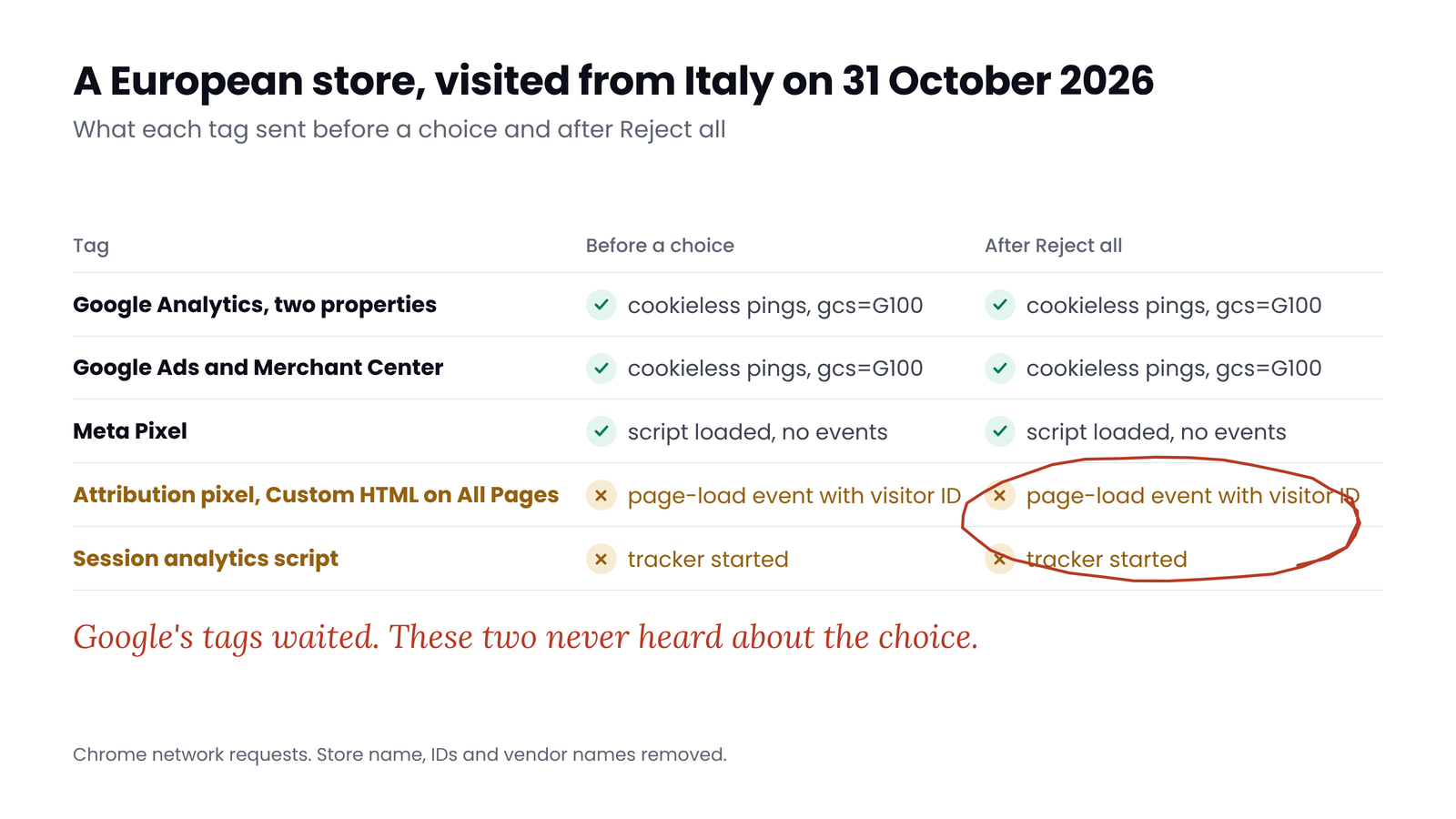
Your cookie banner can say Reject while a pixel keeps sending anyway. In October 2026 we audited a European store from Italy, testing it before any choice and again after Reject all. Google's tags did what Consent Mode tells them to. An attribution pixel added in Tag Manager sent a page-load event with a visitor ID both times. Consent Mode never touched it, because Consent Mode only governs Google's tags. This guide covers the setup that matters in Tag Manager, and a 15-minute test that checks every tag on the live site.
What Consent Mode v2 does, and what it doesn't
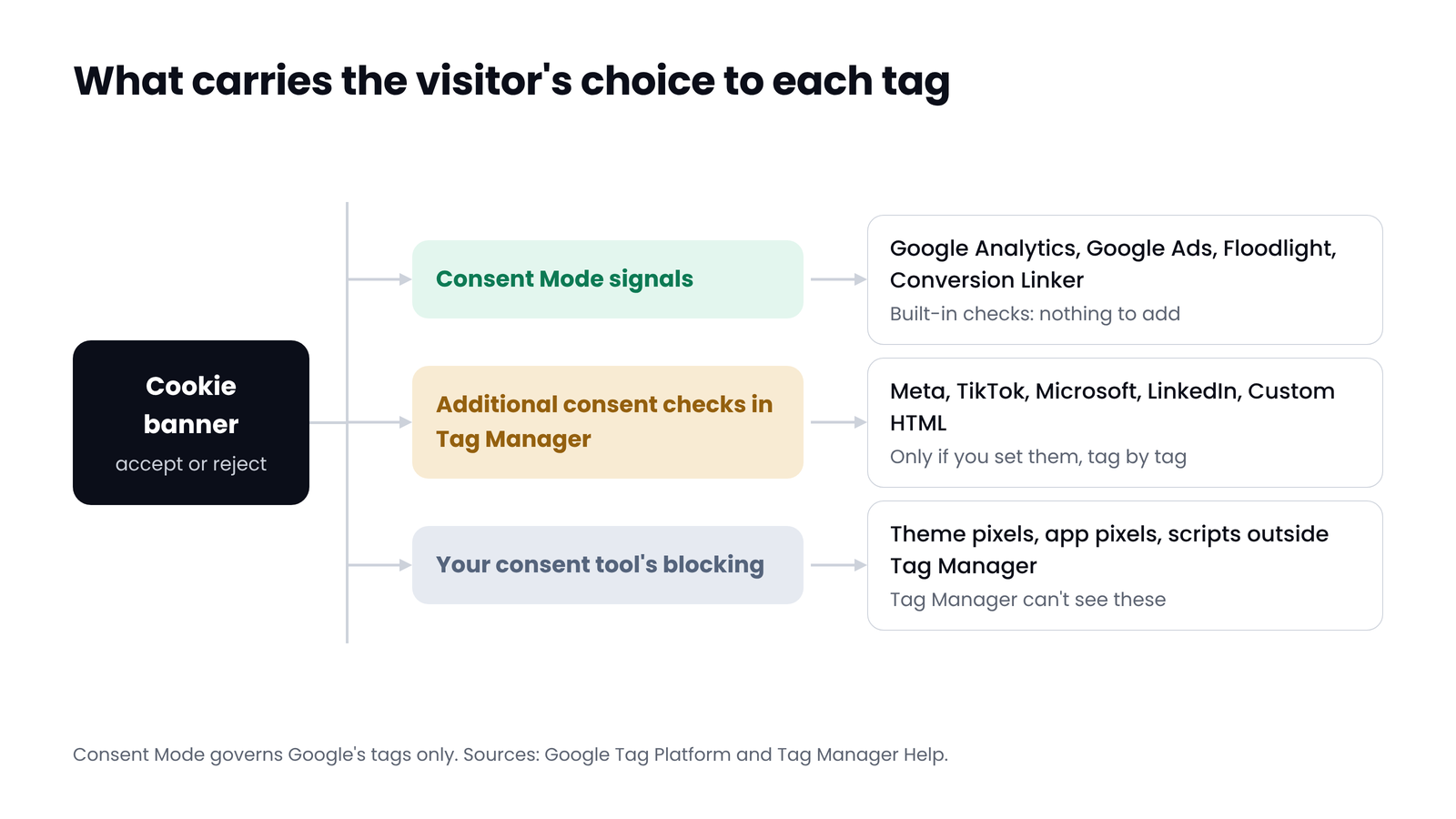
Consent Mode is Google's way of telling its own tags what a visitor chose on your cookie banner. Version 2 sends four signals:
- ad_storage: whether advertising cookies may be stored.
- analytics_storage: whether analytics cookies may be stored.
- ad_user_data: whether user data may be sent to Google for advertising.
- ad_personalization: whether that data may be used for personalised ads, such as remarketing.
Google's tags read these signals and change how they behave: the Google tag, Google Analytics, Google Ads, Floodlight and the Conversion Linker. Most other tags don't. The Meta Pixel, TikTok, LinkedIn, Hotjar and every Custom HTML tag fire on their triggers whatever the signals say, unless you give each one its own consent check in Tag Manager. A few vendor templates, such as Microsoft's UET template, can read Tag Manager's consent state, but only when they're set up to.
For visitors in the EEA, Google requires advertisers to collect consent and pass it on to keep using measurement, ad personalisation and remarketing, and its EU user consent policy also covers the UK and Switzerland. Since early March 2024, properties that don't send consent signals only add users from outside the EEA to their audiences.
Basic or advanced
| Basic | Advanced | |
|---|---|---|
| Google tags before a choice | Don't load | Load with consent denied |
| After a reject | Nothing reaches Google, not even the choice | Cookieless pings: no cookies or persistent identifiers |
| After an accept | Full data | Full data |
| Modelling | A general model | A model built on your own site's pings |
| Behavioural modelling in GA4 | Not eligible | Eligible, above Google's traffic threshold |
Which one is right is a legal and business decision for your market, not a technical one. What matters for this guide: both only cover Google's tags.
 (opens the full-size image in a new tab)
What we saw on a live store
As part of an audit, we visited a European fashion store from Italy on 31 October 2026. Its banner offers Preferences and Accept on the first screen. Reject all sits inside Preferences. We loaded pages before making a choice, then chose Reject all and loaded the next page.
 (opens the full-size image in a new tab)
Google's tags behaved as designed. Every request to Google Analytics, Google Ads and Merchant Center carried gcs=G100, the value read as ads and analytics both denied, and npa=1. These are the cookieless pings advanced Consent Mode sends. The Meta Pixel's script loaded but sent no events.
The attribution pixel didn't. It sat in Tag Manager as a Custom HTML tag on All Pages, with no consent setting, and sent a page-load event with a visitor ID before the choice and after Reject all. A session-analytics script also loaded and called its tracker in both states. None of this shows up in Google's consent reports, because none of it is Google's.
It's a pattern we see often in audits: Google's side configured carefully by whoever set up Consent Mode, and a handful of other tags added later by apps, agencies or a developer, with nothing stopping them.
Set it up in Tag Manager: the parts that matter
- Set the default first. Your consent tool's template, or a consent default tag, fires on the Consent Initialization - All Pages trigger. Google is explicit that the default must be set before any Google tag fires, or the tags behave as if Consent Mode isn't there. Set ad_storage, analytics_storage, ad_user_data and ad_personalization to denied for the regions that need consent.
- Send the update on every choice and every page. When the visitor chooses, the banner sends an update. Consent Mode doesn't remember choices, so the banner must also send the stored choice on every later page.
- Leave Google's tags alone. Google Analytics, Google Ads, Floodlight and the Conversion Linker have built-in consent checks. Google warns that adding additional consent checks on top of Consent Mode stops it working properly.
- Give every other tag its own check. Open the tag, go to Advanced Settings, then Consent Settings, and choose Require additional consent for tag to fire with the consent types in the table below.
- Use the Consent Overview. In Admin, Container Settings, tick Enable consent overview. A Consent Overview button appears on the Tags page and sorts every tag into Consent Configured and Consent Not Configured. Work through the second list until it is empty.
- Find the tags Tag Manager can't see. Pixels pasted into the theme, added by apps or loaded by another script aren't controlled by Tag Manager's consent settings at all. List them from the live test below and move them into Tag Manager or into your consent tool's blocking list.
| Tag | Require this consent | Notes |
|---|---|---|
| Meta Pixel | ad_storage, plus ad_user_data if you send customer data | Meta also has its own consent call; a Tag Manager check is simpler |
| TikTok Pixel | ad_storage | |
| Microsoft Advertising (UET) | ad_storage | Microsoft's UET template can also read Tag Manager's consent state if you turn it on |
| LinkedIn Insight, Pinterest, Snapchat, Reddit | ad_storage | |
| Hotjar, Microsoft Clarity, other session recorders | analytics_storage | |
| Custom HTML that sends data anywhere | The type that matches what it does | Most are advertising |
The table is our recommendation, not a legal rule. Your consent tool's categories decide the final mapping.
Test the live site: three visits
Tag Assistant tests your container. The live test checks your site, including everything outside Tag Manager. Use a fresh browser profile or a private window, so old cookies and stored choices don't hide anything, and if your banner only shows in some regions, test from one of them. Open DevTools, go to the Network tab, tick Preserve log, then:
Visit 1: before a choice
Load the home page and one product page without touching the banner. Filter the Network tab by gcs=. In advanced mode, Google's requests should show gcs=G100. In basic mode, there should be no Google requests at all. Then filter by each vendor: facebook.com/tr, analytics.tiktok.com, bat.bing.com, px.ads.linkedin.com. There should be nothing. Check Application, Cookies too: no _fbp, _ttp, _uetsid or _gcl_au.
Visit 2: after accepting
Accept all, then load another page. Google's requests should change to gcs=G111 and every pixel you use should now send. If one stays silent after an accept, its consent check is set too strictly or its consent type doesn't match your tool's categories.
Visit 3: after rejecting
Clear the site's cookies, reload, and choose Reject all, wherever your banner hides it. Load two more pages, because a choice that only applies to the page you made it on fails on page two. Google should be back to gcs=G100 or silent, and no other vendor should send anything.
| gcs value | Read as |
|---|---|
| G100 | Ads and analytics both denied |
| G110 | Ads granted, analytics denied |
| G101 | Ads denied, analytics granted |
| G111 | Both granted |
Google confirms its tags pass consent state in the gcs parameter but doesn't document the values. The reading above is the one practitioners use. The longer gcd parameter carries the full v2 state, but its format is undocumented and changes, so don't build checks on it.
Then in Tag Assistant
Run Preview, open the first Consent event and check that On-page Default shows Denied for all four types. Accept on the site, open the latest Consent event and check On-page Update shows Granted. For any tag that didn't fire, Tag Assistant lists the consent it was waiting for under Required Additional Consent.
Then check Google's own panels
Two places confirm what Google receives, after a delay:
- GA4: Admin, Data collection and modification, Consent settings. It shows whether each stream sends the ads and analytics signals. Allow 48 to 72 hours after a change.
- Google Ads: Goals, Conversions, Summary, open a website conversion action, then Diagnostics. It says whether Consent Mode is implemented and whether modelling is active. Modelling needs 700 ad clicks over 7 days for a domain and country.
GA4 also tells you when visitors who decline send nothing. In a US store's property in October 2026, the home page carried this recommendation: "Your Analytics reports are currently not receiving data for users who decline Analytics cookies." On a site running basic mode, that is the setup working as designed, and the trade-off it makes.
Six ways Consent Mode setups go wrong
- The default is set too late. Tag Assistant warns "A tag read consent state before a default was set". Usually the consent tool loads slowly, or a non-consent tag sits on Consent Initialization.
- The update never fires, or only on page two. The banner records the choice but doesn't send it to Tag Manager, or the trigger listens for the wrong event name.
- Only v1 signals. An old template or custom code sets ad_storage and analytics_storage but not ad_user_data and ad_personalization.
- Non-Google tags with no consent setting. Exactly what we saw above. Consent Overview finds them in minutes.
- Pixels outside Tag Manager. Theme code, apps and scripts that load other scripts never see your Tag Manager consent settings.
- Regions that don't match the banner. The banner only shows in the EU, but the default is denied everywhere, so visitors elsewhere are only measured through cookieless pings, or not at all in basic mode. Or the reverse.
Myth
If Consent Mode is set up, our tags respect consent.
Reality
Consent Mode covers Google's tags. Every other tag respects consent only if Tag Manager or your consent tool blocks it, and tags outside Tag Manager need their own handling. Passing a Consent Mode check says nothing about your Meta Pixel.
Consent is one of five areas in our Google Tag Manager audit checklist.
Quick check
Quick check
- A consent default tag or template fires on Consent Initialization - All Pages, with all four v2 types.
- Google's tags have no additional consent checks added.
- Consent Overview shows no tags under Consent Not Configured.
- Before a choice: gcs=G100 or no Google requests, and no requests to any other ad or analytics vendor.
- After Reject all: the same, on the next two pages too.
- After accepting: gcs=G111 and every pixel sends.
- GA4 Consent settings and Google Ads Diagnostics both show consent signals arriving.
Ask yourself
The free GTM Auditor lists every tag in your container without a consent setting, by name, and checks that the Consent Mode default fires on Consent Initialization. The website check in the Tracking audit visits your pages before a choice and, where a banner shows, after accepting and after rejecting, and shows which tags respect it. Check my site's consent setup
This guide explains how Consent Mode and tags behave. It isn't legal advice: whether your setup meets the rules depends on where your visitors are.
Frequently asked questions
Does Consent Mode block the Meta Pixel?
No. Consent Mode only changes how Google's tags behave. The Meta Pixel fires on its trigger whatever the consent signals say, unless you set Require additional consent for tag to fire on it in Tag Manager, or your consent tool blocks it.
Where does the consent default go in Google Tag Manager?
On the Consent Initialization - All Pages trigger, through your consent tool's template or a consent default tag. It fires before every other trigger, including Initialization, so the default is in place before any Google tag reads it.
What is the difference between basic and advanced Consent Mode?
In basic mode, Google's tags don't load until the visitor accepts, and nothing reaches Google after a reject. In advanced mode, the tags load with consent denied and send cookieless pings, which lets Google model conversions from your own site's data.
What does gcs=G100 mean?
It is the consent state Google's tags send with each request. G100 is commonly read as ads and analytics both denied, and G111 as both granted. Google confirms the parameter but doesn't document the values.
Do advertisers need a Google-certified consent tool?
Google requires a certified consent tool for publishers who show personalised ads through AdSense, Ad Manager or AdMob. Advertisers aren't required to use a certified tool, but their banner still has to meet Google's EU user consent policy and send the Consent Mode signals.
If Consent Mode works, is my site compliant?
Not on its own. Consent Mode passes the visitor's choice to Google's tags. Whether your banner, your other tags and your data use meet the law depends on your markets, and a working setup still needs every non-Google tag handled.
Sources
- Google: Consent mode overview: https://developers.google.com/tag-platform/security/concepts/consent-mode
- Google: Set up consent mode on websites: https://developers.google.com/tag-platform/security/guides/consent
- Google: Debug consent mode with Tag Assistant: https://developers.google.com/tag-platform/devguides/consent-debugging
- Tag Manager Help: Tag Manager consent mode support: https://support.google.com/tagmanager/answer/10718549
- Tag Manager Help: Unblock Google tags when using consent mode: https://support.google.com/tagmanager/answer/12962079
- Analytics Help: Consent settings in Google Analytics: https://support.google.com/analytics/answer/14275483
- Google Ads Help: Verify consent mode implementation: https://support.google.com/google-ads/answer/14218557
- Google: EU user consent policy: https://www.google.com/about/company/user-consent-policy/
- Simo Ahava: Consent Mode v2 for Google tags: https://www.simoahava.com/analytics/consent-mode-v2-google-tags/

Qudees Kiani
Founder of Swishiy. Five years of marketing measurement work across Google Ads, Meta and GA4, for ecommerce and lead-gen businesses.
Book a 30-minute callIs your Google Ads data telling the truth?
The free auditor checks tracking, brand vs non-brand and wasted spend. Automated, Google Ads only, 60 seconds.