Meta Pixel and Conversions API Deduplication in GTM: Event IDs Step by Step

Qudees Kiani, founder · · 8 min read
Short answer
Meta reliably counts a Pixel event and a Conversions API event once when both carry the same event name and event ID and arrive within 48 hours. In Tag Manager, create one ID per event in the web container, send it with the Pixel and the tag that feeds your server, and read it in the server's Conversions API tag.
On this page
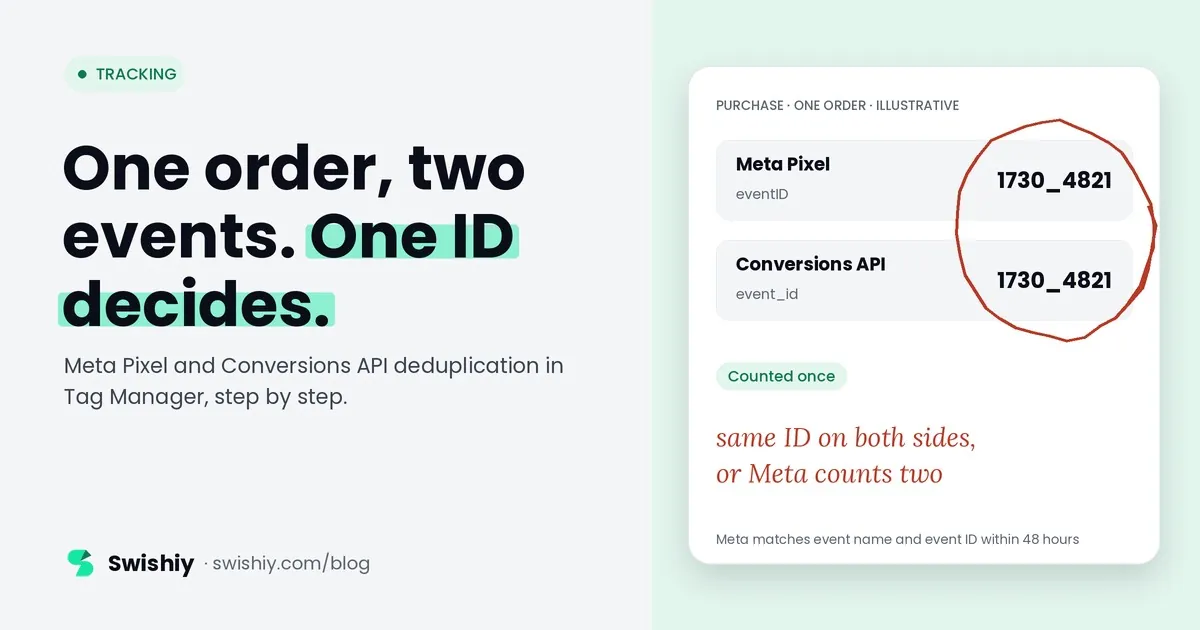
If the browser and the server both send Lead without the same event ID, Meta can count two leads. The fix is one value, created once and passed through three tags in two containers, and it goes wrong in quiet ways: a variable that creates a new ID for every tag, a parameter that never reaches the server, a test code left in after launch. This guide walks through the setup in Tag Manager, the mistakes we see most, and how to prove it works in Events Manager.
How Meta decides two events are one
Meta recommends sending the same events from the Pixel and from the Conversions API, so a purchase blocked in the browser still arrives from the server. That means most events arrive twice. Meta keeps one copy when:
- both copies go to the same pixel (dataset),
- the Pixel's event name matches the server's
event_name, - the Pixel's
eventIDmatches the server'sevent_id, - and the second copy arrives within 48 hours of the first.
Meta generally keeps the copy it receives first and discards the other. Without an event ID, Meta can fall back on matching the fbp cookie or external ID, but generally only when the browser event arrives first, so it can miss pairs. Meta's own advice is to send an event ID on every event that goes both ways.
One thing to know before you look at the numbers: Events Manager's Overview counts events before deduplication. A store with 450 orders a month can show over 900 Purchase events there and still be counting each order once. We showed exactly that for a US store in our post on the Meta Conversions API.
Deduplication only works inside Meta. For the same sale claimed by Meta and Google, see double counting across platforms.
How the ID travels through Tag Manager
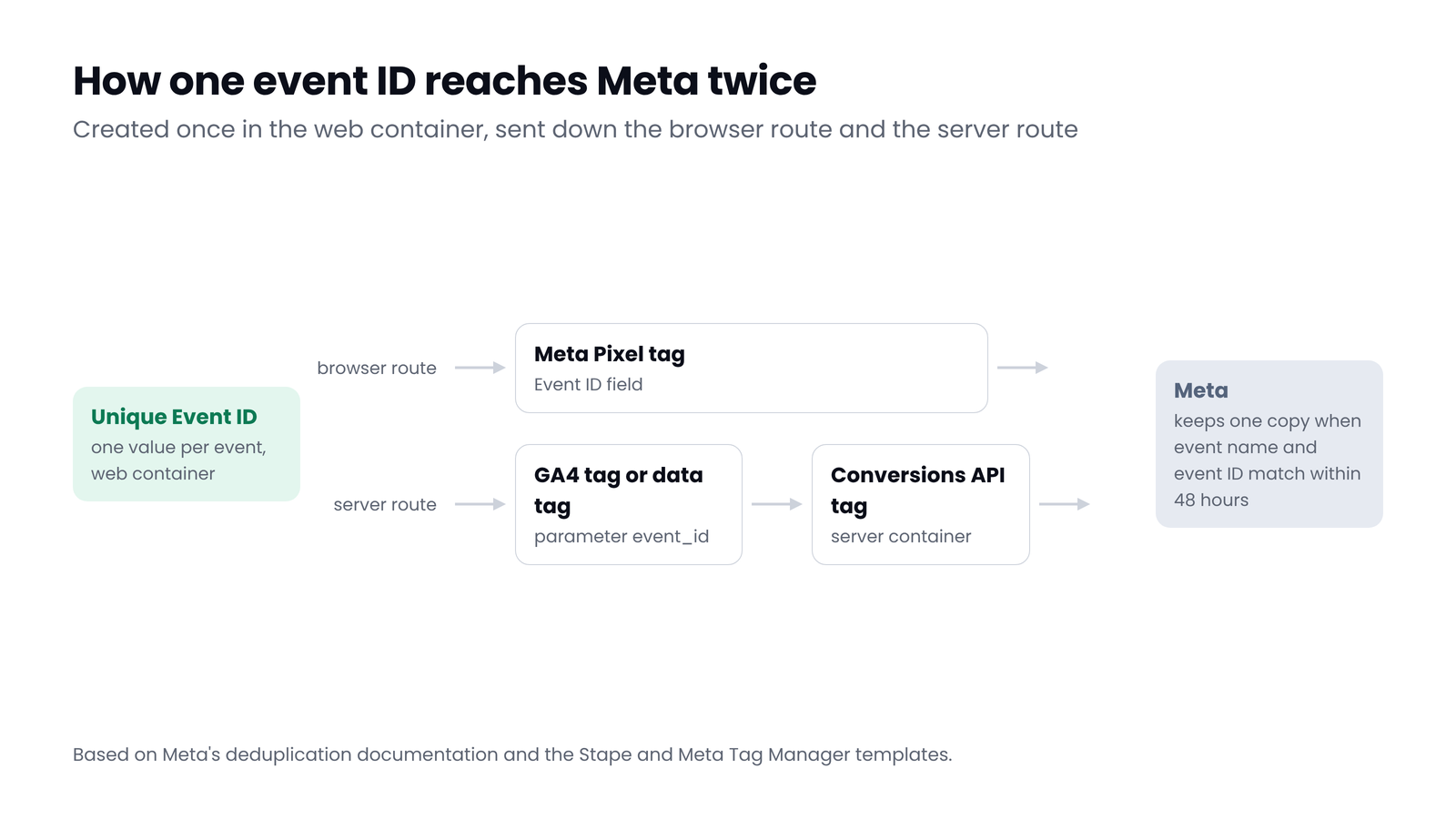
In a typical server-side setup, the browser sends each event twice from the web container: once to Meta through the Pixel tag, and once to your server container through a GA4 tag or a data tag. The server container then sends it to Meta through the Conversions API tag. The event ID has to be created once and ride along both routes.
 (opens the full-size image in a new tab)
Set it up, step by step
In the web container
- Create the ID once per event. Add a variable from the Community Template Gallery that builds a unique ID per dataLayer event, such as Stape's Unique Event ID. Avoid a plain timestamp: two visitors can share one.
- Give it to the Pixel tag. In Stape's Facebook Pixel tag or Simo Ahava's template, put the variable in the Event ID field. In Custom HTML, it is the fourth argument:
fbq('track', 'Purchase', {...}, {eventID: '{{Event ID}}'}). - Give it to the tag that feeds the server. On a GA4 event tag, add a parameter named
event_idwith the same variable. On Stape's Data Tag, addevent_idunder Event Data. - Fire both tags on the same trigger, so they read the same value for the same event.
In the server container
- Read the ID in the Conversions API tag. Stape's Meta Conversions API tag picks up
event_idfrom the event data, or you can set it under Server Event Data Override with an Event Data variable forevent_id. Meta's own Conversions API Tag readsevent_idin its current code. Meta's server-side guide usesevent_idin its GA4 steps but also mentionsx-fb-event_id, so check which key your version reads. - Keep the event names identical. If your tag lets you set the event name, use the standard one (Purchase, Lead, AddToCart) so it matches the Pixel exactly. Meta's own tag maps GA4 names, such as generate_lead to Lead, for you.
- Remove the test event code before you publish. Meta says the test_event_code field is for testing only and must be removed from production payloads.
What we found in one store's containers
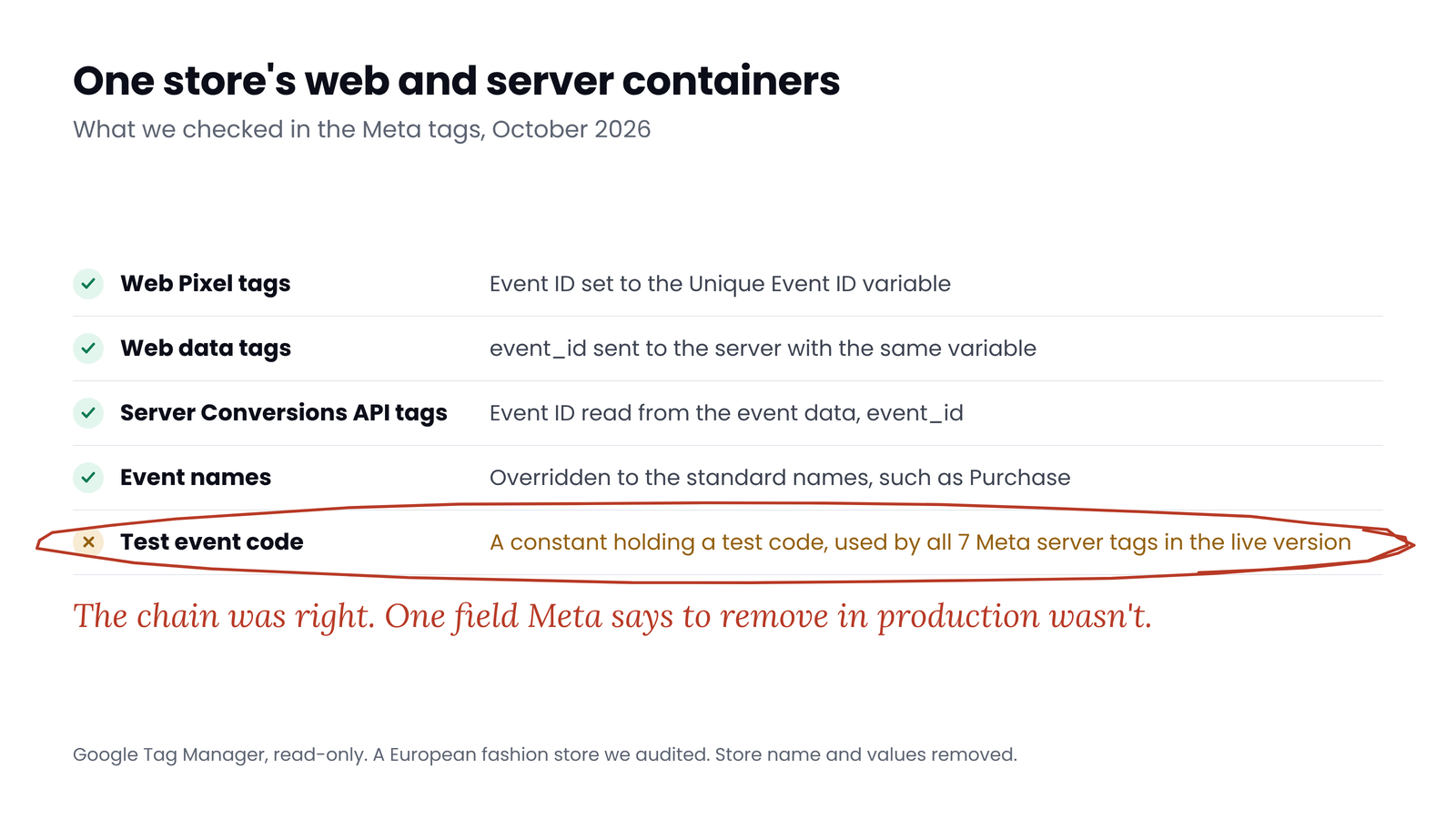
In an audit, we read the web and server containers of a European fashion store. The ID chain was built correctly in all three places.
 (opens the full-size image in a new tab)
The Pixel tags take their Event ID from a Unique Event ID variable, the data tags send the same variable as event_id, and the server's Conversions API tags read event_id from the event data. But all seven Meta tags in the server container also pointed at one constant: a test event code, still in the live version.
Meta's documentation is clear that events sent with a test code are not dropped. They still flow into Events Manager and are used for targeting and measurement. Meta also says the code must be removed in production. It's a one-field fix, and it's invisible unless someone opens the server container.
Five ways the setup goes wrong
- A new ID for every tag. Tag Manager evaluates variables each time a tag reads them. A variable that generates a random number on every call gives the Pixel one ID and the GA4 tag another. Use a template built to return one ID per event, or push the ID into the dataLayer once and read it from there.
- Different sources on each side. The order number on the server and a random ID in the browser never match. Pick one source and use it on both sides.
- The ID never reaches the server. The parameter is missing from the GA4 tag, or the server tag looks for a different key. Server Preview shows whether
event_idis in the event data. - A test event code left in. As above. Check every Conversions API tag, any variable they use, and whether a
test_event_codeparameter arrives from the web container, which Meta's tag also reads. - Two setups sending the same events. On Shopify, the Facebook & Instagram channel sends its own Pixel and server events. Adding a Tag Manager Pixel and Conversions API on top sends a second set with different IDs, and Meta has no event ID to match them on. Keep one setup per platform.
Myth
If Events Manager shows twice as many purchases as our store, deduplication is broken.
Reality
Events Manager's Overview counts every event before deduplication, so about double is expected when both routes work. Check the Event Deduplication tab instead. Ads Manager only counts purchases attributed to your ads, so if it ever reports more purchases than your store had orders, deduplication is failing.
On Shopify, the Facebook & Instagram app and Tag Manager can both send purchases. See the Shopify tracking audit.
Check it works
- Web Preview. Trigger an event and open the Pixel tag and the GA4 or data tag. Both should show the same event ID value.
- Server Preview. Open the incoming request:
event_idshould be in the event data, and the outgoing request to Meta should carry the same value. - Test Events. In Events Manager, browse the site with Test Events open. Each event should appear from the browser and the server with the same event ID.
- Event Deduplication tab. Open an event's details and check the share of events deduplicated and how often each source carries an event ID. Meta warns when the rate is too low.
- The bottom line. Ads Manager only counts purchases attributed to your ads, so it should sit at or below your store's orders for the same period. More purchases than orders means something is counted twice, and missing deduplication is the usual cause.
Quick check
Quick check
- One variable creates the event ID, once per event.
- The Pixel tag and the tag that feeds the server read that same variable, on the same trigger.
- The server's Conversions API tags read event_id from the event data.
- Event names match exactly on both sides.
- No Conversions API tag, or variable it uses, carries a test event code.
- Only one setup sends Meta events: the Shopify channel or Tag Manager, not both.
- Ads Manager never reports more purchases than your store had orders.
Ask yourself
The free GTM Auditor reads your web and server containers and checks Meta's Pixel and Conversions API tags event by event: which events go from both sides, and which ones don't share an event ID. It also flags test event codes left in. Read-only. Audit my containers
Frequently asked questions
How does Meta deduplicate Pixel and Conversions API events?
It matches events sent to the same pixel with the same event name and the same event ID, received within 48 hours of each other, and generally keeps the first one it receives. Without an event ID it can try matching on fbp or external ID, which only works when the browser event arrives first.
Do I need an event ID on PageView and AddToCart, or only on purchases?
On every event you send from both the browser and the server. Meta recommends including event_id on all events. Without it, those events can be counted twice, which inflates event counts and reporting.
Should I use the order ID as the event ID?
You can for purchases, as long as both the Pixel and the server send the same order ID. For other events there is no natural ID, so generate one per event in the web container and pass it to both sides.
Why does Events Manager show twice as many events as my orders?
The Overview counts events before deduplication, so when the Pixel and the Conversions API both send each purchase, about double is normal there. Check the Event Deduplication tab, and compare Ads Manager with your orders: it only counts purchases attributed to your ads, so it should never report more than your store's orders.
What happens if I leave a test event code in production?
Meta says events sent with test_event_code are not dropped. They still flow into Events Manager and are used for targeting and measurement. Meta also says to remove the code from production payloads.
Does Shopify's Facebook & Instagram app handle deduplication?
It sends its own Pixel and server events. The problems we see start when a second setup, such as Tag Manager, sends the same events with different IDs. Use one setup per platform.
Sources
- Meta for Developers: Handling duplicate Pixel and Conversions API events: https://developers.facebook.com/docs/marketing-api/conversions-api/deduplicate-pixel-and-server-events
- Meta for Developers: Server event parameters: https://developers.facebook.com/docs/marketing-api/conversions-api/parameters/server-event
- Meta for Developers: Conversions API best practices: https://developers.facebook.com/documentation/ads-commerce/conversions-api/best-practices
- Meta for Developers: Using the API (test events): https://developers.facebook.com/docs/marketing-api/conversions-api/using-the-api
- Meta for Developers: Verifying your setup: https://developers.facebook.com/documentation/ads-commerce/conversions-api/verifying-setup
- Meta for Developers: Conversions API for server-side Google Tag Manager: https://developers.facebook.com/documentation/ads-commerce/conversions-api/guides/gtm-server-side
- GitHub: Meta's Conversions API Tag for Google Tag Manager: https://github.com/facebookincubator/ConversionsAPI-Tag-for-GoogleTagManager
- Stape: Set up the Meta Conversions API: https://stape.io/helpdesk/documentation/how-to-set-up-meta-conversions-api
- Simo Ahava: Facebook Conversions API with server-side tagging: https://www.simoahava.com/analytics/facebook-conversions-api-gtm-server-side-tagging/

Qudees Kiani
Founder of Swishiy. Five years of marketing measurement work across Google Ads, Meta and GA4, for ecommerce and lead-gen businesses.
Book a 30-minute callIs your Google Ads data telling the truth?
The free auditor checks tracking, brand vs non-brand and wasted spend. Automated, Google Ads only, 60 seconds.