ChatGPT Ads Conversion Tracking: Pixel, Conversions API and Tag Manager Setup

Qudees Kiani, founder · · 10 min read
Short answer
ChatGPT ads conversion tracking has two parts: a browser pixel that loads on your site, and a Conversions API that receives the same events from your server. Send a purchase as order_created and a lead as lead_created, give both copies the same event ID so OpenAI counts one, and attach the event to a campaign.
On this page

OpenAI opened its self-serve Ads Manager in May 2026 and added a pixel and a Conversions API with it. That means every advertiser who tries ChatGPT ads starts tracking from zero: no template in most tag managers, no years of forum answers, and a click ID most tools have never heard of. In one account we set up, the two events worth sending weren't page views or form fills at all. They were CRM stages: 297 qualified leads and 164 won deals. This guide covers the pixel, the Conversions API, Google Tag Manager, consent, and how to check the numbers.
How ChatGPT ads conversion tracking works
OpenAI gives you two ways to report a conversion, and recommends you can use either or both. The Measurement Pixel is a script on your site that sends events from the visitor's browser. The Conversions API receives events from your server. Both write to the same data source, which OpenAI calls a Pixel ID, created in the Conversions tab of Ads Manager.
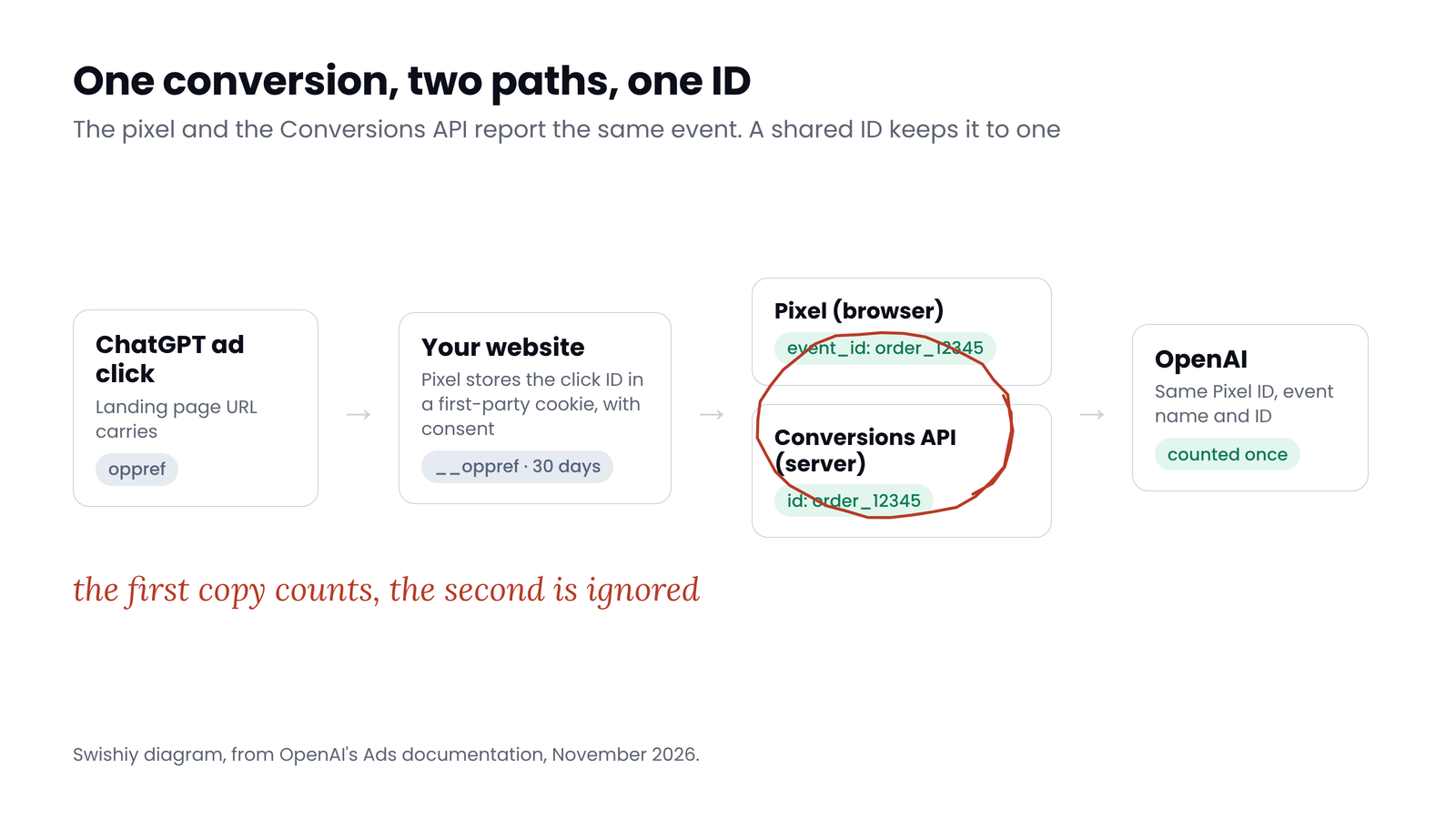
When someone clicks a ChatGPT ad, the landing page URL can carry a click identifier called oppref. The pixel reads it from the URL and, with consent, stores it in a first-party cookie named __oppref for 30 days. A second cookie, __obref, holds a random browser reference for 365 days. Those two values are how a later purchase gets tied to the ad.
 (opens the full-size image in a new tab)
Which events to send
OpenAI's docs name two standard events for most advertisers: "use order_created for a purchase or lead_created for a lead submission." The full list is longer, and each event belongs to a data type that decides which fields it accepts.
| What happened | Event name | Data type | Where it can come from |
|---|---|---|---|
| Page viewed | page_viewed | contents | Pixel or API |
| Product viewed | contents_viewed | contents | Pixel or API |
| Added to cart | items_added | contents | Pixel or API |
| Checkout started | checkout_started | contents | Pixel or API |
| Purchase | order_created | contents | Pixel or API |
| Lead submitted | lead_created | customer_action | Pixel or API |
| Call or demo booked | appointment_scheduled | customer_action | Pixel or API |
| Sign-up | registration_completed | customer_action | Pixel or API |
| Subscription or trial | subscription_created, trial_started | plan_enrollment | Pixel or API |
| App install or open | app_installed, app_opened | API only | |
| Anything else | custom, with your own name | custom | Pixel or API |
Amounts are in cents
amount: 2599. Send 25.99 or 26 and your revenue is wrong by a factor of 100. If you reuse a Google or Meta data layer value, convert it first.How to set up the pixel
- Create the data source. In Ads Manager, open Conversions and create a data source. That gives you a Pixel ID.
- Load the pixel on every page. Add OpenAI's script, which loads
https://bzrcdn.openai.com/sdk/oaiq.min.js, and calloaiq("init", { pixelId: "YOUR-PIXEL-ID" }). Adddebug: truewhile testing to log activity in the browser console. - Send the conversion. For a purchase:
oaiq("measure", "order_created", { type: "contents", amount: 2599, currency: "USD" }, { event_id: "order_12345" }). For a lead:oaiq("measure", "lead_created", { type: "customer_action" }), with anevent_idin the options if you also send it from the server. - Use a real ID. OpenAI says to "use the actual order ID or another unique event ID." The order number or CRM lead ID works. A random number made in the browser doesn't, because your server can't know it.
- Create the conversion event. Back in Conversions, open Conversion Events and create an event on top of the base event you send, such as Purchase on
order_created. - Attach it to a campaign. Reporting on a goal only starts from the point a conversion event is attached to a campaign, so do this before you spend.
How to set up the Conversions API
The Conversions API takes the same events from your server at https://bzr.openai.com/v1/events, with your Pixel ID in the pid parameter and a Conversions API key as a bearer token. Create the key in the Conversions tab. It belongs on a server and never in a web page.
Each event has an id, a type such as order_created, a timestamp_ms, an action_source, and a data object with the same fields the pixel uses. Three rules are easy to miss:
- You pass the click ID yourself. OpenAI says: "When an ad click supplies an
opprefidentifier, capture it and include the original value", and that the API "does not capture this value automatically." Storeopprefwith the lead or order when it's created. - Events can be up to 7 days old.
timestamp_mshas to fall within the last 7 days. A deal that closes three weeks after the lead can't be sent with its original date. - A batch fails as a whole. You can send up to 1,000 events in one request, and one bad event rejects all of them. Set
validate_onlyto true to check a payload without saving it.
The API also accepts hashed emails, external IDs, location, IP address and user agent in a user object. More matching data helps OpenAI connect a server event to a click when the cookie is gone.
How deduplication works
If the pixel and the API both report the same purchase, you want one conversion. OpenAI matches duplicates on three things: the Pixel ID, the event name and the event ID. The pixel's event_id and the API's id must hold the same value. In OpenAI's words, it "uses the first event it receives for a matching key and ignores later duplicates." For a custom event, the custom event name has to match too.
The docs don't state a time window for this match, so don't rely on a late server copy being caught. Send both within minutes. The idea is the same as on Meta, which we cover in Meta Pixel and Conversions API deduplication in Tag Manager.
ChatGPT ads tracking in Google Tag Manager
OpenAI's docs don't cover Tag Manager, but you don't need a Custom HTML tag for everything. Stape publishes an OpenAI Ads Pixel template for web containers and an OpenAI Ads Conversions API tag for server containers. TAGGRS and Addingwell publish server templates too. These are vendor templates, so read what each one sends before you publish it.
- Web container. Add the pixel template with your Pixel ID, fire the base tag on all pages after consent, and map your existing data layer events:
purchasetoorder_created,generate_leadtolead_created. - Event ID. Use one variable for the event ID in the web tag and pass the same value to your server container, the same way you would for Meta.
- Server container. Add the Conversions API tag, set the API key as a constant only the server can read, and map
oppreffrom the cookie or the incoming event. - Amounts. Add a variable that multiplies your order value by 100 and rounds it, and use it only for this tag.
- Preview. Run both containers in Preview, place a test order, and check both tags fired with the same ID.
If you don't have a server container yet, our guide to what server-side tracking fixes explains when it's worth adding.
Consent
The pixel doesn't wait for your cookie banner on its own. OpenAI says the pixel "initializes consent to true by default unless you set it to false" or it finds a stored denial. So in the EU and the UK, the order matters: call oaiq("consent", false) before init, and call oaiq("consent", true) once the visitor agrees.
Google's Consent Mode doesn't control this tag. In Tag Manager, give the pixel its own consent requirement, usually ad_storage, so it can't fire first. Our post on Consent Mode v2 in Tag Manager shows how to test what each tag does after "Reject all".
What we saw in one account
A European B2B merchandise company's account we set up doesn't sell through a checkout. A lead becomes a quote, then a deal, days or weeks later. So the events we send to ChatGPT ads come from the CRM, through a server container, using the Conversions API.
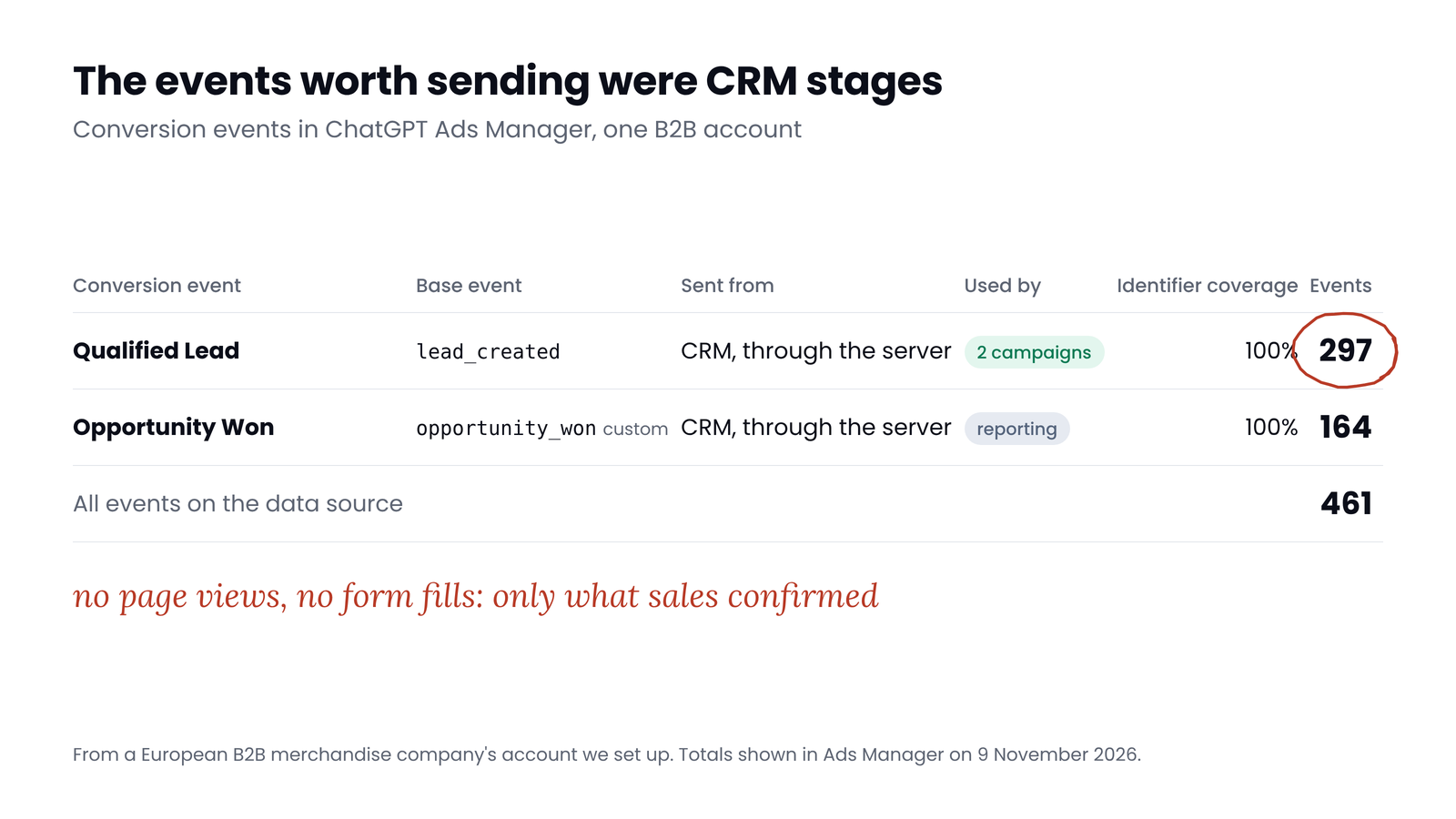
On 9 November 2026, Ads Manager showed two conversion events on one data source. Qualified Lead, built on the standard lead_created event, had received 297 events. Opportunity Won, a custom event, had received 164. That's all 461 events on the data source: nothing but CRM stages. Identifier coverage was 100% on both, because every event carried matching data from the CRM record. Ads Manager shows these as running totals, without a date range.
 (opens the full-size image in a new tab)
The campaigns use Qualified Lead as their goal, since it happens often enough to learn from. Won deals are sent as well, so the account can report on revenue later. The same server container sends these stages to Google Ads, Meta and Microsoft Ads, which is the subject of our post on B2B offline conversion tracking.
How to check it's working
- Event Stream. In Conversions, open Event Stream and start polling. Fire a test event and it should appear with its source. OpenAI's API returns "a sample of recent events from roughly the last 15 minutes", labelled
pixel_sdkorserver_to_server. - Diagnostics. The Diagnostics tab lists warnings, such as limited matching information or no active campaign using a conversion event.
- Reporting. Conversions "update through daily processing", so allow a day before you judge a campaign.
- Attribution settings. The click window can be 7, 14 or 30 days, and defaults to 30. The view window is 0 or 1 day, and defaults to 1. Results are dated by the ad interaction unless you switch to conversion time.
ChatGPT ads also won't appear correctly in GA4 unless your landing page URLs carry UTM tags. Our UTM naming convention has a row for them.
Myth
ChatGPT ads are too new to track properly, so I'll judge them by clicks for now.
Reality
The pixel and the Conversions API are both live, with standard events, an event ID for deduplication and attribution windows you can set. What's missing is history and tooling, not the tracking. An afternoon of setup gets you conversions you can compare with Google and Meta.
Quick check
Quick check
- The pixel loads on every page, and only after consent where consent is required.
- A purchase sends order_created with the amount in minor units and a currency.
- The browser and server copies of an event share one event ID.
- Your server stores oppref with each lead or order and sends it back.
- A conversion event exists in Ads Manager and is attached to your campaigns.
- Event Stream shows a test event from each source.
Ask yourself
None of our tools reads ChatGPT Ads Manager yet. The free Tracking audit checks what this setup sits on: your Tag Manager container, consent settings on every tag, and whether GA4 and Google Ads count each purchase or lead once. Run my tracking audit
Frequently asked questions
Does ChatGPT have a conversion pixel?
Yes. OpenAI's Measurement Pixel is a script loaded from bzrcdn.openai.com that sends events with the oaiq function. You create a Pixel ID in the Conversions tab of Ads Manager, load the script on every page, and call measure for each conversion.
What is the ChatGPT ads Conversions API?
It's a server endpoint that receives the same events as the pixel. Your server posts events to bzr.openai.com with your Pixel ID and an API key. It's the way to send conversions that happen away from the browser, such as CRM stages, and to back up the pixel when cookies are blocked.
Can I set up ChatGPT ads tracking in Google Tag Manager?
Yes. OpenAI's docs don't mention Tag Manager, but vendors such as Stape, TAGGRS and Addingwell publish templates for the pixel and the Conversions API. Map your existing purchase and lead events to order_created and lead_created, and share one event ID between the web and server tags.
How do I stop ChatGPT ads counting a conversion twice?
Send the same event name and the same event ID from the pixel and the Conversions API, under the same Pixel ID. OpenAI keeps the first copy and ignores later duplicates. Use the order number or lead ID as the event ID.
What is oppref?
It's the click identifier a ChatGPT ad click can add to your landing page URL. The pixel reads it and stores it in the __oppref cookie for 30 days. The Conversions API doesn't capture it for you, so save it with the lead or order and include it in the server event.
What attribution window do ChatGPT ads use?
By default, 30 days after a click and 1 day after a view. You can set the click window to 7, 14 or 30 days and the view window to 0 or 1 day. A click takes precedence over a view.
Does the ChatGPT ads pixel respect cookie consent?
Only if you tell it to. Consent defaults to true unless you call oaiq consent false before init, or the pixel finds a stored denial. Where consent is required, set it to false first and switch it on after the visitor agrees.
Sources
- OpenAI: New ways to buy ChatGPT ads: https://openai.com/index/new-ways-to-buy-chatgpt-ads/
- OpenAI Ads docs: Conversion Tracking: https://developers.openai.com/ads/conversion-tracking
- OpenAI Ads docs: Measurement Pixel: https://developers.openai.com/ads/measurement-pixel
- OpenAI Ads docs: Conversions API: https://developers.openai.com/ads/conversions-api
- OpenAI Ads docs: Supported Events: https://developers.openai.com/ads/supported-events
- OpenAI Ads docs: Reporting: https://developers.openai.com/ads/reporting
- Stape: OpenAI Ads Pixel tag: https://stape.io/helpdesk/documentation/openai-ads-pixel-tag

Qudees Kiani
Founder of Swishiy. Five years of marketing measurement work across Google Ads, Meta and GA4, for ecommerce and lead-gen businesses.
Book a 30-minute call
Is your Google Ads data telling the truth?
The free auditor checks tracking, brand vs non-brand and wasted spend. Automated, Google Ads only, 60 seconds.


