UTM Naming Convention: One Sheet for Google, Meta, LinkedIn, TikTok and ChatGPT Ads

Qudees Kiani, founder · · 8 min read
Short answer
A UTM naming convention is a fixed list of values for utm_source, utm_medium and utm_campaign that everyone uses on every link. GA4 assigns channels by matching those values against set rules, so write them in lowercase, use a medium GA4 recognises such as cpc, paid_social or email, and let each ad platform fill in campaign names automatically.
On this page
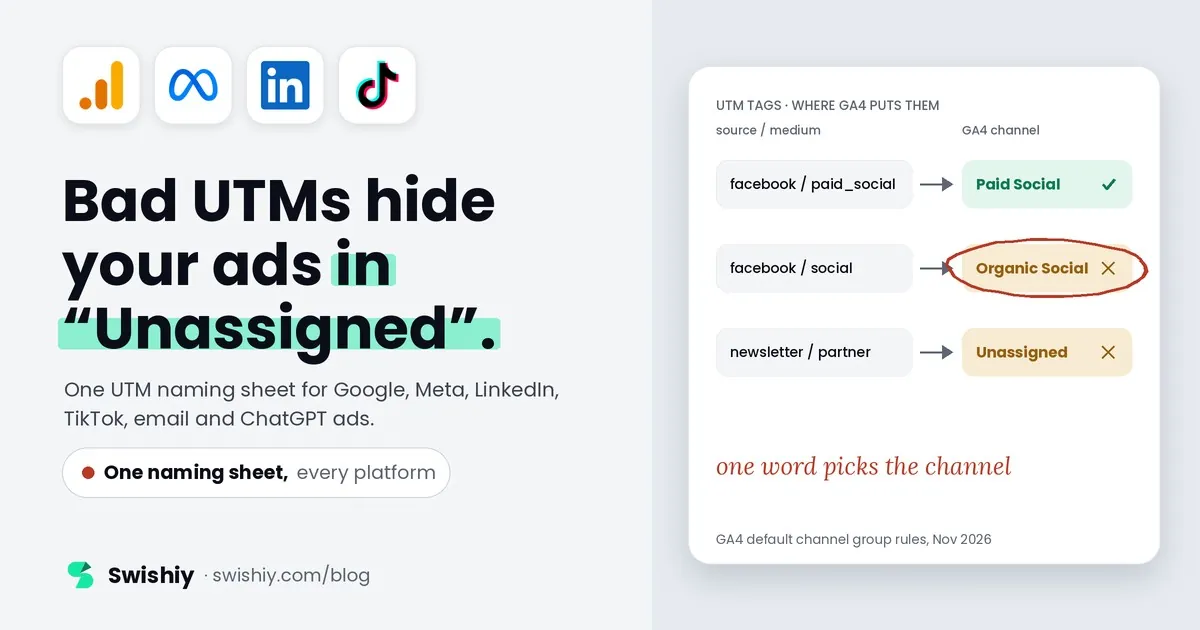
GA4 doesn't know which of your visits came from paid social. It reads the tags on the link and applies a rule. Get one word wrong and the visit is filed somewhere else. In a store we audited, 19,867 sessions from Meta ads were split between two channels because of a word in the campaign name, and 32 sessions arrived with the source set to the literal text {{site_source_name}}. Nothing was broken. The links were just written differently by different people. This guide gives you one convention for every platform, and a sheet to copy.
What UTM parameters are
UTM parameters are tags added to the end of a link. When someone clicks, GA4 reads them and records where the visit came from. Google's rule is short: "you should always use utm_source, utm_medium, and utm_campaign."
| Parameter | What it says | Example | Use it |
|---|---|---|---|
| utm_source | Who sent the visit | facebook, linkedin, newsletter | Always |
| utm_medium | What kind of traffic it is | cpc, paid_social, email | Always |
| utm_campaign | Which campaign | bf26_prospecting_us | Always |
| utm_id | The campaign's ID | 120212345678 | Recommended |
| utm_source_platform | The buying platform | meta, linkedin | Recommended |
| utm_content | Which ad or link | video_a_15s | When you test creatives |
| utm_term | Keyword or audience | lookalike_1pct | Optional |
Two more exist, utm_creative_format and utm_marketing_tactic, but Google says they aren't currently reported in Analytics properties, so skip them.
How GA4 turns UTMs into channels
GA4's default channel group is a list of rules. Each visit is checked against them, and the medium does most of the work.
| GA4 channel | What the link needs |
|---|---|
| Paid Search | A search engine as source, and a medium matching cp, ppc, retargeting or starting with paid |
| Paid Social | A social site as source, and the same kind of paid medium |
| Paid Shopping | A shopping site as source, or a campaign name containing shop or shopping, plus a paid medium |
| Organic Social | A social site as source, or a medium of social, social-network, social-media or sm |
| Source or medium is email, e-mail, e_mail or e mail | |
| Display | Medium is display, banner, expandable, interstitial or cpm |
| Paid Other | A paid medium that fits none of the above |
| AI Assistant | Medium is exactly ai-assistant, or the referrer is a known AI assistant |
| Unassigned | No rule matches |
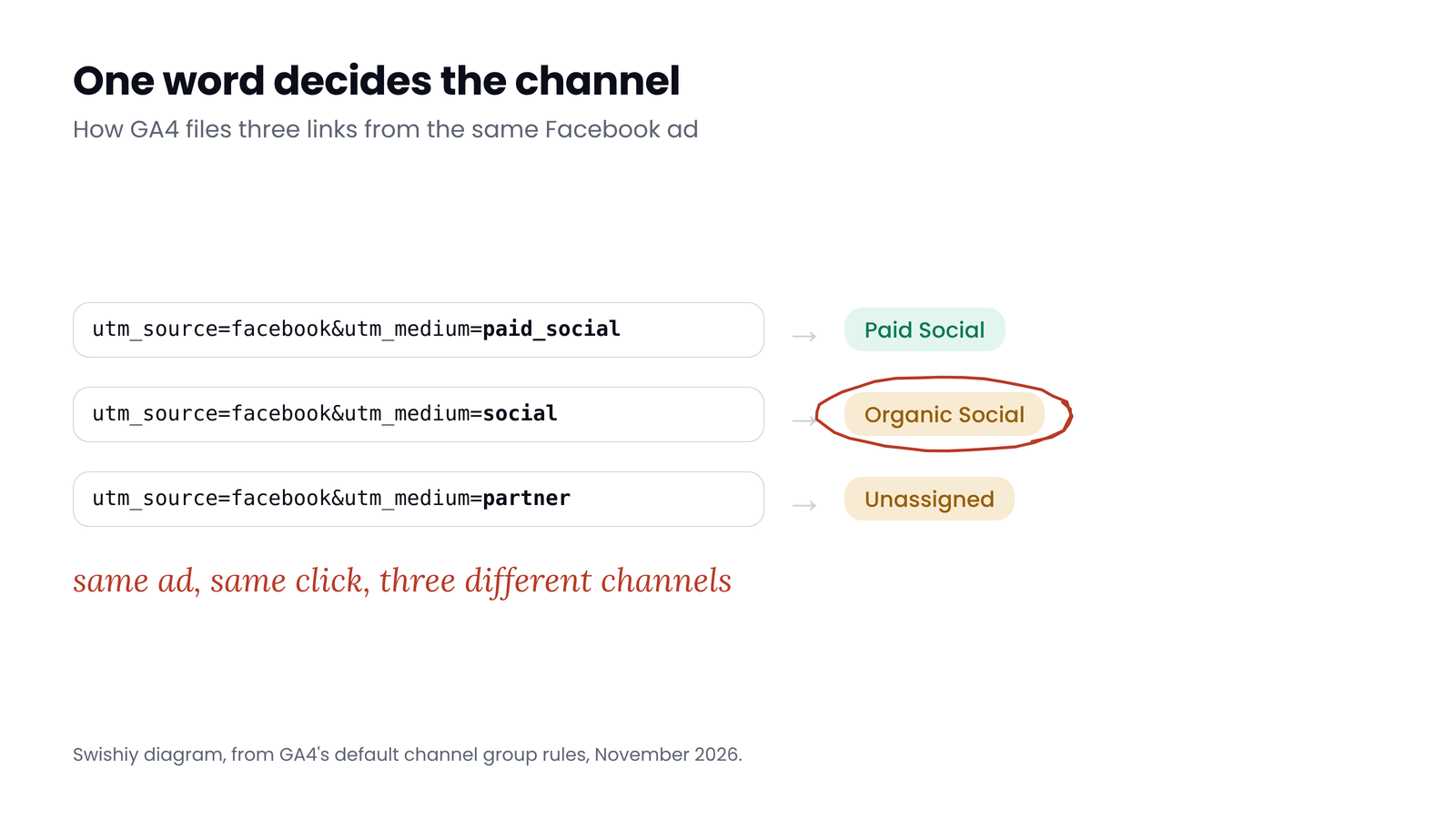
Google's wording for the last one: "Unassigned is the value Analytics uses when there are no other channel rules that match the event data." A medium of partner, promo or Paid Social with a space and capitals where you meant paid_social can all end up there or in the wrong channel. Our post on Direct and Unassigned traffic covers the other causes.
 (opens the full-size image in a new tab)
Case counts
The convention
Four rules cover almost every problem we see:
- Lowercase only. No spaces. Underscores between words.
- Source is the place. The site or tool the click came from:
facebook,linkedin,klaviyo. - Medium comes from a short fixed list. Choose values GA4's rules recognise, and never invent a new one for one campaign.
- Campaign names follow one pattern. For example period, goal, market:
bf26_prospecting_us. Where the platform can insert the name for you, let it.
| Platform | utm_source | utm_medium | utm_campaign | Lands in |
|---|---|---|---|---|
| Google Ads | Leave auto-tagging on | Leave auto-tagging on | Leave auto-tagging on | Paid Search, Paid Shopping, Cross-network and others |
| Meta ads | facebook or instagram, or {{site_source_name}} | paid_social | {{campaign.name}} | Paid Social |
| LinkedIn ads | paid_social | Dynamic campaign name | Paid Social | |
| TikTok ads | tiktok | paid_social | __CAMPAIGN_NAME__ | Paid Social |
| Microsoft Advertising | bing | cpc | Campaign name | Paid Search |
| ChatGPT ads | chatgpt | cpc | Campaign name | Check after the first clicks |
| The tool or list, such as klaviyo | Send name | |||
| Organic social posts | facebook, linkedin and so on | social | Post or theme | Organic Social |
The same table, with one row per platform and columns for content and term, is in the UTM naming sheet. Copy it, add your campaigns and share it with everyone who builds links.
Platform by platform
Google Ads
Don't hand-tag Google Ads. Auto-tagging adds a click ID that carries far more detail than UTMs can, and Google says that when both are present, "the source, medium, and other traffic-classification dimensions use the auto-tagged values." Check that "Tag the URL that people click through from my ad" is ticked in your Google Ads account settings.
Meta
Meta fills in values for you through dynamic parameters. The documented ones include {{campaign.name}}, {{adset.name}}, {{ad.name}}, {{campaign.id}}, {{placement}} and {{site_source_name}}, which returns fb, ig, msg, an or th. A common setup is utm_source=facebook, utm_medium=paid_social, utm_campaign={{campaign.name}}, utm_content={{ad.name}}, utm_id={{campaign.id}}.
Two things to know. Name-based parameters keep the name the campaign had when it was first published, so renaming a campaign later doesn't change its links. And Meta notes that source and medium "may be automatically added to your ad traffic" as Facebook or Instagram and paid. Set your own so the values are the ones in your sheet.
LinkedIn and TikTok
LinkedIn's dynamic UTM tracking can insert the account, campaign group, campaign and creative names and IDs. TikTok supports macros in the URL: __CAMPAIGN_NAME__, __AID_NAME__ for the ad group, __CID_NAME__ for the creative and __PLACEMENT__. In both, type the source and medium yourself and let the platform fill in the rest.
ChatGPT ads
OpenAI's docs describe a click identifier, oppref, but don't mention UTM tags being added for you. Add them to your landing page URLs yourself. GA4's AI Assistant channel is built for unpaid visits from tools such as ChatGPT, so decide where you want paid clicks to sit: a paid medium such as cpc keeps them out of that channel. Look at where the first sessions land and adjust once. Setup of the pixel itself is in our guide to ChatGPT ads conversion tracking.
What bad UTMs looked like in one store
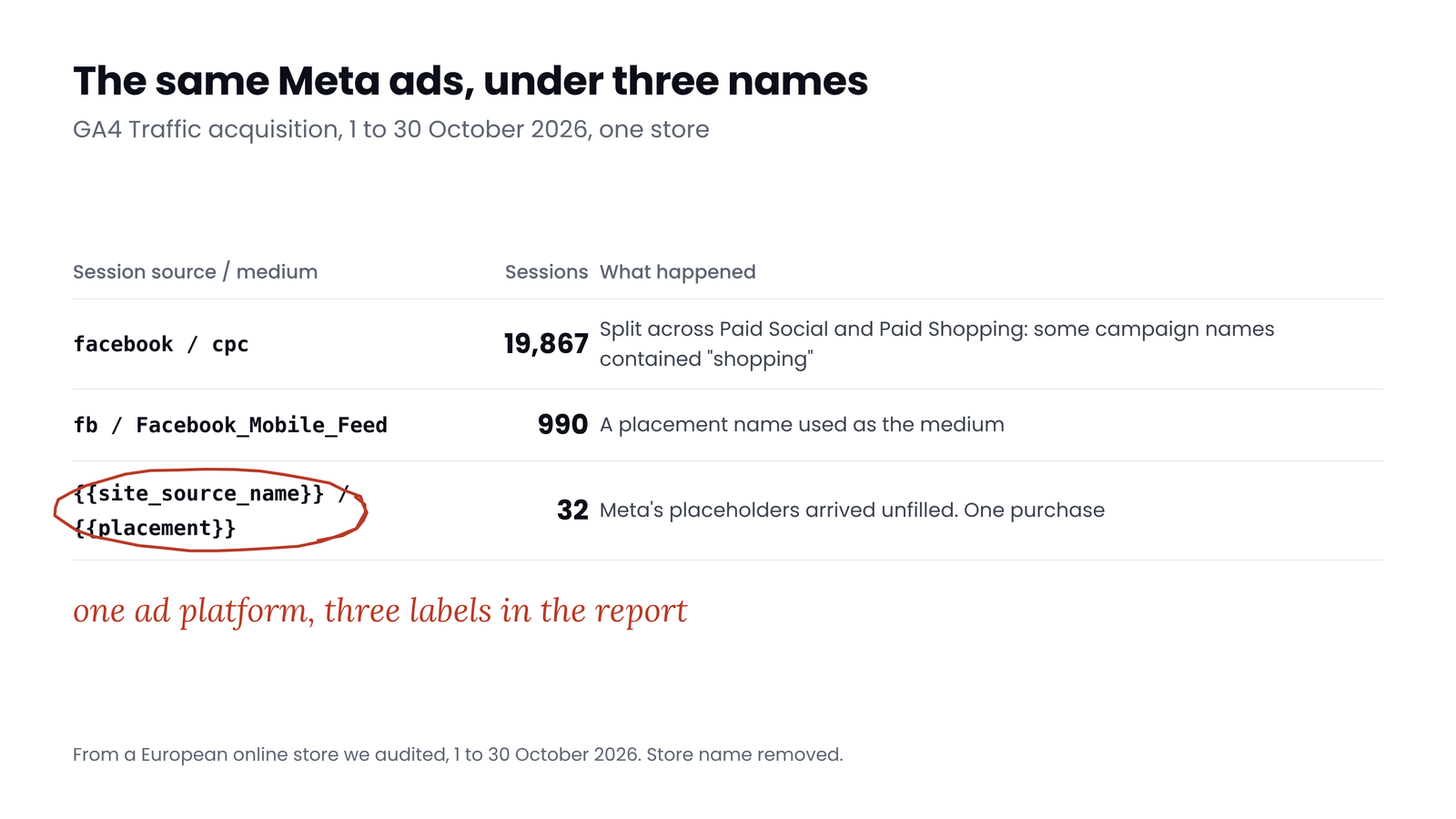
A European online store we audited ran Meta ads through October 2026. In GA4's Traffic acquisition report for 1 to 30 October, we found the same advertising under three different labels.
| Session source / medium | Sessions | What happened |
|---|---|---|
| facebook / cpc | 19,867 | Split between Paid Social and Paid Shopping, because some campaign names contained the word shopping |
| fb / Facebook_Mobile_Feed | 990 | A placement name used as the medium, in capitals, which no paid rule matches |
| {{site_source_name}} / {{placement}} | 32 | Meta's placeholders arrived as plain text, unfilled |
 (opens the full-size image in a new tab)
None of these is a tracking failure. Every session was recorded. But anyone asking GA4 "what did paid social bring in?" got an answer that left part of it out. The 32 placeholder sessions included one purchase.
How to roll it out
- Export what you have. In GA4, open Reports > Acquisition > Traffic acquisition, switch the dimension to Session source / medium and export the last 90 days.
- List the variants. Sort by source. Mark every case of the same thing written two ways, and every medium outside your list.
- Agree the sheet. Fill in the naming sheet for your platforms and campaigns. One owner approves new values.
- Set tags at the highest level. In Meta, LinkedIn and TikTok, use the platform's URL parameter or tracking fields with dynamic values, so nobody types a campaign name by hand.
- Fix live ads first. Update running campaigns. History in GA4 won't change, so note the date you switched.
- Check a week later. Run the same export. New rows should only use values from the sheet.
Myth
UTMs are just for reporting, so small inconsistencies don't matter.
Reality
GA4's channels, its attribution and any audience built on traffic source all read those values. A medium GA4 doesn't recognise moves real ad traffic into Unassigned or an organic channel, and the paid channel looks worse than it is.
Quick check
Quick check
- Every link uses utm_source, utm_medium and utm_campaign.
- All values are lowercase, with no spaces.
- Your mediums come from one short list that GA4's channel rules recognise.
- Google Ads uses auto-tagging, not hand-written UTMs.
- Meta, LinkedIn and TikTok fill in campaign names with dynamic values.
- No source or medium in GA4 contains curly brackets.
- Unassigned is under 5% of sessions.
Ask yourself
The free GA4 Auditor reads your traffic sources for you: the share of sessions and revenue in Unassigned, mediums GA4 doesn't recognise, and the same source written in two cases. Audit my GA4
Frequently asked questions
What is a UTM naming convention?
It's an agreed set of values for your UTM parameters, written down and used by everyone who creates links. It fixes which sources and mediums exist, how campaign names are built, and that everything is lowercase, so the same traffic always appears under one label in GA4.
Are UTM parameters case sensitive?
Yes. Google states that parameter values are case sensitive, so Facebook and facebook are recorded as two sources. Use lowercase everywhere.
What utm_medium should I use for paid social?
Use paid_social or cpc. GA4 puts a visit in Paid Social when the source is a social site and the medium matches cp, ppc, retargeting or starts with paid. A medium of social on its own is treated as Organic Social.
Should I add UTMs to Google Ads?
No, keep auto-tagging on. When a click has both auto-tagging and UTM tags, GA4 uses the auto-tagged values for source, medium and the other traffic dimensions. Auto-tagging also carries Google Ads details that UTMs can't.
Why is my traffic Unassigned in GA4?
Unassigned means no channel rule matched. With tagged links, the usual cause is a medium GA4 doesn't recognise, such as partner or promo, or a missing medium. Fix the tag and new visits are filed correctly. Past data stays as it was.
Which UTM parameters are required?
Google says you should always use utm_source, utm_medium and utm_campaign. It strongly recommends utm_id and utm_source_platform as well. Missing values show as (not set) in reports.
How do I track ChatGPT ads in GA4?
Add UTM tags to your landing page URLs yourself, for example utm_source=chatgpt and a paid medium such as cpc. OpenAI's click identifier, oppref, is for its own conversion tracking and isn't read by GA4.
Sources
- Analytics Help: URL builders, collect campaign data with custom URLs: https://support.google.com/analytics/answer/10917952
- Analytics Help: Default channel group: https://support.google.com/analytics/answer/9756891
- Analytics Help: Benefits of Google Ads auto-tagging: https://support.google.com/analytics/answer/10723328
- Meta Business Help Center: Specifications for dynamic URL parameters: https://www.facebook.com/business/help/2360940870872492
- Microsoft Learn: LinkedIn dynamic UTM tracking: https://learn.microsoft.com/en-us/linkedin/marketing/integrations/ads-reporting/dynamic-utm-tracking
- TikTok Business Help Center: Track offsite web events with UTM parameters: https://ads.tiktok.com/help/article/track-offsite-web-events-with-utm-parameters
- OpenAI Ads docs: Measurement Pixel: https://developers.openai.com/ads/measurement-pixel

Qudees Kiani
Founder of Swishiy. Five years of marketing measurement work across Google Ads, Meta and GA4, for ecommerce and lead-gen businesses.
Book a 30-minute call
Is your Google Ads data telling the truth?
The free auditor checks tracking, brand vs non-brand and wasted spend. Automated, Google Ads only, 60 seconds.


