GA4 Singapore Bot Traffic: The 1280x1200 Crawler and How to Stop It

Qudees Kiani, founder · · 8 min read
Short answer
A sudden wave of GA4 traffic from Singapore with almost no engagement is usually a crawler, not customers. It runs a real browser, often reports a 1280x1200 screen and lands in Direct. It rarely comes from Singapore alone, so don't block the country: flag the fingerprint in Google Tag Manager and filter it in GA4.
On this page
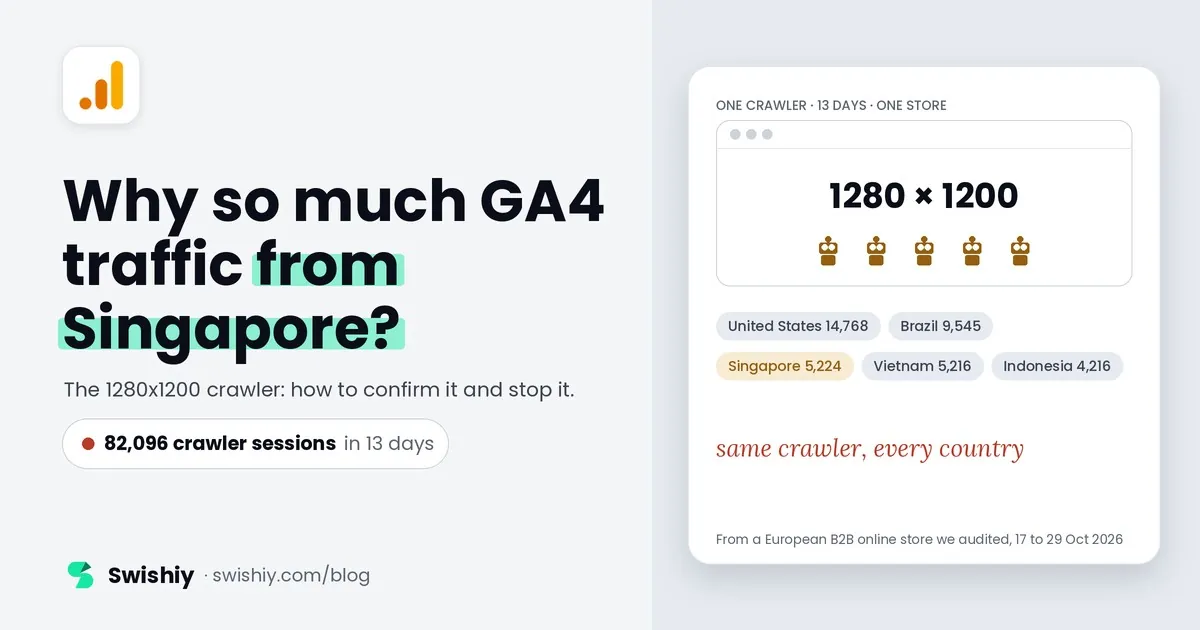
Singapore jumps to the top of your country report, engagement drops to almost nothing, and nobody has run a campaign there. Practitioners have reported the same pattern since 2025. In a store we audited, the crawler behind it made 82,096 sessions in 13 days, and only 5,224 of them came from Singapore. Here's how to spot it, and how to stop it without blocking real visitors.
What the Singapore traffic in GA4 is
It's automated traffic that loads your pages in a real browser. Because it runs JavaScript, your Google tag fires and GA4 counts a visit. Because it isn't on the list of known bots GA4 uses, nothing removes it.
Practitioners describe the same fingerprint again and again. One site owner found that "81% of the Singapore visitors reported 1280x1200", that 61% of the requests came from one cloud network, Tencent Cloud, that engagement averaged one second and that the visits were "all Direct". Another saw Singapore sessions spread across Chrome 103 to 133, while visitors from a control country used 153 and 154.
We haven't found a Google statement on this wave or its fingerprints, so everything here comes from practitioners and from the audit below. That's also why GA4 won't fix it for you: the pattern changes, and it's specific to the sites being crawled.
How to spot the Singapore crawler in GA4
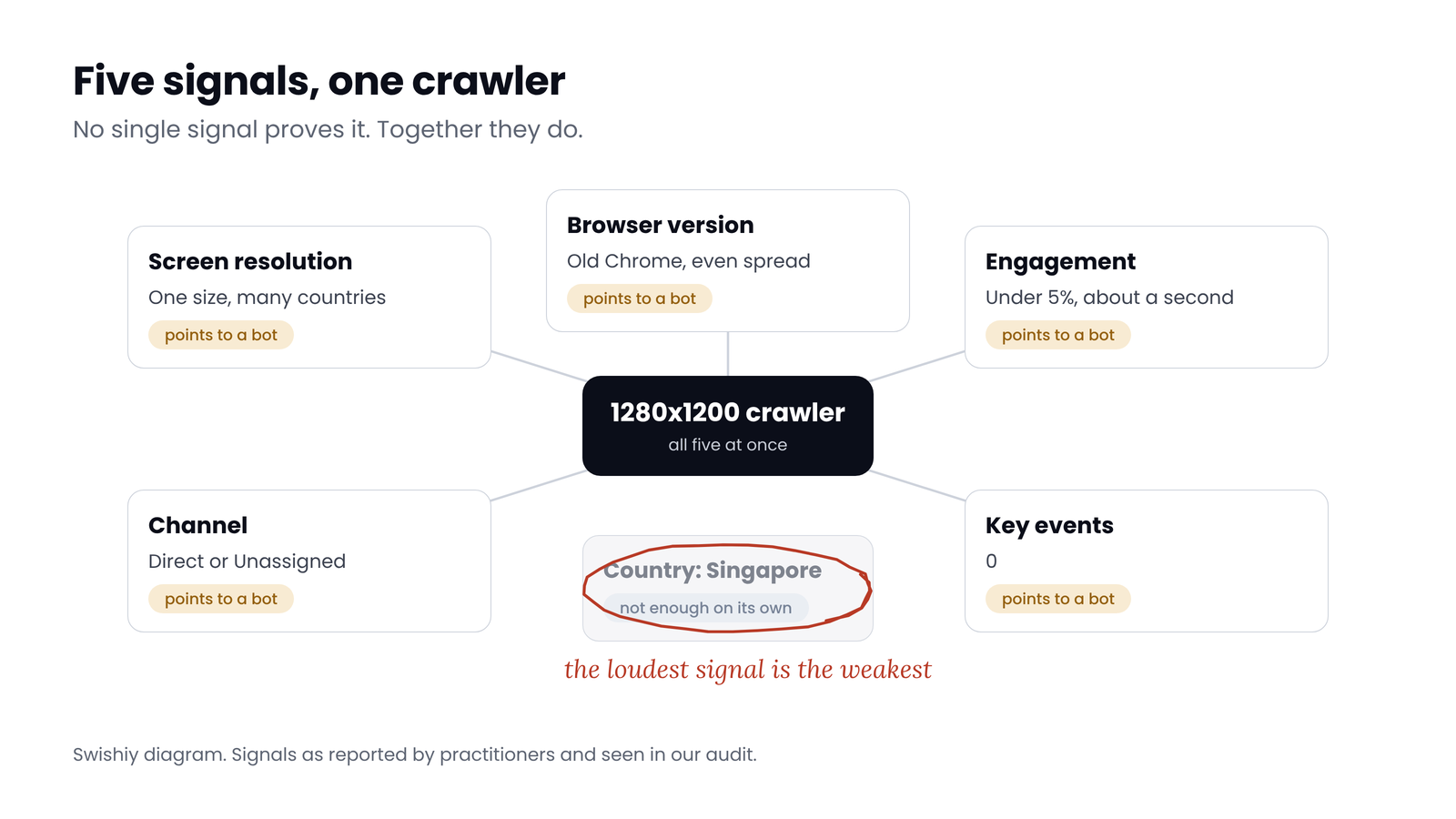
No single signal proves it. Five together do. Build a Free form in Explore with these as rows and Sessions, Engaged sessions and Key events as values, then look for one combination with a huge session count and nothing else.
 (opens the full-size image in a new tab)
| Signal | What the crawler shows | What real visitors show |
|---|---|---|
| Screen resolution | One size, often 1280x1200, across many countries | A spread led by common sizes like 1920x1080 |
| Browser version | Old Chrome versions in an even spread, or a single version | Mostly the current and previous release |
| Engagement | Engaged sessions under 5%, about a second per visit | Your normal engagement rate |
| Channel | Direct or Unassigned | Spread across your channels |
| Key events | Zero | Your usual conversion rate |
What it costs you, by business type
The crawler rarely buys anything. The damage is to the numbers you make decisions with, and every page it loads counts as a page view that can land in your Google Ads audiences. More on that in bot traffic and Google Ads.
| Business type | What gets distorted | What to watch |
|---|---|---|
| Online store | Conversion rate, landing page reports, Direct's share of revenue | Sessions up, purchases flat |
| Lead gen | Lead conversion rate, and cost per lead if you divide by sessions | Form spam arriving at the same time |
| SaaS | Trial conversion rate and pricing page reports | Sign-ups from unusual screen sizes |
| Content site | Pages per session, engagement time, audience size | Engagement rate falling while sessions rise |
Don't block Singapore
What we found in one audit
A European B2B online store we audited saw its sessions roughly double from 17 October 2026. Singapore was the first thing everyone noticed. Screen resolution told a different story.
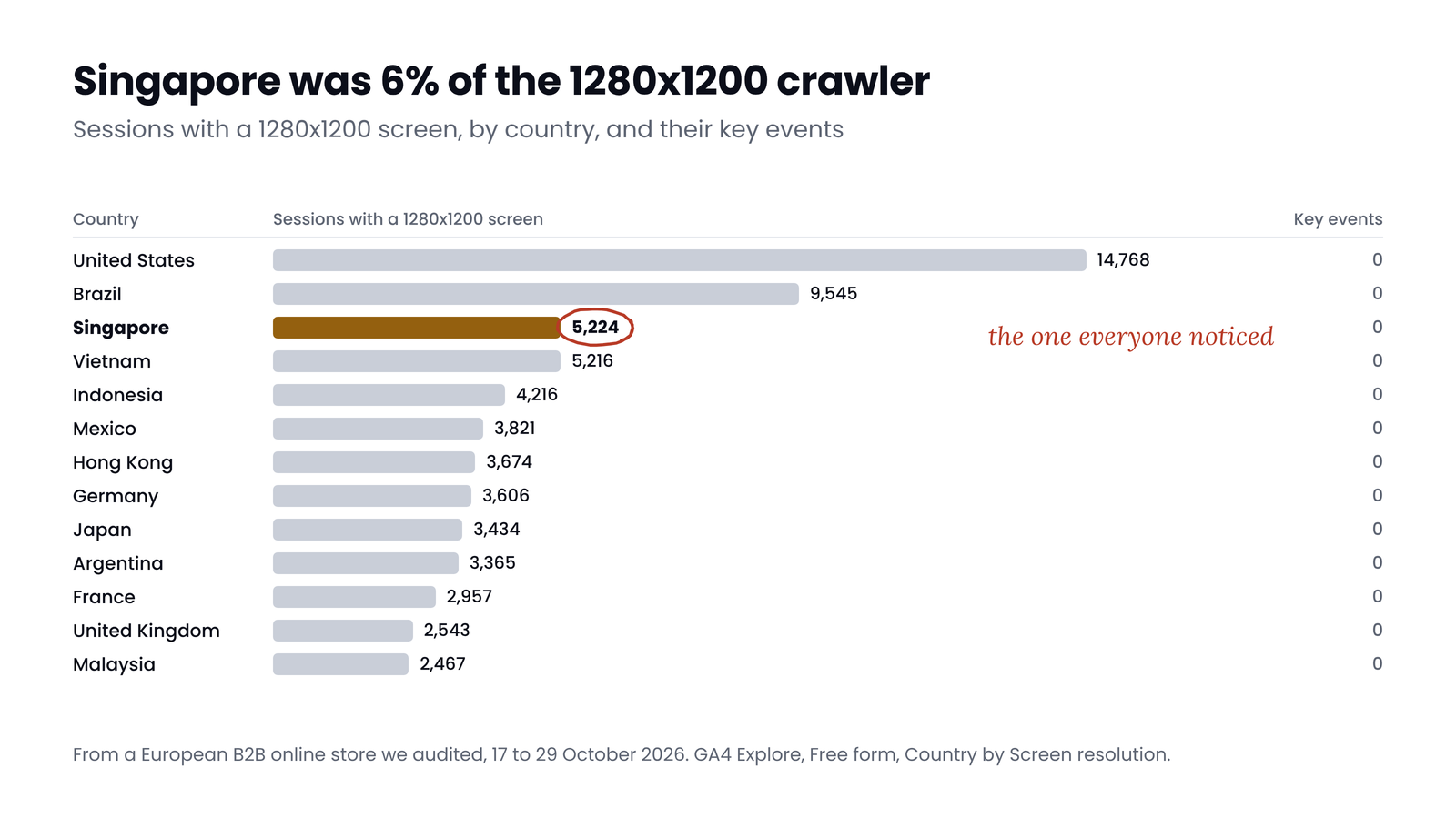
Between 17 and 29 October, 82,096 sessions reported a 1280x1200 screen. The United States sent 14,768 of them and Brazil 9,545. Singapore sent 5,224, eight more than Vietnam. The same screen size came from Indonesia, Mexico, Hong Kong, Germany, Japan, Argentina, France, the UK and Malaysia. None of those countries had a single key event at 1280x1200.
 (opens the full-size image in a new tab)
Singapore did have a fingerprint of its own: 3,957 sessions at 1366x1366, a square screen almost no real monitor has. It looked better than the rest, with 31% of those sessions counted as engaged. It still produced 0 key events. Engagement alone won't separate bots from people, which is the subject of our post on what GA4's bot filter catches. How the store took the crawler out of GA4 is in the case study.
How to stop GA4 Singapore bot traffic
- Confirm it in Explore. Start a Free form. Add Country, Screen resolution and Browser version as dimensions, and Sessions, Engaged sessions and Key events as metrics. Put Country and Screen resolution in Rows for the dates of the spike. A crawler shows up as one screen size with a high session count, almost no engaged sessions and no key events.
- Look past Singapore. Remove Country from Rows and keep Screen resolution. If the same size tops the list in many countries, you're looking at a proxy network, not a Singapore audience. That changes the fix from blocking a country to matching a fingerprint.
- Flag the fingerprint in Google Tag Manager. Send
traffic_type=botwith every event when the browser matches, and the matching rule asbot_reason. Our guide on how to filter bot traffic in GA4 without losing a lead walks through the variable and the tag settings. - Keep your key events out of it. Give your key event tags their own
traffic_typevalue, so a false positive can't remove a lead or a sale. - Filter in Testing, then Active. Create an Internal traffic data filter that excludes
bot, leave it in Testing, and check the "Test data filter name" dimension before you switch it on. It only cleans data from that point on. - Decide whether to block it at the edge too. A GA4 filter cleans reports; it doesn't stop the requests. If the load matters, Cloudflare's options depend on your plan: Bot Fight Mode on the Free plan can't be skipped: Cloudflare says "You cannot bypass or skip Bot Fight Mode using WAF custom rules or Page Rules." Super Bot Fight Mode on Pro and above can be skipped for paths you choose, and bot scores and JA4 fingerprints come with Enterprise Bot Management. A firewall can't see screen size, so match what reaches the server, such as the network or the user agent. Practitioners run that rule in log mode first. On Cloudflare the Log action is Enterprise only, so on other plans check the same filter in Security Analytics before you block.
- Mark the dates in your reports. Filters don't touch past data. Note the dates of the wave and the go-live date, and use an Explore segment that excludes the fingerprint when you compare against those weeks, within your data retention window.
If you'd rather have the crawler flagged and filtered for you, book a call.
Myth
It's Singapore traffic, so it's a Singapore problem.
Reality
The country is just where some of the proxies sit. In our audit, the same 1280x1200 crawler arrived from at least 13 countries, and the US and Brazil each sent more of it than Singapore did.
Quick check
Quick check
- You've checked Screen resolution for the dates Singapore spiked.
- You know whether the same screen size shows up in countries other than Singapore.
- Those sessions have zero key events.
- You know whether they land in Direct or Unassigned.
- The fingerprint is flagged in Google Tag Manager rather than blocked by country.
- Your data filter ran in Testing before it went Active.
- The dates are noted, so nobody compares next month with a bot-inflated one.
Ask yourself
The free Tracking audit doesn't detect bots. It does put each key event in one row: what sends it, what GA4 counts and which Google Ads actions record it. That's where a bot wave would cost you money, so it's the part to check first. Run my tracking audit
Frequently asked questions
Why is there so much traffic from Singapore in GA4?
It's usually automated traffic, not people. Practitioners have reported waves since 2025: visits from Singapore and China with a 1280x1200 screen, about a second of engagement and no referrer. The traffic comes from cloud and proxy networks, so the country is where the servers sit, not where an audience is.
Is the Singapore traffic in GA4 real?
It's real in the sense that something loaded your pages and ran your Google tag. It isn't customers. Check engagement and key events: if a country's sessions jumped with almost no engagement and zero key events, treat them as bots until proven otherwise.
Should I block Singapore in Cloudflare?
Usually not. Blocking a country turns away real visitors from it and misses the same crawler coming from other countries. In our audit Singapore sent 6% of the crawler. Match the fingerprint in Google Tag Manager for GA4 instead. If you also block at the edge, match the network or the user agent, and check the rule in Security Analytics before it goes live.
Why does the bot traffic show a 1280x1200 screen?
Automated browsers often run with a fixed window size, and a fleet of them reports the same one. Practitioners link 1280x1200 to headless browsing setups. A real audience shows a spread of sizes, so one unusual size at the top of Screen resolution is a strong clue.
Why does the Singapore traffic show as Direct?
The crawler opens your pages without a referrer or campaign parameters, so GA4 has no source to assign. In the store we audited, 66% of Direct sessions and 71% of Unassigned sessions carried the bot flag on the two days we checked.
Does the Singapore bot traffic affect Google Ads?
It doesn't change what Google Ads bids on unless it triggers key events that Google Ads imports. In our audit the crawler produced no key events. It can still distort GA4 reports, conversion rates and audiences built from site visitors, so it's worth filtering.
Will filtering it remove the traffic from past reports?
No. GA4 data filters only apply from when they take effect, up to 36 hours after you set them. For past dates, use an Explore segment that excludes the fingerprint, and note the dates of the wave.
Sources
- Analytics Help: Known bot-traffic exclusion: https://support.google.com/analytics/answer/9888366
- Analytics Help: Data filters: https://support.google.com/analytics/answer/10108813
- Analytics Help: Analytics dimensions and metrics: https://support.google.com/analytics/answer/9143382
- Cloudflare Docs: Bot Fight Mode: https://developers.cloudflare.com/bots/get-started/bot-fight-mode/
- Cloudflare Docs: Super Bot Fight Mode: https://developers.cloudflare.com/bots/get-started/super-bot-fight-mode/
- Cloudflare Docs: Enterprise Bot Management: https://developers.cloudflare.com/bots/plans/bm-subscription/
- Cloudflare Docs: Rule actions: https://developers.cloudflare.com/ruleset-engine/rules-language/actions/
- Cloudflare Docs: Security Analytics: https://developers.cloudflare.com/waf/analytics/security-analytics/
- Stape: Filtering bot traffic in GA4 with server-side GTM and Stape's Bot Detection: https://stape.io/blog/filtering-spam-in-ga4-with-stape-bot-detection-power-up
- Samuel Nobre: Three quarters of my GA4 users were a bot in Singapore (2026): https://samuelnbr.com/blog/ga4-singapore-bot-traffic
- DEV Community: Is your GA4 Singapore traffic a bot? Two checks that work without ASN data (2026): https://dev.to/aulvem/is-your-ga4-singapore-traffic-a-bot-two-checks-that-work-without-asn-data-5b67
- DefiniteSEO: GA4 bot traffic spike from China and Singapore (2025): https://definiteseo.com/analytics/ga4-bot-traffic-spike-from-china-and-singapore/

Qudees Kiani
Founder of Swishiy. Five years of marketing measurement work across Google Ads, Meta and GA4, for ecommerce and lead-gen businesses.
Book a 30-minute call
Is your Google Ads data telling the truth?
The free auditor checks tracking, brand vs non-brand and wasted spend. Automated, Google Ads only, 60 seconds.


