Bot Traffic in Google Ads: How Bots Mess Up Your Data

Qudees Kiani, founder · Updated · 9 min read
Short answer
Bot traffic hurts Google Ads even when you're not charged for it. Every page a bot loads is a page view in GA4, so bots join the visitor audiences you share with Google Ads, dilute Performance Max audience signals and drag down conversion rates. If an event a bot can trigger is a conversion, they reach Smart Bidding too.
On this page
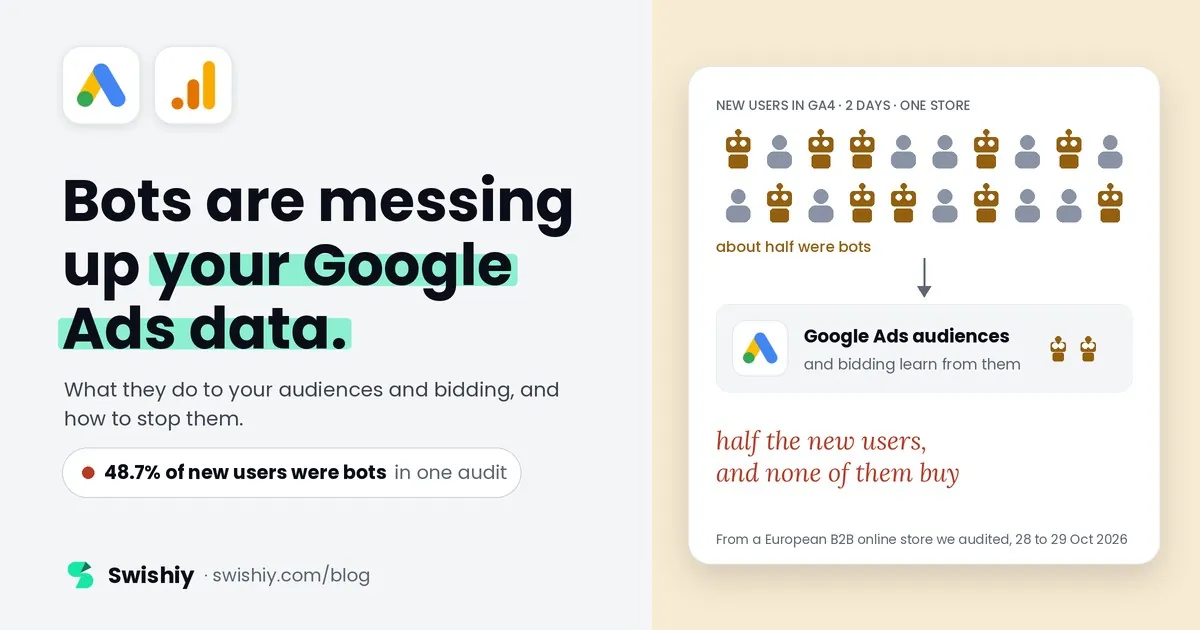
Most advertisers think about bots as fake clicks. Google already filters a lot of those, and you aren't charged for them. The bigger problem is quieter. In a store we audited, a crawler loaded 12,462 pages in two days. GA4 counted each one as a page view and logged 12,447 first visits from it. That traffic flows into the audiences, reports and conversions your Google Ads campaigns use. This post shows where it goes, how to check your own account, and how to stop it.
How bot traffic gets into Google Ads without clicking an ad
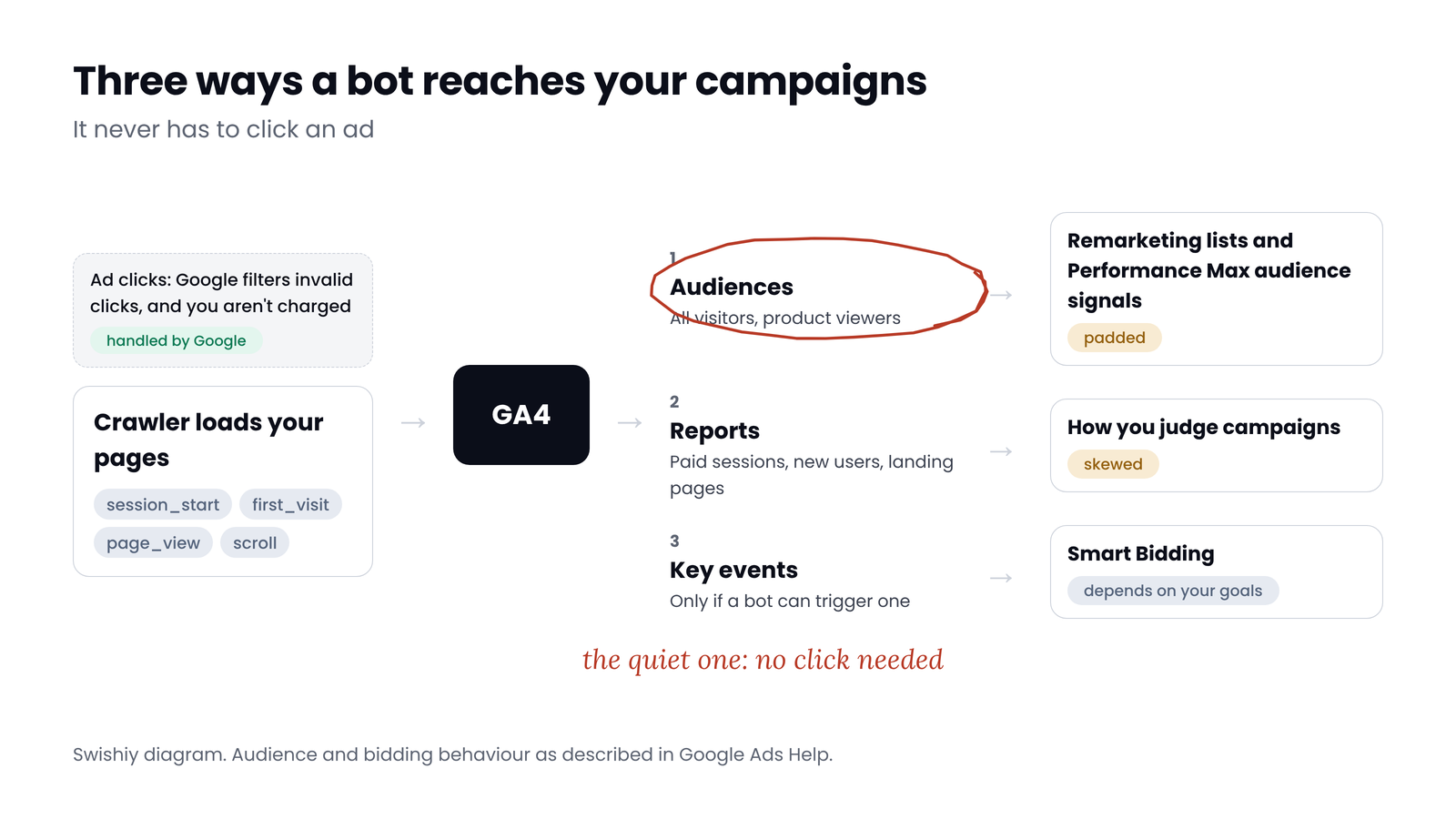
A modern crawler loads your site in a real browser. Your Google tag fires, and GA4 records what it records for a person: a session_start, a first_visit on the first visit, a page_view for every page, a scroll if it reaches the bottom.
GA4's own bot filter only removes bots on a known list, so these events stay. From there they travel three ways into Google Ads: through the audiences you share, through the reports you judge campaigns by, and through any key event you import as a conversion.
 (opens the full-size image in a new tab)
Bots in your audiences: remarketing lists and audience signals
Most remarketing audiences are built on page views: all visitors, product viewers, category viewers, people who reached the cart page. A bot that loads those pages qualifies like anyone else.
Once your GA4 property is linked, Google says you can "use your Analytics audiences" in Google Ads as remarketing lists and audience segments. For Performance Max, "Website visitor lists" come first among the audience signals Google suggests, and Google says signals help its models decide how to optimise. Signals guide Performance Max rather than limit it, so a list padded with bots steers it toward the wrong people.
Size is the other trap. Google Ads needs at least 100 active users in the last 30 days before a list can serve on Search, YouTube or Display. Bots can push a list past that line, so a list looks big and ready when the real audience behind it is small.
Bots in your reports: conversion rate and new users
Some of it lands on your paid traffic directly. A bot session that arrives with ad parameters, from an ad click or from a landing page URL it picked up somewhere, shows up as Paid Search. Your Google Ads conversion rate in GA4 drops, and nothing about your ads changed.
The rest skews the numbers you use to decide where money goes. New users jump, so it looks as if prospecting is working. Direct grows, so it looks like brand demand. Landing page conversion rates fall, so good pages look broken. None of it is a decision you'd make on clean data.
Bots in your bidding: when a cheap event is a conversion
Google describes Smart Bidding as strategies that "use Google AI to optimize for conversions or conversion value in every auction." If every conversion is a real result, bots that don't buy can't teach it much. If a conversion is something a bot does on its own, like a view of a thank-you URL, a scroll or a product page view, every bot visit becomes a conversion your campaigns are rewarded for.
That's why the key event list matters more than usual during a bot wave. Our post on which GA4 key events to mark covers what belongs there, and primary and secondary conversions covers what Google Ads should bid on.
What bots distort in Google Ads, by business type
| Business type | Audiences | Reports | Bidding risk |
|---|---|---|---|
| Online store | All visitors and product viewers lists grow; Performance Max signals are diluted | Paid conversion rate and landing page reports drop | Low if only purchase is primary; high if view_item or add_to_cart is |
| Lead gen | Service page visitor lists grow | Cost per lead looks fine, leads per session drop | High if a thank-you page view counts as the lead, or if bots submit forms |
| SaaS | Pricing and feature page lists grow | Trial rate per session drops | High if sign-up is primary and bots create accounts |
| Content site | Reader lists grow | Pages per session and engagement fall | Depends on what you count as a conversion |
Not charged doesn't mean no harm
What we found in one audit
A European B2B online store we audited had a crawler wave in October 2026. Two days after we started flagging bot traffic, before the filter was switched on, we compared flagged and unflagged events.
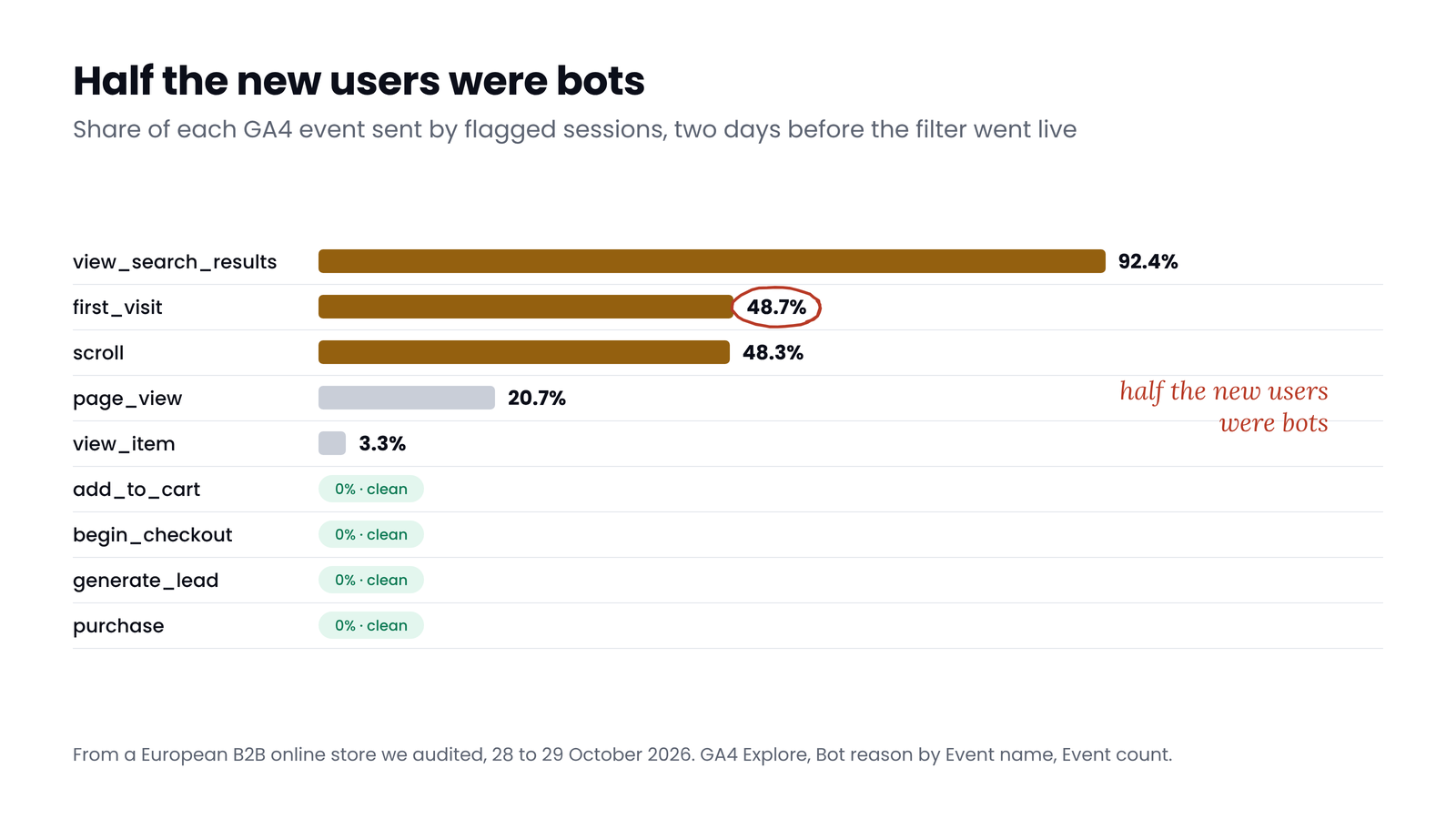
On 28 and 29 October, flagged sessions sent 12,462 page views, 20.7% of all page views. They triggered 12,447 first_visit events, 48.7% of the total: half of the new users in those two days were the crawler. They made up 48.3% of scrolls and 92.4% of view_search_results events, because the crawler kept loading search result pages.
They triggered no add_to_cart, begin_checkout, generate_lead or purchase events. That's the good news: this store's Google Ads conversions stayed clean. The bad news: half the new users in those two days were bots, so any list of recent new visitors was half bot too. Lists built on product views barely moved, because bots sent 3.3% of view_item events. And 9.0% of the sessions GA4 credited to Paid Search carried the bot flag.
 (opens the full-size image in a new tab)
How the store took the crawler out of GA4 is in the case study.
How to protect Google Ads from bot traffic
- Find the bots in GA4 first. In Explore, build a Free form with Screen resolution and Browser version as rows, and Sessions, Engaged sessions and Key events as values. Bots show up as a few values with huge session counts, almost no engagement and no key events. If Singapore is involved, see the 1280x1200 Singapore crawler.
- Check how much of it is paid. Add Session default channel group as a second row. Bot sessions under Paid Search, Paid Shopping or Cross-network are the ones that change how you read campaign results.
- Check Google Ads for the same days. Open the Invalid traffic card on the Overview page for the same dates. If it isn't in your account yet, add the Invalid clicks column to your campaign report. Then compare Google Ads clicks with GA4's paid bot sessions. If GA4 shows far more paid sessions than Google Ads shows clicks, the crawler is probably reusing your ad URLs, and Google won't flag that.
- Check what Google Ads bids on. In Goals > Conversions > Summary, look at every primary conversion and the GA4 key event behind it. If any of them is something a bot can do alone, like a page view, a scroll or a product view, make it secondary or replace it with a real result.
- Flag and filter the bots in GA4. Send
traffic_type=botfrom Google Tag Manager when the fingerprint matches, and exclude it with a data filter, keeping your key events exempt. The full setup is in how to filter bot traffic in GA4 without losing a lead. Filtered events never reach your GA4 audiences again. Lists Google Ads builds from its own tag don't go through GA4, so the filter doesn't touch them. - Treat the audiences already filled as inflated. Bots that joined before the filter stay until their membership duration runs out. You can't add a condition to an existing GA4 audience, so duplicate it, exclude users where
bot_reasonexists, and point your campaigns at the new list. That only catches bots flagged while the filter was in Testing, so treat list sizes from the wave as inflated. - Protect your forms separately. A GA4 filter doesn't stop a bot submitting a form. If your leads go to Google Ads, add protection on the form itself, so a fake lead never becomes a conversion.
If you'd rather have the bots flagged and filtered for you, book a call.
Myth
If Google doesn't charge me for bot clicks, bots don't cost me anything.
Reality
The crawler in our audit didn't need to click an ad. It loaded pages, and GA4 turned those page views into audience members, new users and paid sessions. The cost shows up in the lists and numbers your campaigns run on, not on the invoice.
Quick check
Quick check
- You know what share of your page views and new users came from bots during your last spike.
- You've checked bot sessions by channel, including Paid Search.
- You've compared GA4's paid bot sessions with the clicks and invalid clicks Google Ads reports.
- Every primary conversion in Google Ads is a real business result.
- Your remarketing audiences and Performance Max signals exclude flagged visitors.
- Your lead forms have their own bot protection.
Ask yourself
None of our tools detects bots. The free Tracking audit checks the other half of the problem: which conversions Google Ads bids on, whether each one comes from a tag or a GA4 import, and whether a purchase or lead is counted twice. Check what my Google Ads bids on
Frequently asked questions
How does bot traffic affect Google Ads performance?
Mostly through your data, not your bill. Bots that load your site create GA4 page views and new users, so they join remarketing audiences, dilute Performance Max audience signals and lower the conversion rates you judge campaigns by. If a conversion is something a bot can trigger, they reach Smart Bidding too.
Do bots get added to my remarketing audiences?
They can. A GA4 audience built on page views includes any visitor whose browser fired your tag, and a crawler running a real browser does. Once your GA4 audiences are shared with Google Ads, those bot members are part of the list, at least until a filter stops new ones joining and their membership expires.
Am I charged for bot clicks in Google Ads?
Not for the ones Google identifies. Google says you won't be charged for invalid clicks or impressions, and invalid traffic found after billing is credited where appropriate and possible. Bots that load your site without clicking an ad never show up there at all, which is why you also have to check GA4.
Does bot traffic affect Performance Max?
It can. Google suggests website visitor lists as audience signals for Performance Max, and says signals help its models optimise. A visitor list padded with bots describes the wrong people, and if an event a bot can trigger is a conversion goal, the campaign gets rewarded for bot activity.
Can bots trigger conversions in Google Ads?
Yes, if a conversion is something a bot can do on its own, like a page view of a thank-you URL or a product page view. Bots can also submit forms, and Google says its protections "can't prevent all invalid leads." Keep primary conversions to real business results and protect your forms.
Will filtering bots in GA4 clean my Google Ads audiences?
Going forward, yes, for audiences built in GA4: filtered events are never processed, so they never qualify. Lists Google Ads builds from its own tag aren't affected. Bots that already joined stay until their membership duration ends, and data filters don't change past data. Treat list sizes from the wave as inflated.
Sources
- Google Ads Help: Invalid clicks: https://support.google.com/google-ads/answer/42995
- Google Ads Help: About invalid traffic: https://support.google.com/google-ads/answer/11182074
- Google Ads Help: About Smart Bidding: https://support.google.com/google-ads/answer/7065882
- Google Ads Help: About audience signals for Performance Max campaigns: https://support.google.com/google-ads/answer/14530785
- Google Ads Help: About audience segments in Audience manager: https://support.google.com/google-ads/answer/7558048
- Analytics Help: Create, edit and archive audiences: https://support.google.com/analytics/answer/9267572
- Analytics Help: Share audiences with your linked advertising products: https://support.google.com/analytics/answer/12800258
- Analytics Help: Known bot-traffic exclusion: https://support.google.com/analytics/answer/9888366
- Analytics Help: Data filters: https://support.google.com/analytics/answer/10108813
- PPC Land: Google Ads filters miss fake leads: https://ppc.land/google-ads-filters-miss-fake-leads-so-advertisers-must-add-3-form-checks/

Qudees Kiani
Founder of Swishiy. Five years of marketing measurement work across Google Ads, Meta and GA4, for ecommerce and lead-gen businesses.
Book a 30-minute call
Is your Google Ads data telling the truth?
The free auditor checks tracking, brand vs non-brand and wasted spend. Automated, Google Ads only, 60 seconds.


