Does GA4 Filter Bot Traffic? What It Catches and What Slips Through

Qudees Kiani, founder · · 8 min read
Short answer
Yes, but only known bots. GA4 automatically excludes bots and spiders identified by Google's research and the International Spiders and Bots List, and you can't see or change what it removes. Crawlers that run a real browser and fire your Google tag aren't on that list, so they reach your reports, usually as Direct or Unassigned.
On this page
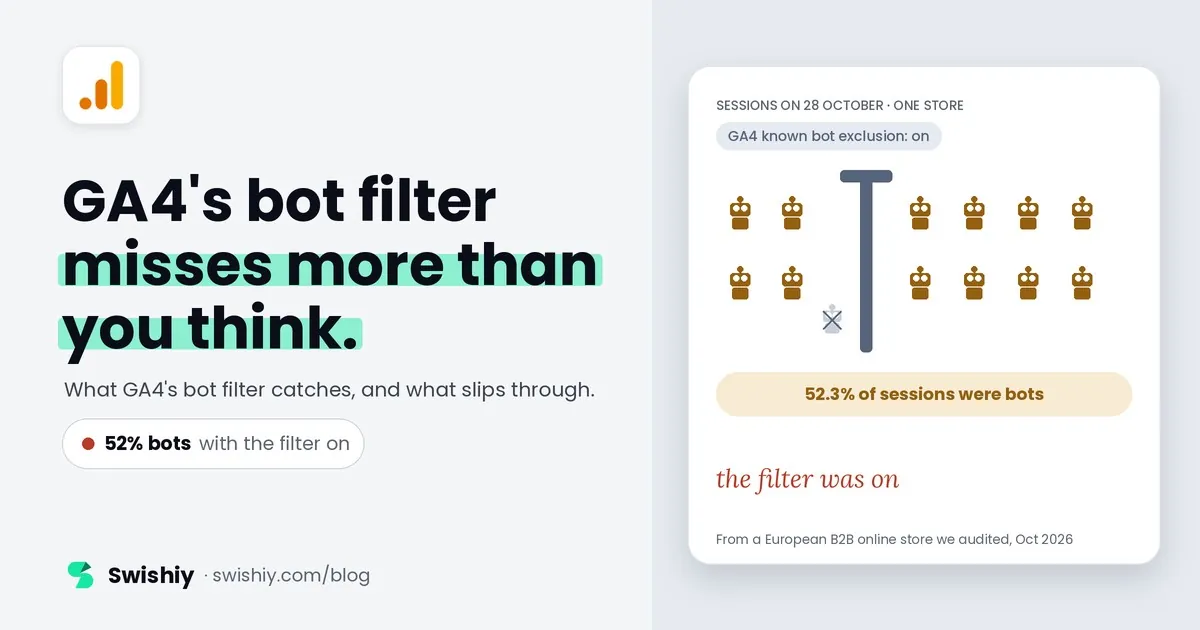
GA4 has a bot filter, and it's always on. In a store we audited, bot-flagged sessions still made up 52% of traffic on the first full day we flagged them. A bot score from the server didn't catch it, and neither did the engagement rate. This post covers what GA4's filter removes, what slips through and why, and the layers that do work.
Does GA4 filter bot traffic?
Yes. Google says "traffic from known bots and spiders is automatically excluded", identified "using a combination of Google research and the International Spiders and Bots List". It's on for every property.
You get no control over it. In Google's words, "you cannot disable known bot traffic exclusion or see how much known bot traffic was excluded." There's no report of what was removed and no way to add a bot to the list.
What GA4's bot filter catches, and what slips through
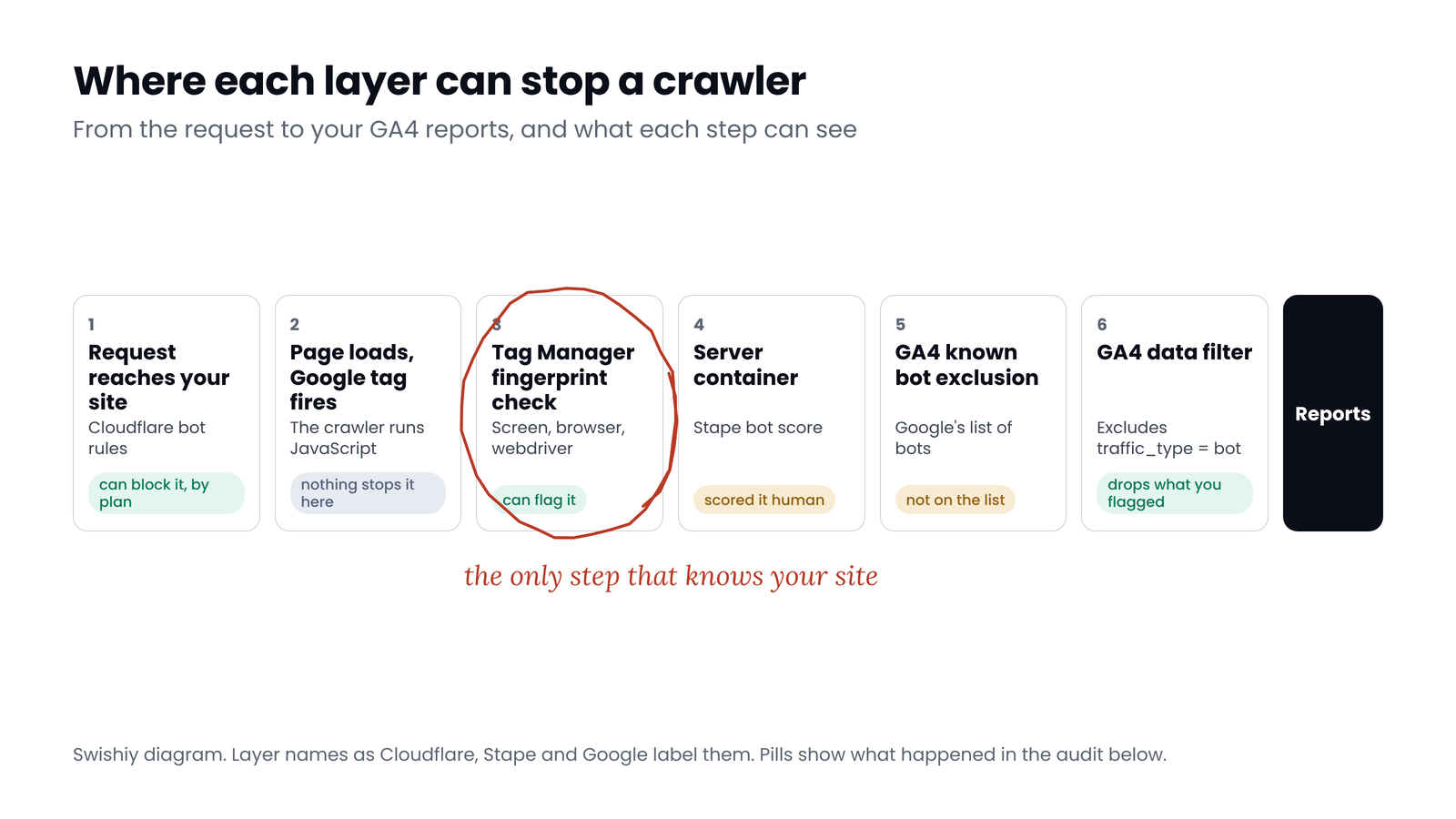
A list of known bots catches traffic that identifies itself: search engine crawlers, uptime monitors, SEO tools that say who they are. Most of those don't run your Google tag anyway.
What slips through is traffic built to look like a visitor. A headless browser loads your page, runs JavaScript, fires the Google tag and sends a user agent copied from a real Chrome. It isn't on any list, because it doesn't announce itself and its fingerprint changes from one wave to the next. GA4 counts it as a session like any other, and every page it loads as a page view that can join your Google Ads audiences, which we cover in bot traffic and Google Ads.
 (opens the full-size image in a new tab)
| Layer | What it catches | What it misses | Who gets it |
|---|---|---|---|
| GA4 known bot exclusion | Bots identified by Google's research and the International Spiders and Bots List | Anything that looks like a normal browser | Every GA4 property, always on |
GA4 data filter on traffic_type | Whatever your own tag marks as bot | Anything you didn't flag, and all past data | Every property, up to 10 data filters |
| Explore segment | Whatever you exclude, back as far as your data retention allows | Standard reports, audiences and exports stay unchanged | Every property |
| Stape Bot Detection | Requests it scores above 75, if you turn blocking on | Crawlers it scores as human | Stape Pro plan and above |
| Cloudflare Bot Fight Mode | Requests that match bot patterns, sitewide | Can't be skipped for chosen paths, so it can challenge requests you need | Free plan |
| Cloudflare Super Bot Fight Mode | Definitely automated traffic, and more on higher plans | Fingerprints only you know about | Pro plan and above |
| Cloudflare Bot Management | A bot score from 1 to 99, plus JA3 and JA4 fingerprints for your own rules | Nothing until you write and maintain the rules | Enterprise |
| Country block | Everything from that country, people included | The same crawler from other countries | Any firewall |
Where to start, by business type
| Business type | Start with | Add if needed | Be careful with |
|---|---|---|---|
| Online store | A GTM fingerprint tag and a GA4 data filter, with purchase exempt | An edge rule if the crawl load is heavy | Bot challenges on checkout and payment callbacks |
| Lead gen | A GTM fingerprint tag and a GA4 data filter, with lead events exempt | Protection on the form itself, for spam submissions | Challenges on form endpoints and booking widgets |
| SaaS | A fingerprint tag on the marketing site | Sign-up protection in the app | Challenges on API and app traffic |
| Content site | A GTM fingerprint tag and a GA4 data filter | An edge rule if crawling costs you hosting | Blocking search engine and social crawlers |
Server-side tracking doesn't filter bots on its own
What we found in one audit
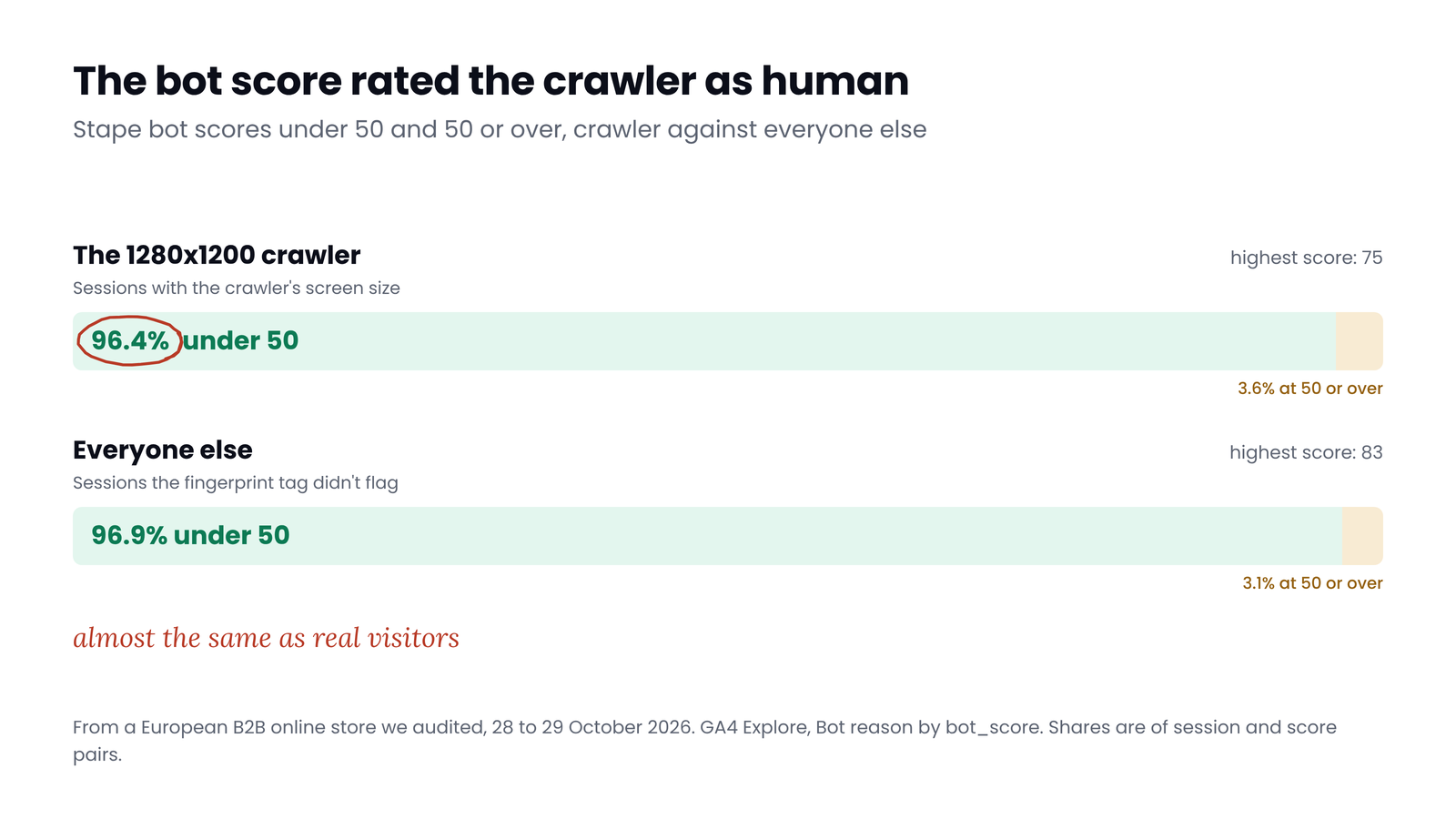
A European B2B online store we audited sent GA4 through a server-side container on Stape, with Stape's bot score passed into GA4 as a custom dimension. When a crawler wave hit in October 2026, we compared that score against the fingerprint tag we built.
On 28 and 29 October, 96.4% of the scores on sessions with the crawler's 1280x1200 screen were under 50, the band Stape calls "highly likely to be a real human user". For visitors the tag didn't flag, the figure was 96.9%. No 1280x1200 session scored above 75, which is where Stape's optional blocking starts, so even with blocking on, every one of them would have got through. The score couldn't tell the two groups apart.
 (opens the full-size image in a new tab)
Engagement didn't settle it either. A second fingerprint, a 1366x1366 screen from Singapore, had 31% of its sessions counted as engaged between 17 and 29 October. It produced 0 key events. What did separate bots from buyers was the screen size, the browser and the key events. Our post on the Singapore crawler shows the full pattern, and the case study shows how the store fixed it.
What to do instead of trusting the defaults
- Measure what reaches GA4. In Explore, build a Free form with Screen resolution and Browser version as rows, and Sessions, Engaged sessions and Key events as values, for the weeks around a spike. Bots show up as a few rows with huge session counts and no key events.
- Match a fingerprint, not a score. Pick the signals that separate your bots from your buyers: a screen size, a browser version,
navigator.webdriver. Check that each one has zero or near-zero key events before you use it. - Flag it and filter it in GA4. Send
traffic_type=botfrom Google Tag Manager when the fingerprint matches, and excludebotwith an Internal traffic data filter. The full setup is in how to filter bot traffic in GA4 without losing a lead. - Exempt your key events. Give key event tags their own
traffic_typevalue, so the filter can never drop a lead or a sale. - Add an edge rule only if the load matters. If the crawl costs you hosting or slows the site, block it at the edge. A firewall can't see screen size or
navigator.webdriver, so match what reaches the server: the network, the user agent or, on Enterprise, a JA4 fingerprint. Cloudflare's Log action is Enterprise only, so on other plans check the rule in Security Analytics first. Keep checkout, payment callbacks, forms and your tracking endpoint out of any challenge. - Check again every month. Crawlers change. Look at Screen resolution and Browser version for the last 28 days, and add a rule when a new one shows up.
If you'd rather have the fingerprint tag and the filter set up for you, book a call.
Myth
If a session is engaged, it's a person.
Reality
GA4 counts a session as engaged if it lasts longer than 10 seconds (the default, which you can change), has a key event, or has two or more page views. A crawler can load two pages or wait 10 seconds as easily as a person. In our audit, 31% of one crawler's sessions were engaged, and none of them converted.
Quick check
Quick check
- You know which screen sizes and browser versions drove your last traffic spike.
- You've checked a bot score against key events before trusting it.
- You treat engagement rate as a clue rather than proof.
- Your bot rule is a tag in Google Tag Manager, not just an Explore segment.
- Your key events are exempt from that rule.
- You checked what any firewall rule would catch before you switched it on.
Ask yourself
None of our tools detects bots, and we won't pretend otherwise. The free Tracking audit puts each key event in one row: what sends it, what GA4 counts and which Google Ads actions record it. That shows you whether a bot wave could reach the numbers you bid on. Run my tracking audit
Frequently asked questions
Does GA4 filter bot traffic automatically?
Yes, for known bots. Google excludes traffic from bots and spiders identified by its own research and the International Spiders and Bots List, on every property. Crawlers that use a real browser and fire your tags aren't on that list, so they still show up in your reports.
Can I see how much bot traffic GA4 removed?
No. Google says you can't disable known bot traffic exclusion or see how much was excluded. You only see what's left, which is why unknown bots have to be spotted by their pattern in Explore.
Does server-side tracking filter bots?
Not by itself. A crawler that fires your web tag sends events to your server container like a visitor would. Some server hosts add bot detection, like Stape's power-up, but it only blocks requests it scores above 75, and only if you switch blocking on. Check its scores against your key events.
Does Cloudflare stop bots from reaching GA4?
It can stop some of them before the page loads, depending on the plan. Bot Fight Mode on the Free plan applies sitewide and can't be skipped for chosen paths. Super Bot Fight Mode on Pro and above can be, and bot scores and JA4 fingerprints come with Enterprise Bot Management.
Is a high engagement rate proof that traffic is human?
No. GA4 counts a session as engaged if it lasts longer than 10 seconds (by default), has a key event, or has two or more page views, and a crawler can do the first and the last. In our audit, one crawler had 31% of its sessions engaged and zero key events.
How much of my GA4 traffic is bots?
GA4 won't tell you. Check Screen resolution and Browser version in Explore for a period that includes your spike. If a few values carry a large share of sessions with almost no engagement and no key events, add them up: that's your estimate until you flag them.
Sources
- Analytics Help: Known bot-traffic exclusion: https://support.google.com/analytics/answer/9888366
- Analytics Help: Data filters: https://support.google.com/analytics/answer/10108813
- Analytics Help: Filter out internal traffic: https://support.google.com/analytics/answer/10104470
- Analytics Help: Engagement rate and bounce rate: https://support.google.com/analytics/answer/12195621
- Stape Help: Bot Detection power-up: https://stape.io/helpdesk/documentation/bot-detection-power-up
- Cloudflare Docs: Bot Fight Mode: https://developers.cloudflare.com/bots/get-started/bot-fight-mode/
- Cloudflare Docs: Super Bot Fight Mode: https://developers.cloudflare.com/bots/get-started/super-bot-fight-mode/
- Cloudflare Docs: Bot score: https://developers.cloudflare.com/bots/concepts/bot-score/
- Cloudflare Docs: Enterprise Bot Management: https://developers.cloudflare.com/bots/plans/bm-subscription/
- Cloudflare Docs: Rule actions: https://developers.cloudflare.com/ruleset-engine/rules-language/actions/
- Measureu: How to identify and remove bot traffic in Google Analytics 4: https://measureu.com/bot-traffic-google-analytics/

Qudees Kiani
Founder of Swishiy. Five years of marketing measurement work across Google Ads, Meta and GA4, for ecommerce and lead-gen businesses.
Book a 30-minute call
Is your Google Ads data telling the truth?
The free auditor checks tracking, brand vs non-brand and wasted spend. Automated, Google Ads only, 60 seconds.


