What if your tracking isn't broken, but your browser is quietly filtering out the evidence you need?
Server-side tracking sends your website's tracking data to a server you control first, and that server passes it on to Google Analytics, Google Ads, Meta and the rest. Because the server runs on your own domain, it keeps cookies alive that Safari would otherwise wipe after a week, and it gets past most ad blockers. In one European ecommerce store we manage, it recovered 15% of all tracking data over 90 days and 36% of purchase events. It does not get around cookie consent, and it is not worth it for every business. This guide covers where the line is.
What you'll learn:
- What server-side tracking changes, explained without the jargon
- How much data it actually recovers, with 90 days of numbers from a live store
- The things it cannot fix, so nobody oversells it to you
- Whether your store is big enough for it to pay off
What server-side tracking actually is
Before getting into the technical side, it helps to understand what actually changes when tracking moves from the browser to the server.
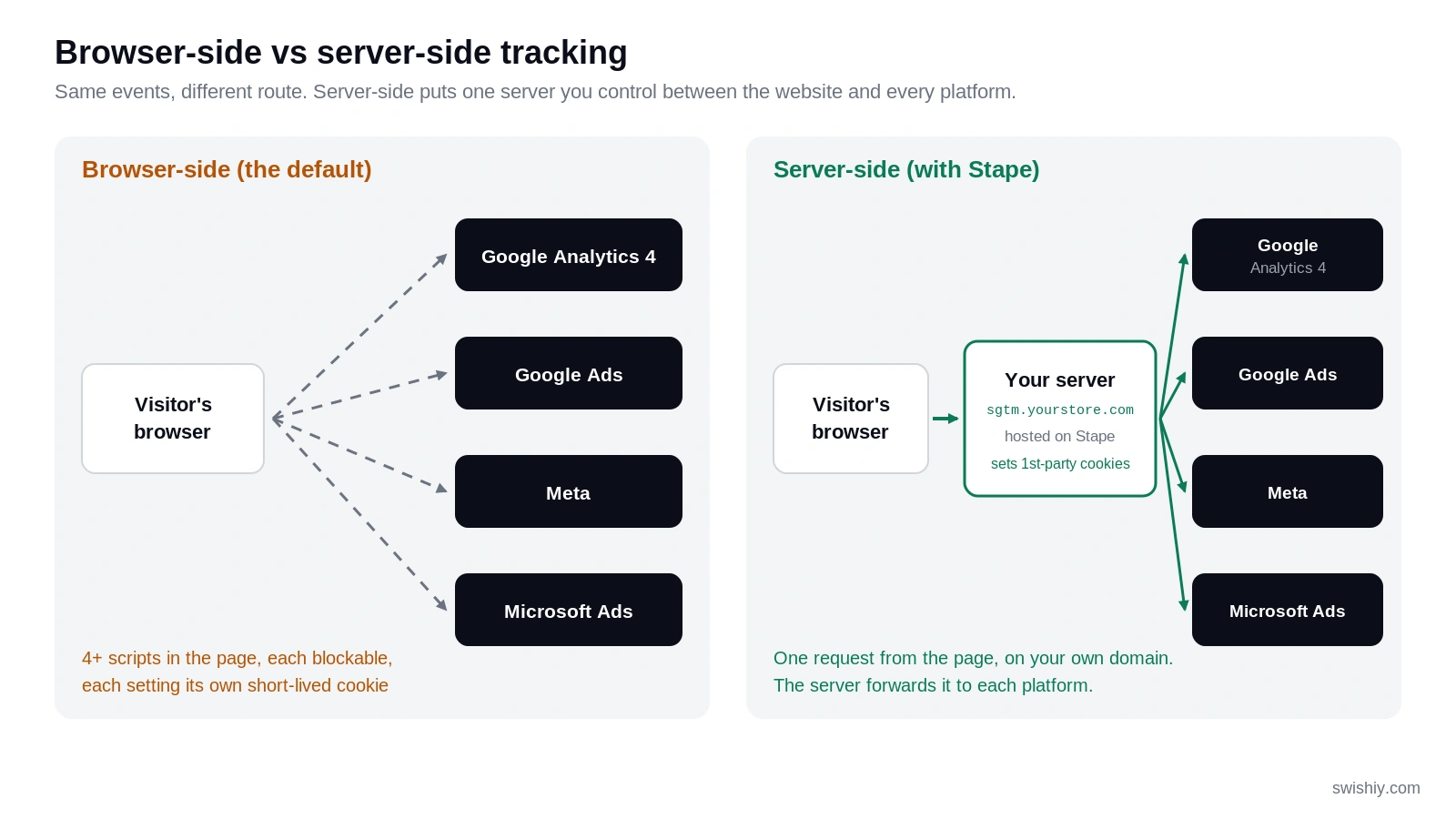
On a normal website, every marketing platform has its own script running in the visitor's browser. The Google Analytics script sends data to Google. The Meta Pixel sends data to Meta. The Microsoft Ads tag sends data to Microsoft. Four platforms means four scripts, four sets of cookies, and four separate chances for something to go wrong.
Server-side tracking puts one step in between. The browser sends a single stream of events to a server on your own domain, something like sgtm.yourstore.com. That server, a server-side Google Tag Manager container, decides what each platform receives and forwards it. We host ours on Stape, which runs the container for you, so there is no infrastructure to manage.
That sounds like plumbing, and it is. But changing where the data travels changes what browsers allow it to do, and that is where the lost data starts coming back.
Why browser tracking loses data in the first place
Two things eat your tracking data in the browser: privacy features and ad blockers.
Cookies, explained in one minute
A cookie is how a website remembers a visitor. Analytics and ad platforms use it to know that the person buying today is the same person who clicked an ad last week. Without it, a returning customer looks like a brand new one, and the ad that brought them gets no credit.
A third-party cookie is set by a domain other than the one you are on, for example facebook.com while you browse a store. Safari and Firefox block these outright, and Chrome restricts them too.
A first-party cookie is set by the site you are on. These are allowed, but Safari's Intelligent Tracking Prevention limits them in two ways that matter here. If a cookie is created by JavaScript, which is how every standard tracking script works, Safari deletes it after 7 days. If the visitor arrived from an ad with a click ID in the URL, Safari can cut that to 24 hours. Safari runs on every iPhone, and for many stores iPhone users are the best customers.
A first-party cookie set by your own server, from the same IP address as your website, is not capped by Safari. It can last as long as the browser allows, which is up to 400 days. That last row is the point of the whole exercise.
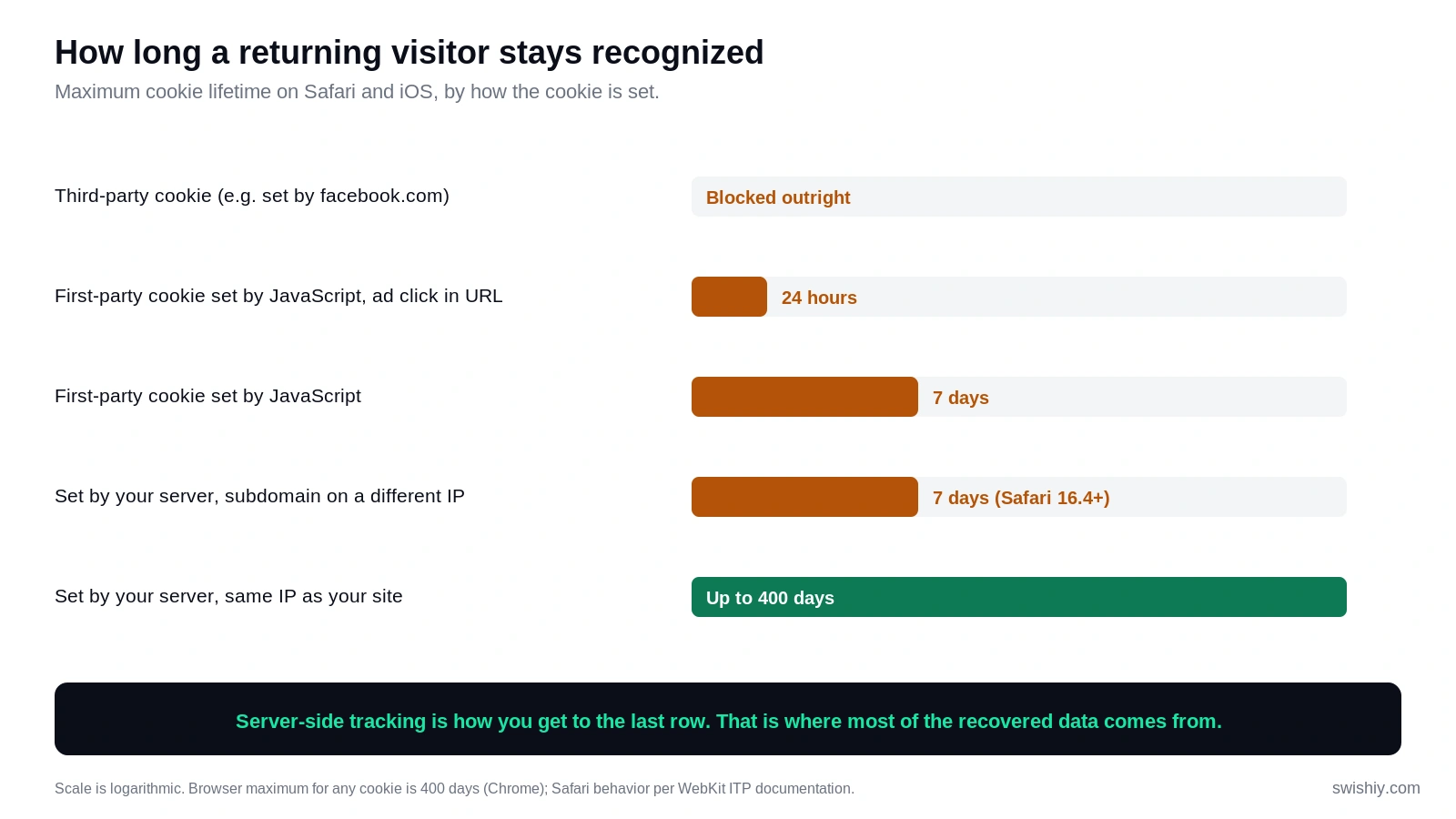
One detail trips up a lot of setups. Since Safari 16.4, a server-set cookie also gets capped at 7 days if your tracking subdomain points to a different IP address than your main website. A custom subdomain on its own is not always enough. This is what Stape's Cookie Keeper and same-origin options are built to solve, and it is one of the first things we check on any setup we take over.
Ad blockers
Ad blockers keep lists of known tracking domains and script names. A request to google-analytics.com or a file called gtm.js is easy to spot and block. A request to your own subdomain, loading a script with a non-standard name, is much harder to flag. Stape's Custom Loader does exactly that renaming.
What it recovered in one real store
Here is what 90 days of server-side tracking looked like for a European ecommerce store we manage. The setup is a Stape container on a custom subdomain, with one power-up enabled (Custom Loader). The numbers come straight from Stape's analytics.
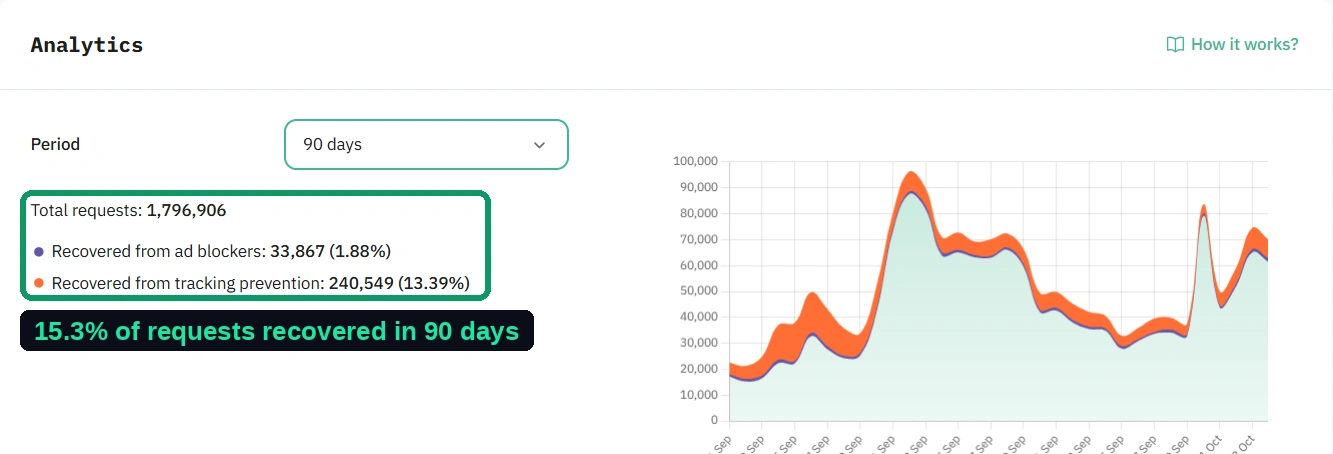
Of 1,796,906 tracking requests, the server recovered 274,416, or 15.3%:
- 240,549 (13.4%) were affected by tracking prevention. These are requests where the browser would have shortened or blocked the visitor's cookie, and the server kept a durable first-party cookie instead.
- 33,867 (1.9%) came from visitors running an ad blocker and would not have been sent at all.
That 15% matches what we see across the roughly 50 server-side setups we have built: typically 15 to 20% more data reaching the platforms.
The headline number understates it, though. The recovery rate climbs the closer an event gets to revenue.
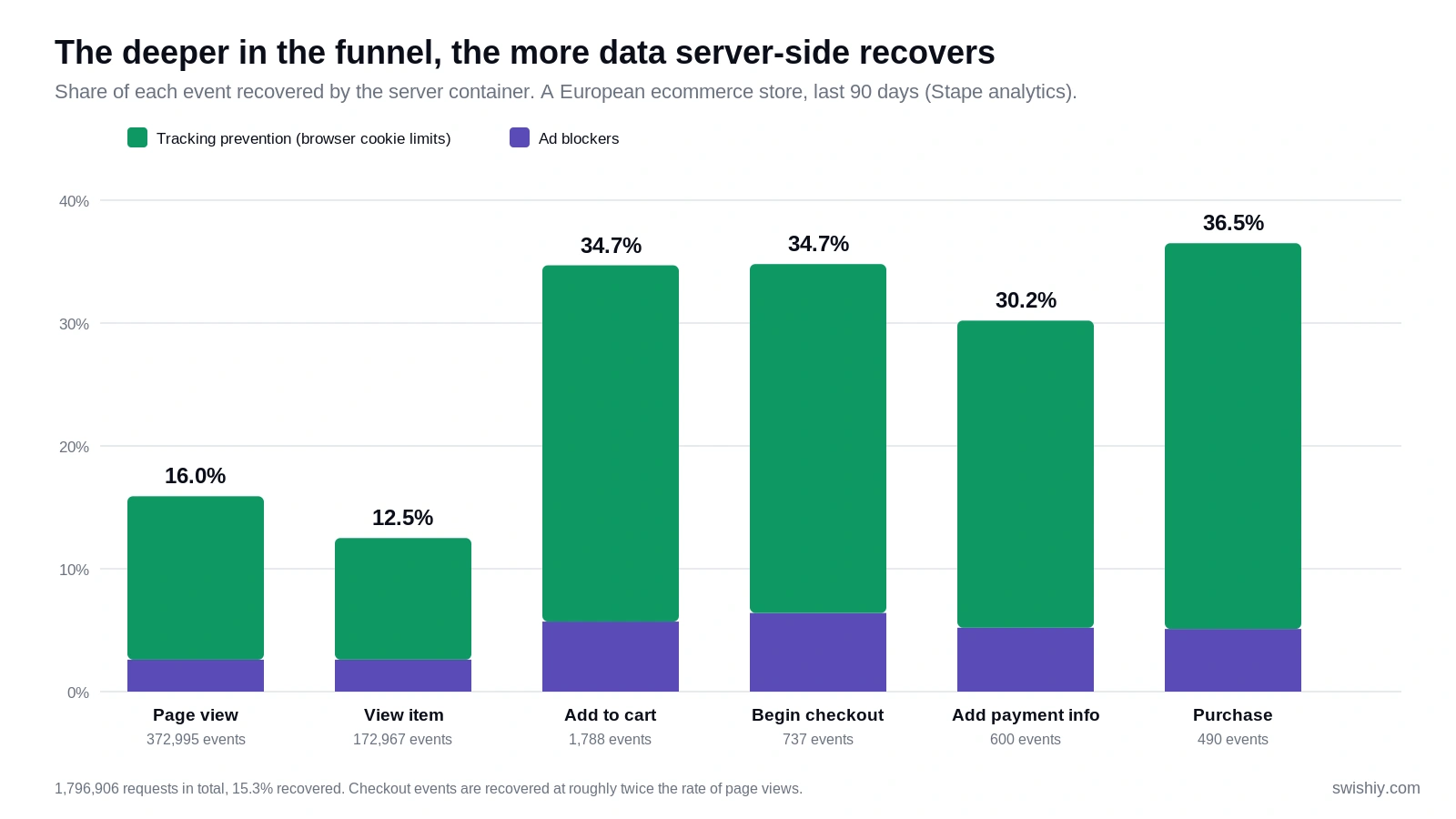
Page views were recovered at 16%. Add to cart, checkout and purchase events were recovered at 30 to 37%. Of 490 purchase events, 179 would otherwise have been blocked or lost the cookie that tied them back to the visitor's earlier sessions and the ad that brought them.
Why the jump? Most of the recovery here is cookie-related, and cookies matter most for returning visitors. Someone browsing for the first time has no history to lose. Someone who came back to buy two weeks after clicking an ad is exactly the person Safari would have reset into a stranger. Buyers are, almost by definition, more often returning visitors.
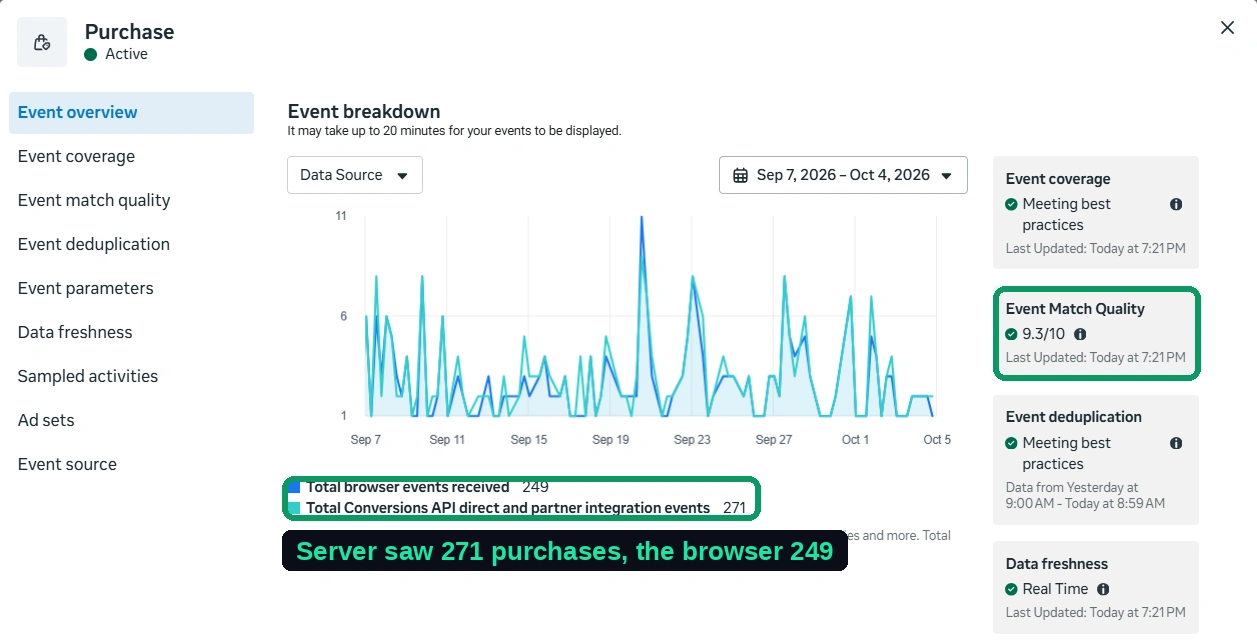
The same store's Meta data tells the same story from the other side. Over the four weeks to October 4, Meta received 271 purchases through the Conversions API and 249 through the browser Pixel. The server saw 22 purchases, about 9%, that the Pixel never did. Because the server sends hashed customer data with every event, the Purchase event's match quality sits at 9.3 out of 10. We covered how that works in our guide to the Meta Conversions API.
In GA4, open the Purchase report and break it down by browser. What share of your revenue comes from Safari? Every one of those buyers is on a 7-day cookie unless your tracking runs through your own server.
What server-side tracking does not fix
This is the section most vendors skip. It is also the one that saves you from paying for the wrong thing.
It does not get around consent
Server-side tracking changes where data is processed. It does not change whether you are allowed to collect it. In the same store, roughly half of all page views and one in five purchases came from visitors who declined cookies. The server still receives those events, but it forwards only what each visitor's consent choice allows. For declined visitors, Meta receives nothing and Google receives only an anonymous consent-mode signal.
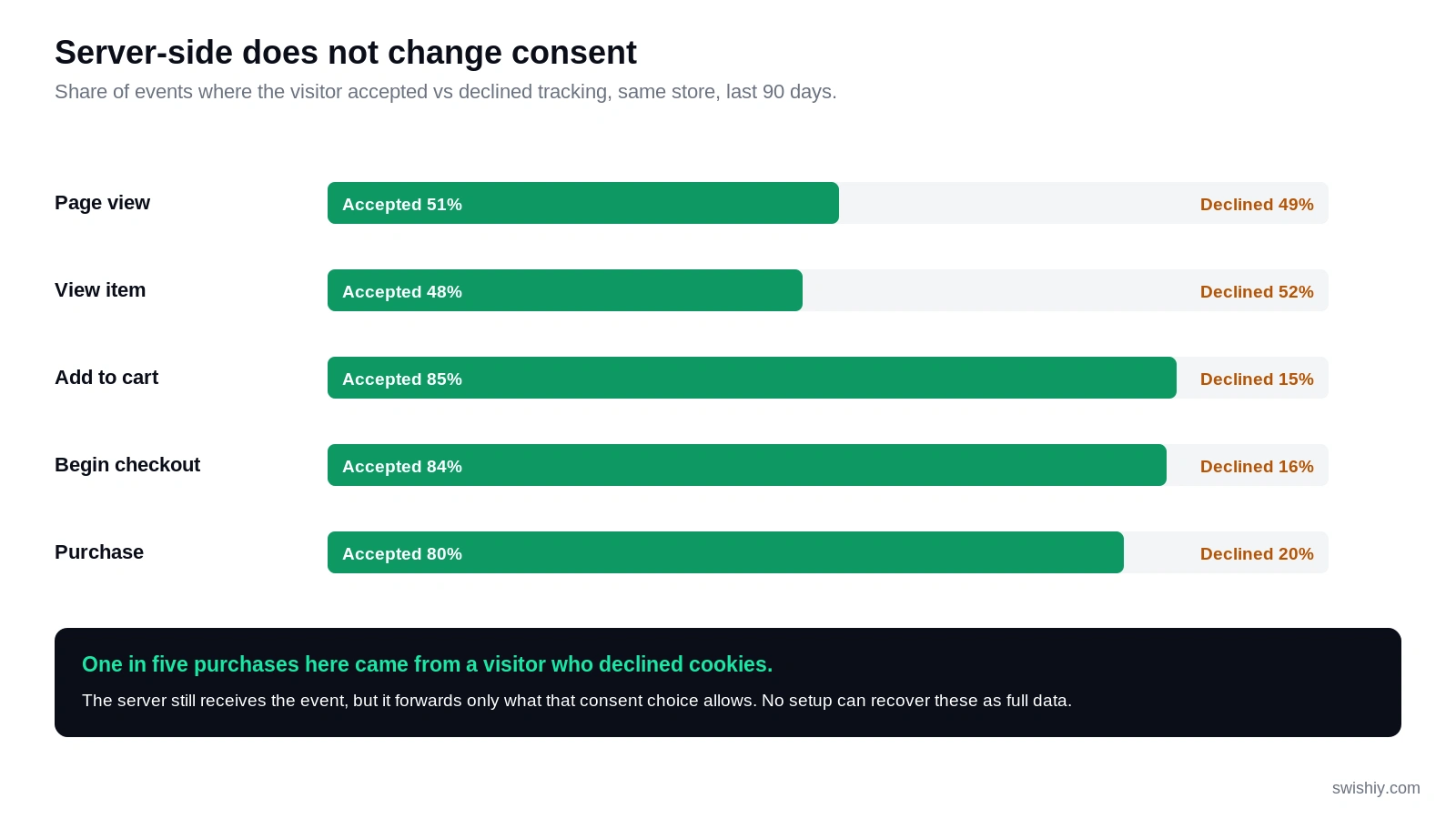
We handle consent through a cookie banner (a consent management platform) loaded in Google Tag Manager, and the consent state travels with every event to the server container. If someone offers you server-side tracking as a way around your cookie banner, walk away. It is a legal risk, and it creates numbers your Google data will not match.
Server-side tracking gets around cookie consent.
It changes where the data is processed, not whether you are allowed to collect it. Declined visitors stay declined. What it recovers is data from people who said yes but whose browser was quietly throwing their cookies away.
It does not fix a broken setup
A server forwards whatever it is given. If your conversion actions are wrong, if purchase values are missing, or if the same order fires twice, server-side tracking sends those mistakes to every platform faithfully. If you suspect your Google Ads conversion tracking is counting the wrong things, fix that first. It is the cheaper problem to solve, and server-side will not hide it.
It does not bring back iOS 14 attribution
Apple's App Tracking Transparency controls tracking inside apps like Facebook and Instagram. A server on your website has no say over what happens in someone else's app. What it does improve is the data you send Meta about purchases on your own site, which is a real gain, but a different one.
What a setup involves
A standard setup takes us one to two weeks from access to sign-off. Most of that time is testing, not building.
Server-side tracking isn't a single switch. A typical setup involves a few connected steps, from auditing what is already there to testing the finished setup against real orders.
- Audit what exists. Which tags fire today, on which pages, with which consent rules. Duplicates and dead tags get removed before anything moves.
- Create the server container and custom domain. A Stape container on a subdomain of the client's site, with DNS pointed so the server and the site share an origin where possible.
- Route the web container through it. The website sends one GA4 event stream to the server instead of separate requests to each platform.
- Build the server-side tags. One tag per platform and event, deduplicated against the browser where the platform needs both, as Meta does.
- Wire consent through. The banner's choice is passed to the server, and every tag respects it.
- Validate against real orders. We compare purchases in each platform with the store's actual orders before calling it done.
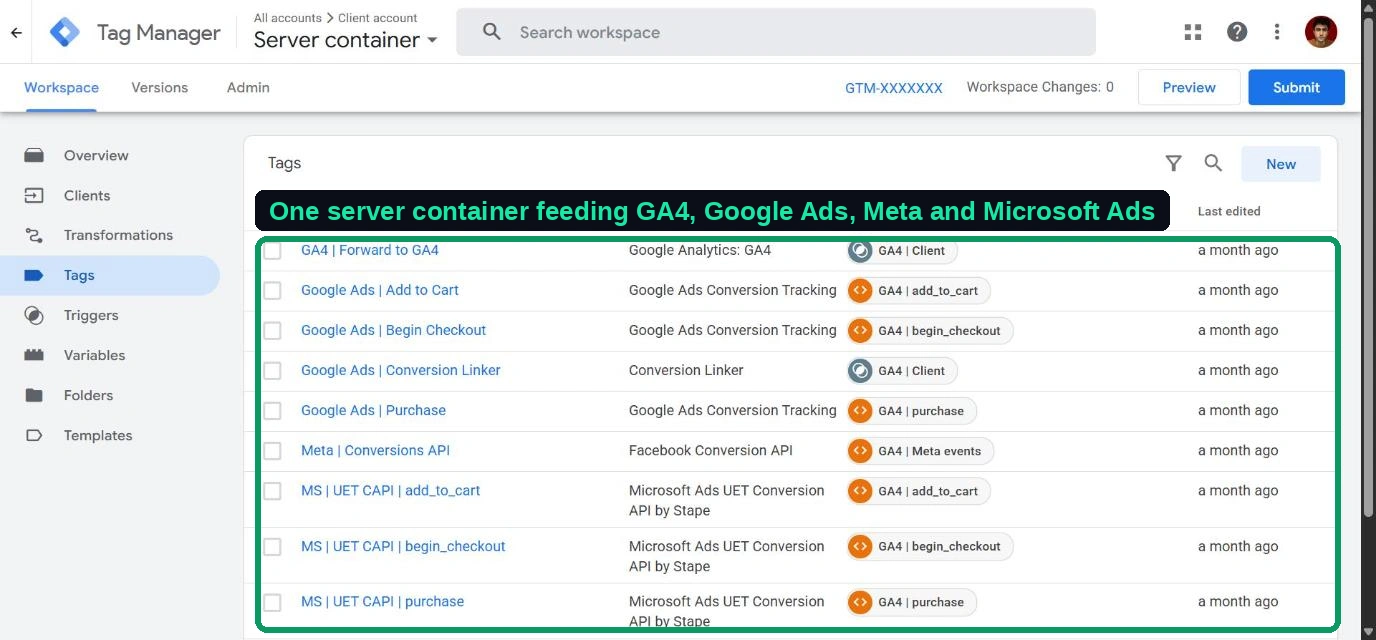
In the store above, one server container feeds GA4, Google Ads (conversions plus the Conversion Linker), Meta's Conversions API and Microsoft Ads' UET Conversion API, all from the same event stream.
Power-ups worth knowing about
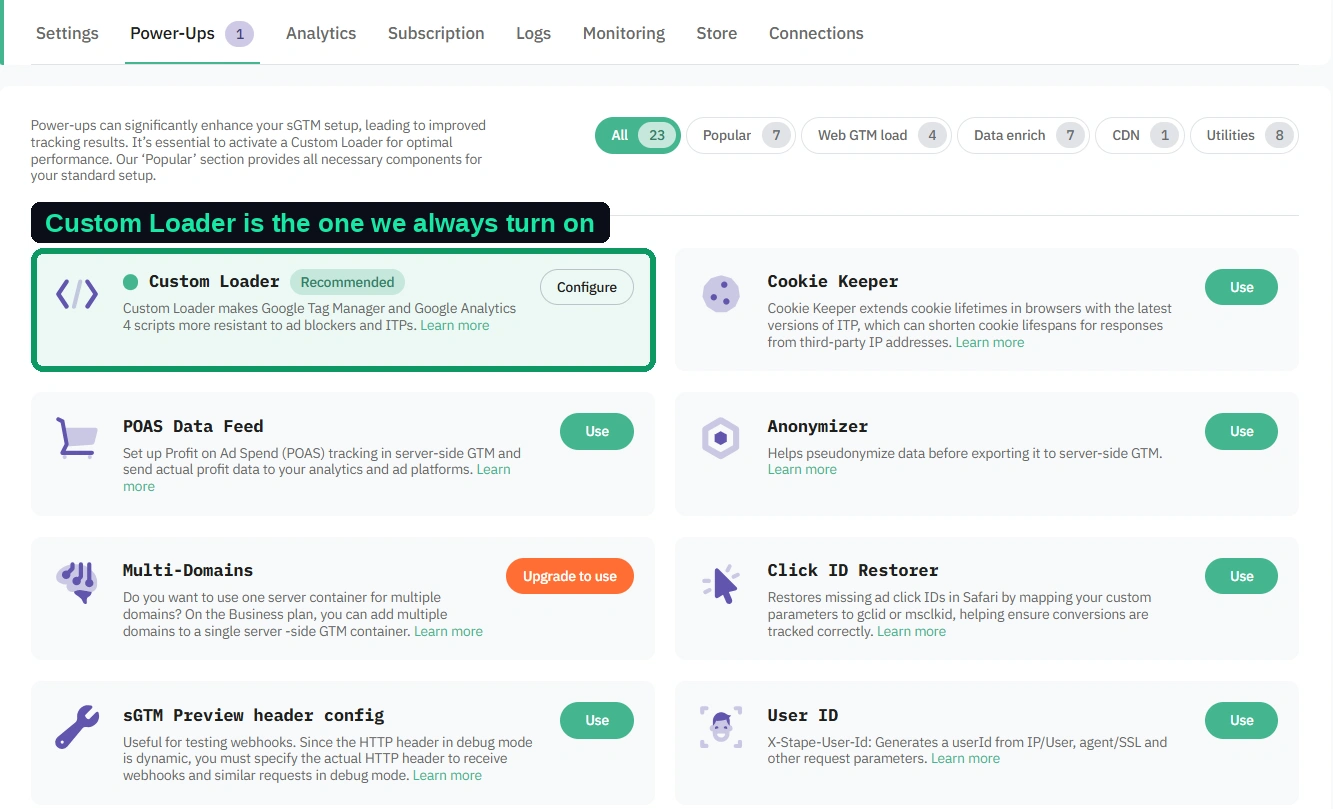
Stape adds optional features called power-ups. The store above runs on just one, but these are the three we evaluate on every build:
| Power-up | What it does | Status |
|---|---|---|
| Custom Loader | Serves the Google Tag Manager script from your own domain under a different name so ad blockers do not catch it. | On for every client |
| Cookie Keeper | Handles the Safari same-IP cookie cap described above. | Evaluated per site |
| Click ID Restorer | Recovers Google and Microsoft click IDs that Safari strips. | Evaluated per site |
We explain each one, and when to skip it, in our guide to Stape power-ups.
When it is worth it, and when it isn't
Server-side tracking has a running cost and a setup cost, so the question is whether 15 to 20% more data changes decisions worth more than that.
Our rule of thumb: if your site has fewer than about 1,000 users a month or makes under $10,000 a month in revenue, you do not need it yet. There is not enough data for the recovered share to move ad platform bidding, and the money is better spent elsewhere. Turn on the free native integrations your platform offers, such as Shopify's Meta integration, and come back to this later.
Above that, it usually pays for itself when two or three of these are true:
- A large share of your revenue comes from Safari or iPhone users
- You run paid campaigns on Meta, Google Ads or both, and bidding optimizes on purchases or leads
- Customers often take more than a week between first visit and purchase
- You sell in markets where consent banners are mandatory, so every consented visitor counts more
- You want one place to control exactly what data each platform receives
What it costs
There are two parts. Hosting: Stape plans scale with request volume. The store above sends about 850,000 requests a month and sits on Stape's Pro+ plan, with room to roughly double. We compare what server-side GTM hosting costs across Stape, Addingwell and Google Cloud in a separate post. Setup: the build, the consent wiring and the validation, which is a one-off project.
Set that against the numbers above. If 36% of purchase events were losing their link to the ad that drove them, your ad platforms were bidding on a third less signal than they could have had.
How to check a setup you already have
If someone has already set up server-side tracking for you, here is how to tell whether it is doing its job.
- In Stape, open the container's Analytics tab and look at the share recovered from ad blockers and tracking prevention. Under 5% usually means the custom domain or Custom Loader is not set up.
- In your browser's developer tools, open Application, then Cookies, on your site. The _ga and _fbp cookies should be set by your own domain with an expiry many months out, not 7 days.
- Open server-side GTM Preview and complete a test purchase. The event should arrive and fire tags for every platform you use.
- In Meta Events Manager, open the Purchase event. The integration should read "Multiple" and deduplication should be meeting best practices.
- Decline the cookie banner in a fresh browser, browse and add to cart, then check that no full events reach Meta from that session.
Where Swishiy fits
We have built around 50 server-side setups on Stape, for ecommerce and lead generation businesses, with the pixel and server deduplicated, consent wired through, and every purchase validated against real orders before go-live. If your numbers look anything like the ones above, or you are not sure whether your store is past the threshold, see our server-side tracking setup, or talk through your setup with us.