Offline Conversion Tracking for B2B: Send Every CRM Stage to Google Ads and Meta

Qudees Kiani, founder · · 9 min read
Short answer
Offline conversion tracking sends what happens after the form, such as a qualified lead, a proposal or a won deal, from your CRM back to Google Ads and Meta. Treat the funnel like a shop's: each stage is its own conversion with a value. Bidding then learns from leads that close, not from every form fill.
On this page

An online store tells Google Ads everything: product viewed, added to cart, checkout started, purchase, with a value on the sale. A B2B company usually tells it one thing: someone filled in a form. Whether that lead was a student, a competitor or a €40,000 order, the ad platform sees the same conversion. In one setup we built, a new customer's opportunity closes about a third of the time and a returning customer's about 70%. Those two leads shouldn't be worth the same to your bidding. This guide shows how to send every CRM stage back, with a value.
What offline conversion tracking is
Offline conversion tracking means sending conversions that happen outside your website, in a CRM, on a call or in a signed quote, back to the ad platform that brought the click. The platform matches each one to an ad click, using a click ID or the hashed email or phone number the lead gave you.
Google now calls its version enhanced conversions for leads, and describes it as "an upgraded version of offline conversion import". Meta calls its version the Conversions API for CRM. The principle is the same in both: your CRM is the source of truth, and the ad platform gets to hear what happened next.
Track a B2B funnel like an online store
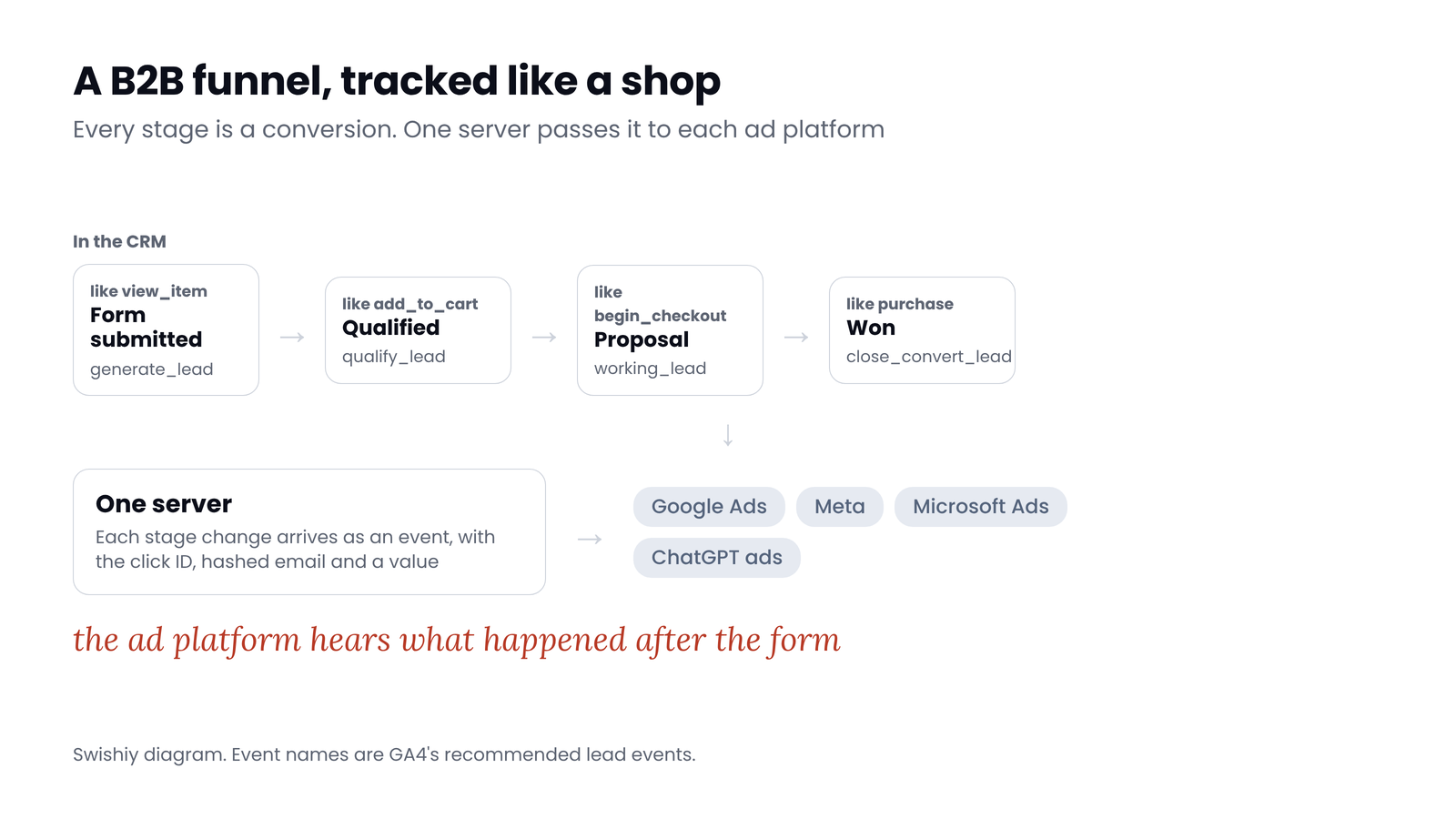
The easiest way to design this is to copy ecommerce. A shop's funnel has steps that happen often and are worth little, and steps that happen rarely and are worth a lot. Yours does too. GA4 even has a set of recommended lead events that map to them.
| Online store | B2B funnel | GA4 recommended event | Typical use in ads |
|---|---|---|---|
| view_item | Form submitted | generate_lead | Reporting only |
| add_to_cart | Lead qualified | qualify_lead | Bidding, when deals are rare |
| begin_checkout | Proposal sent or in negotiation | working_lead | Bidding or reporting |
| purchase | Deal won | close_convert_lead | Bidding, with the deal value |
| refund | Deal lost | close_unconvert_lead, disqualify_lead | Retract or adjust the value |
Google's own advice matches this. Its offline conversion import guidance says to "create a separate conversion action for each stage of the funnel". You then choose which stages bid and which only report, the same choice a shop makes between purchase and add to cart. Our post on primary and secondary conversions covers that choice.
 (opens the full-size image in a new tab)
What each platform needs
| Google Ads | Meta | |
|---|---|---|
| Name | Enhanced conversions for leads (offline conversion import) | Conversions API for CRM (Conversion Leads) |
| Matches on | Hashed email or phone, and the GCLID when you have it | Lead ID first, then hashed contact details and click ID |
| How fast to send | GCLID is kept for 90 days; enhanced conversions data for 63 days | Event time can be up to 7 days in the past |
| Stages | One conversion action per stage | Send every stage as it changes; you order them in Events Manager |
| Which stage to optimise | The ones you mark as primary | "Choose the earliest lead stage to optimize for" |
| Changing a value later | Conversion adjustments, within 55 days | Send the next stage with its value |
| How to send | Data Manager, the API, or a connector such as HubSpot or Zapier | Conversions API with action_source system_generated |
The Google Ads API route is changing
For Meta, each CRM event carries action_source set to system_generated and event_source set to crm, plus the name of your CRM. The event name is your own stage label. Meta says the stage you optimise for "does not need to be the last stage of the funnel", which matters when won deals are too rare to learn from.
What value should a lead stage have?
A won deal has a real value. An open opportunity doesn't yet, but it has an expected one: the deal's size multiplied by the chance it closes. That's the same logic a sales forecast uses, and it's a practitioner method, not something Google or Meta prescribe.
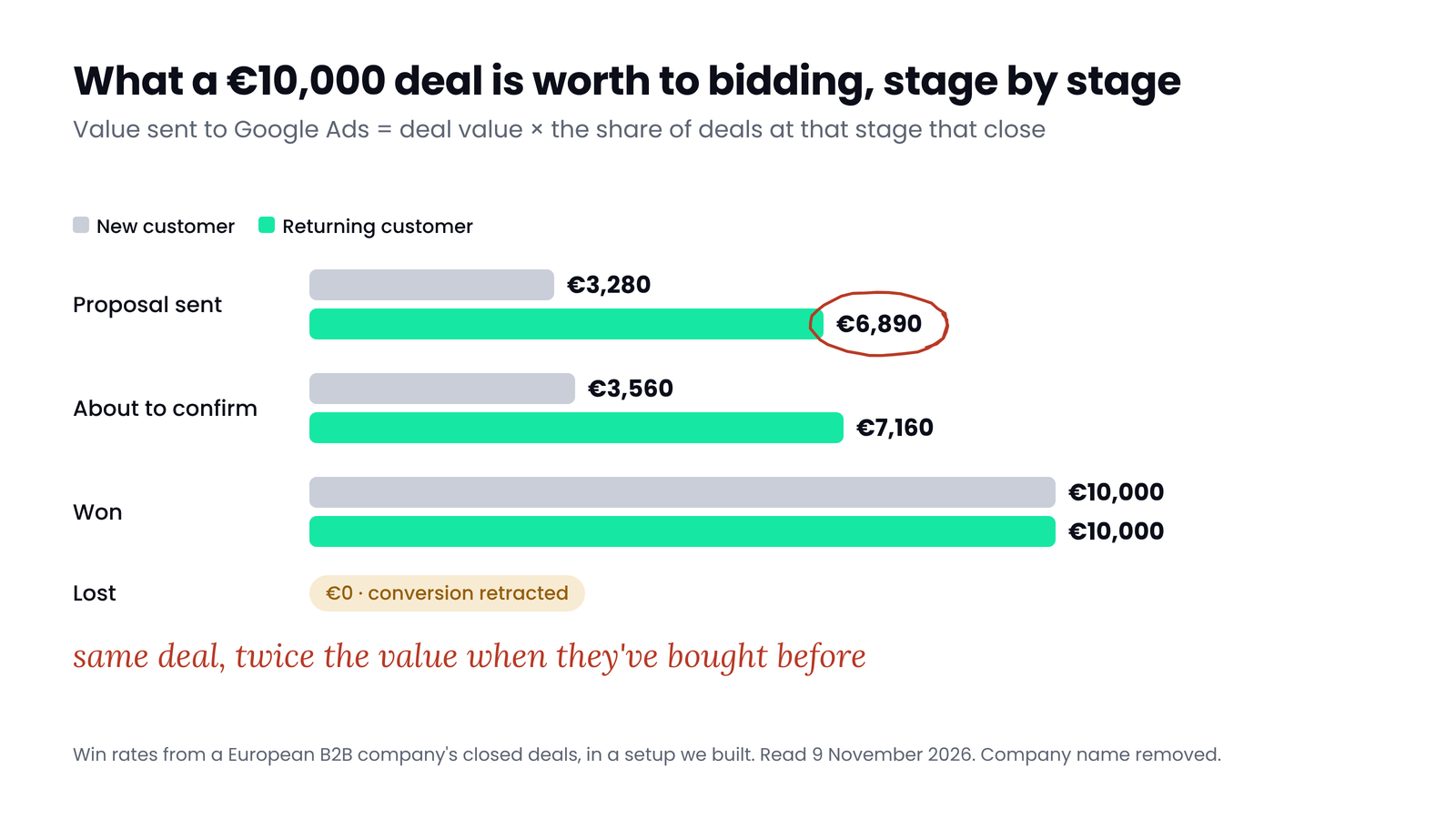
The chance of closing isn't one number. In the setup below it depends on the stage, on whether the customer has bought before, and on the country. So the value sent to Google Ads is worked out per deal, at the moment the stage changes.
What a working setup looks like
We built this for a European B2B merchandise company. Every time an opportunity changes stage or value in the CRM, a webhook sends the change to one server-side Tag Manager container. That container holds the win rates and does the maths, then passes the event to each platform.
The win rates come from the company's own closed deals. For a new customer, an opportunity closes about 33% of the time at the proposal stage and 36% once it's about to confirm. For a returning customer the same stages close 69% and 72% of the time. Country matters as well: at an early stage, a new customer's odds range from about 25% in France to 40% in Germany.
 (opens the full-size image in a new tab)
Three tags handle Google Ads:
- Initial conversion. When a lead becomes an opportunity, the container sends a conversion worth the deal value times its win rate, with an order ID that never changes.
- Restatement. When the deal moves stage or changes size, a conversion adjustment restates the value on that same order ID. A won deal is restated to its full value.
- Retraction. When the deal is lost, a retraction removes the conversion, so bidding stops learning from it.
In Google Ads, the opportunity and won-deal actions are primary, so they drive bidding. Form fills, call bookings and quote requests from the website are still tracked, as secondary actions for reporting. Meta gets four stage events: qualified lead, proposal, about to confirm and won. Microsoft Ads and ChatGPT ads get qualified lead and won.
How to set it up
- Capture the click. On every form, store the GCLID, the Meta click ID and your UTM values in hidden fields or first-party cookies, and save them on the CRM record. Without this, nothing later can be matched.
- Pick three to five stages. Use stages your sales team already keeps up to date. Qualified, proposal and won is enough to start.
- Work out your win rates. For each stage, divide the deals that were later won by all the deals that reached it. Use at least a few months of closed deals, and split by customer type if the rates differ a lot.
- Create one conversion action per stage in Google Ads, choosing Qualified lead or Converted lead as the goal, and configure your funnel stages in Meta Events Manager.
- Send stage changes as they happen. Use a CRM webhook into a server container, a native connector, or a scheduled upload. Google recommends uploading daily, or on a steady schedule.
- Use a stable ID. Give each opportunity one order ID for its whole life, so a restatement or retraction can find the original conversion.
- Respect consent. Only send a lead's data to an ad platform when that lead agreed to advertising use. Pass the consent state with the record.
- Run it beside your old conversion first. Google suggests running a new action alongside the old one for one to two conversion cycles, or 4 weeks, before you switch which one is primary.
The server container doing this work is the same kind covered in our guide to server-side tracking, and the tools that host one are compared in a separate post.
Myth
We get a handful of deals a month, so there isn't enough data to send anything back.
Reality
That's the case for sending more stages, not fewer. Qualified leads happen ten or twenty times as often as won deals. Send them with an expected value and the platform has enough to learn from, long before the deals close.
Quick check
Quick check
- Every lead in your CRM stores the click ID and source it came with.
- Google Ads has a separate conversion action for at least two stages after the form.
- The stage you bid on happens often enough: aim for dozens a month, not a few.
- Each stage is sent with a value, and won deals with the real one.
- Lost deals are retracted or adjusted, not left in.
- Stage changes reach the ad platforms within a day.
- Only leads who gave consent are sent.
Ask yourself
Before you add CRM stages, check what Google Ads bids on today. The free Google Ads Auditor grades your conversion setup first: which actions are primary, whether a lead is counted more than once, and whether values are present. Audit my Google Ads
Frequently asked questions
What is offline conversion tracking?
It's sending conversions that happen away from your website, such as a qualified lead or a signed deal in your CRM, back to the ad platform. The platform matches each one to an ad click using a click ID or hashed contact details, so reports and bidding reflect real sales.
What's the difference between offline conversion import and enhanced conversions for leads?
Enhanced conversions for leads is Google's upgraded version of offline conversion import. The older method matched only on the GCLID. The newer one also matches on hashed email or phone collected on your form, so it still works when the click ID is missing. Google still recommends importing GCLIDs when you have them.
How long do I have to upload an offline conversion to Google Ads?
Google keeps a GCLID for 90 days, and accepts enhanced conversions data up to 63 days after the click. If your sales cycle is longer than that, send an earlier stage such as qualified lead inside the window, and adjust its value later.
Which lead stage should I optimise for?
The earliest stage that still says something about quality and happens often enough to learn from. For most B2B funnels that's qualified lead or opportunity. Meta's guidance is to choose the earliest lead stage to optimise for, and notes it doesn't need to be the last stage.
How do I put a value on a lead?
Multiply the expected deal size by the share of deals at that stage that go on to close. A €10,000 opportunity with a 33% win rate is worth €3,300. Restate the value as the deal moves, and send the real amount when it's won.
Can I change a conversion's value after I've sent it?
In Google Ads, yes. A conversion adjustment can restate the value up to 55 days after the conversion was first recorded, and a retraction removes it. A retracted conversion can't be adjusted again, so only retract when the deal is lost.
Do I need a server container for this?
No. Native connectors such as HubSpot's, or a scheduled upload through Google's Data Manager, can send stages too. A server container helps when you send the same stages to several ad platforms, or need custom value logic in one place.
Sources
- Google Ads Help: Upgrade offline conversion import to enhanced conversions for leads: https://support.google.com/google-ads/answer/14274408
- Google Ads Help: Offline conversion imports FAQs: https://support.google.com/google-ads/answer/10029210
- Analytics Help: Recommended events: https://support.google.com/analytics/answer/9267735
- Meta for Developers: Conversion Leads, configure your sales funnel: https://developers.facebook.com/documentation/ads-commerce/conversions-api/conversion-leads-integration/crm-integration/5-configure-your-sales-funnel
- Meta for Developers: Conversion Leads payload specification: https://developers.facebook.com/documentation/ads-commerce/conversions-api/conversion-leads-integration/payload-specification
- PPC Land: Google Analytics launches lead acquisition and loss tracking reports: https://ppc.land/google-analytics-launches-lead-acquisition-and-loss-tracking-reports/

Qudees Kiani
Founder of Swishiy. Five years of marketing measurement work across Google Ads, Meta and GA4, for ecommerce and lead-gen businesses.
Book a 30-minute call
Is your Google Ads data telling the truth?
The free auditor checks tracking, brand vs non-brand and wasted spend. Automated, Google Ads only, 60 seconds.


