Meta Pixel Helper Alternatives: Check Your Pixel on Every Page at Once

Qudees Kiani, founder · · 8 min read
Short answer
Meta Pixel Helper, now called Meta Ads Data Advisor, shows what fires on the page you have open. It doesn't compare pages for you, often can't see pixels on Shopify's checkout, and only shows what your own cookie choice allows. For a full check, walk the purchase path with your browser's Network tab or a multi-page checker.
On this page
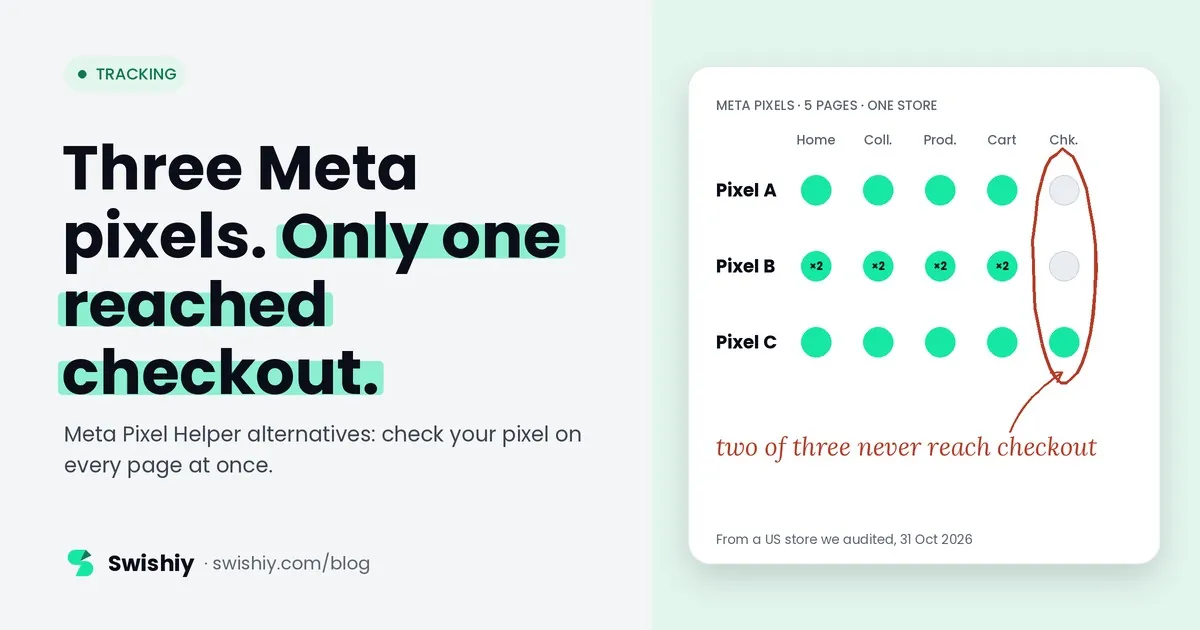
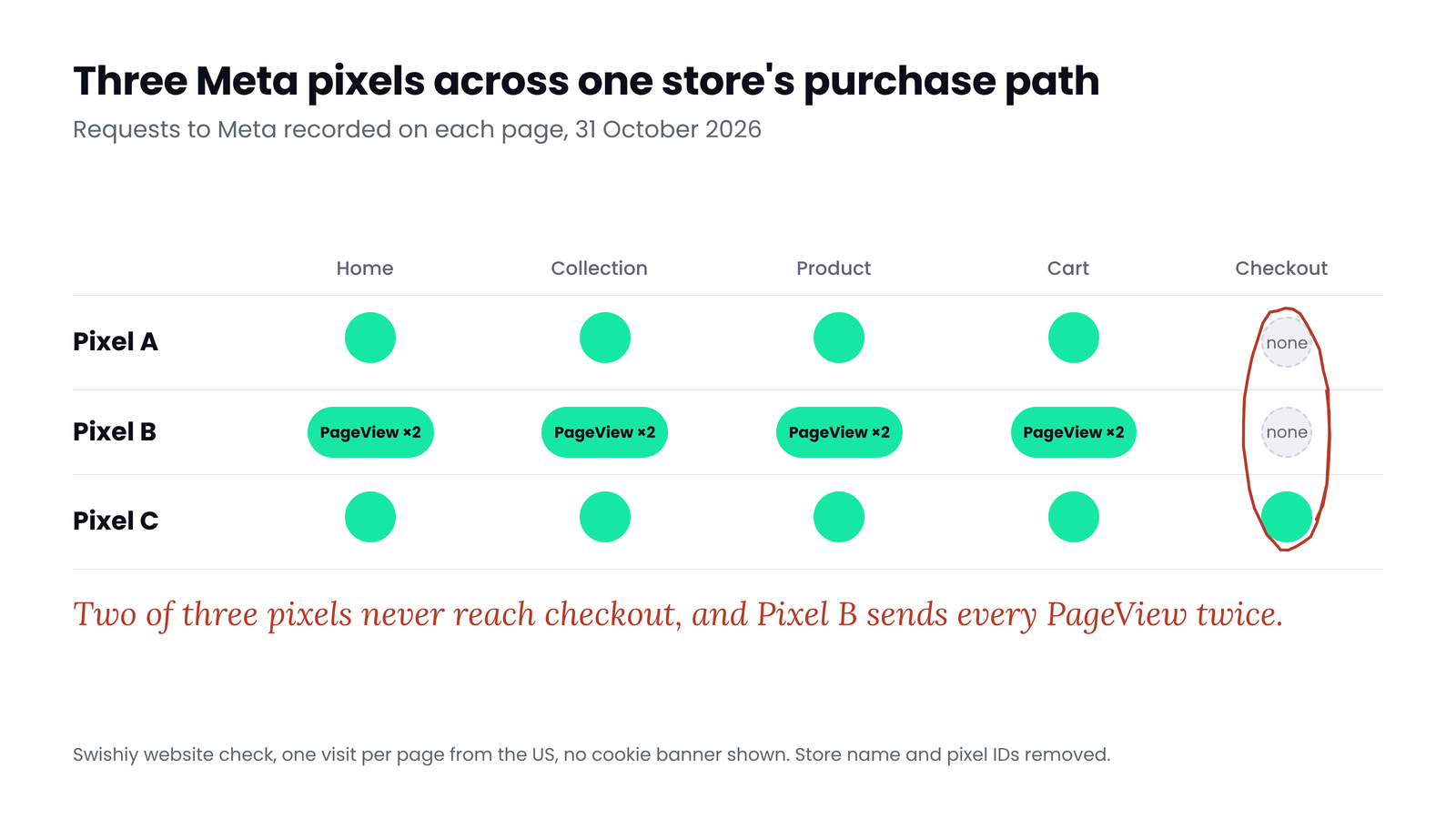
Pixel Helper checks the pages you click through, one at a time. Problems usually sit on the pages you didn't click. In a store we checked in October 2026, the home page loaded three Meta pixels, and one sent PageView twice on every page. At checkout, only one of the three was still there. You would only see that by opening every page in turn and comparing what the extension showed. This guide covers what the extension does well, where it stops, and how to check every page in one pass.
Pixel Helper is now Meta Ads Data Advisor
Meta has renamed the extension. Its developer documentation now calls it "Meta Ads Data Advisor (formerly Meta Pixel Helper)", a free extension for Chrome and Microsoft Edge, and existing installs update on their own. The core job is the same: open a page and the extension lists the pixels it finds and the events each one sends. It also adds guided setup, and monitoring alerts if you log in with Facebook.
For each event it shows the parameters (content IDs, value, currency and so on), whether Advanced Matching data was sent, and a status. Meta's documentation lists the common problems it flags: the same pixel code twice on a page, base code in the wrong place, missing parameters such as content_ids, value or currency, and more than one conversion event on a page. It is still the quickest way to answer "does this page fire my pixel?"
What it can't tell you
The extension shows the page you have open, and it can keep a log of events across your browsing session. You still have to visit each page and compare the results yourself. That leaves four gaps.
1. The pages you didn't open
A pixel missing from checkout, or a PageView sent twice only on product pages, shows up only if you open those pages and compare them yourself. Many problems sit further in than the home page, because apps, checkout scripts and payment providers take over there.
2. Shopify's checkout
On Shopify, pixels added through apps and Customer events run in a sandbox: app pixels in a strict sandbox, custom pixels in an iframe. Merchants often report that the extension shows no pixel on checkout and thank-you pages, even where Meta's Test Events receives events from the sandbox. Shopify has its own Pixel Helper, opened from Settings, Customer events, which tests one custom pixel at a time. It covers custom pixels only, not app pixels such as the Facebook & Instagram channel.
3. Consent
The extension shows what fires for you, under whatever you clicked on the cookie banner, possibly months ago. It doesn't show what a new visitor sees before choosing, or whether the pixel stops after someone rejects. A store can look perfect in the extension and still fire before a visitor has chosen.
4. The server side
Conversions API events go from a server to Meta and never pass through the browser. The extension can confirm a server setup exists, but whether server events arrive, carry the same event ID as the pixel, and get deduplicated is answered in Events Manager, not in the browser.
What a full pass found on one store
Here is what our website check found on a US store we audited, on 31 October 2026. It opened the home page, a collection, a product, the cart and the checkout in a real browser and recorded every request to Meta.
 (opens the full-size image in a new tab)
Three pixels is not a problem on its own. Apps and agencies often add their own. But two of the three stop before checkout, so any audience or optimisation built on those two never sees a checkout or a purchase from the browser. And one pixel sends PageView twice on every page, which inflates PageView counts, and any report built on them, for that pixel.
Opening the home page with the extension would show three pixels and their events. Seeing the rest takes five page loads, notes on each, and a comparison by hand.
The alternatives, and what each one checks
| Tool | What it checks | Pages | Consent states | Server events | Price |
|---|---|---|---|---|---|
| Meta Ads Data Advisor (Pixel Helper) | Pixels and events on the open page, with warnings | Pages you visit, with a session log | Whatever you clicked | Confirms a setup exists | Free |
| Events Manager, Test Events | Browser and server events in real time, while you browse or send test events | Wherever you click | Whatever you clicked | Yes | Free |
| Events Manager, Overview and Event Deduplication tabs | Event counts, deduplication rate and key usage, over days | All traffic, not by page | No | Yes | Free |
| Shopify Pixel Helper | One custom pixel at a time, on Shopify | Page by page, log clears on navigation | Shows when a pixel waits for consent | No | Free |
| Browser DevTools, Network tab | Every request to Meta, with pixel ID and event name | Any page you open | Any state you set up | No | Free |
| Multi-page checkers | Every pixel and event across a set of pages in one run | Home to checkout | Depends on the tool | No | Free and paid options |
| Monitoring tools | Live traffic, continuously, with alerts | All real traffic | Some flag consent breaches | Some | Monthly |
No single tool covers everything. A sensible pairing is a multi-page check for the browser side, and Events Manager's Deduplication tab for the server side.
Check every page yourself in 15 minutes
You don't need a tool for a one-off check. Chrome's DevTools shows every request the Meta pixel sends.
- Start clean. Open a new Chrome profile or a private window, so old cookies and cookie choices don't hide anything.
- Open DevTools. Go to the Network tab, tick Preserve log, and type
facebook.com/trin the filter box. - Walk the purchase path. Home, a category, a product, add to cart, the cart, checkout. Don't touch the cookie banner yet.
- Read each request. The
idparameter is the pixel ID andevis the event name. Note which pixels appear on which page, and any event sent twice to the same pixel on one page load. If your pixel goes through your own domain or a gateway, filter by that domain instead. - Repeat after a choice. Clear the site's cookies, accept the banner and walk the path again. Then clear them, reject and walk it once more. If your banner is opt-in, as it usually is for the EU and UK, there should be no requests to
facebook.com/trbefore a choice or after a reject. Which rules apply depends on where your visitors are. - Check the server side. In Events Manager, open Test Events and browse the site, then check the Event Deduplication tab for each event.
On Shopify
Myth
If Pixel Helper shows a green tick on my home page, my pixel works.
Reality
It means the pixel fired on that page, for you, under the cookie choice you made. Checkout, other pixels, other consent states and the server side are separate questions.
Quick check
Quick check
- Every Meta pixel you use loads on home, category, product, cart and checkout.
- No pixel sends the same event twice on one page load.
- You know where each pixel comes from: the Shopify Meta channel, Tag Manager or an app.
- If your banner is opt-in, nothing is sent to facebook.com/tr before a choice or after a reject.
- Events Manager shows browser and server events with a healthy deduplication rate.
Ask yourself
The website check in our free Tracking audit opens your home page, a category, a product, the cart and the checkout in a real browser, lists every Meta pixel and event on each page, and flags events sent twice. No sign-in, nothing to install. Check my Meta pixel
Frequently asked questions
Is Meta Pixel Helper still available?
Yes, under a new name. Meta now calls it Meta Ads Data Advisor (formerly Meta Pixel Helper). It is a free extension for Chrome and Microsoft Edge, and existing installs update automatically.
Why does Pixel Helper show no pixel on my Shopify checkout?
On checkout and thank-you pages, Shopify only runs sandboxed app and custom pixels, and the extension often can't see inside the sandbox. Check the Network tab for requests to facebook.com/tr instead. Shopify's own Pixel Helper, under Settings, Customer events, tests custom pixels only, not app pixels such as the Facebook & Instagram channel.
Why does my PageView fire twice?
Usually because the pixel is installed twice, for example by the Shopify Meta channel and again in the theme or Tag Manager. Look at where each copy comes from and remove one.
How do I check Conversions API events?
In Events Manager. Test Events shows browser and server events as they arrive, and the Event Deduplication tab shows whether events from both sources share an event ID and are counted once.
Can I check a pixel on a site I don't own?
Yes. The extension, the Network tab and multi-page checkers only see what any visitor's browser sees on public pages. Server events and Events Manager need access to the account.
Does Pixel Helper work on phones?
No. It is a desktop browser extension for Chrome and Edge. To test a mobile layout, use Chrome's device mode in DevTools on a desktop.
Sources
- Meta for Developers: Meta Ads Data Advisor: https://developers.facebook.com/documentation/meta-pixel/support/meta-ads-data-advisor
- Meta for Developers: Verifying your Conversions API setup: https://developers.facebook.com/documentation/ads-commerce/conversions-api/verifying-setup
- Meta for Developers: Handling duplicate pixel and Conversions API events: https://developers.facebook.com/docs/marketing-api/conversions-api/deduplicate-pixel-and-server-events
- Shopify Dev: Pixels and sandboxes: https://shopify.dev/docs/apps/build/marketing-analytics/pixels
- Shopify Help: Testing custom pixels: https://help.shopify.com/en/manual/promoting-marketing/pixels/custom-pixels/testing
- Shopify Community: Meta pixel not found at checkout: https://community.shopify.com/t/why-isnt-my-meta-pixel-found-at-checkout/306711
- Shopify Community: Custom pixels and Meta Test Events: https://community.shopify.com/t/customer-events-many-problems-with-the-custom-pixels/358500

Qudees Kiani
Founder of Swishiy. Five years of marketing measurement work across Google Ads, Meta and GA4, for ecommerce and lead-gen businesses.
Book a 30-minute callIs your Google Ads data telling the truth?
The free auditor checks tracking, brand vs non-brand and wasted spend. Automated, Google Ads only, 60 seconds.