Most people asking what server-side tracking costs get one of two answers. "It's basically free" or "it's an enterprise thing." Neither is true for the stores we work with.
The hosting bill depends on one number: how many requests your server container receives each month. For a small store that can be zero dollars. For a busy one it's still usually less than a single day of ad spend. The part that actually costs money is the setup, and the mistakes that make you pay for traffic you didn't need.
In this post we take three real stores we manage, with their names removed, and work out what each would pay on Stape, Addingwell and Google Cloud.
- What a "request" is, and why your count is higher than your GA4 events
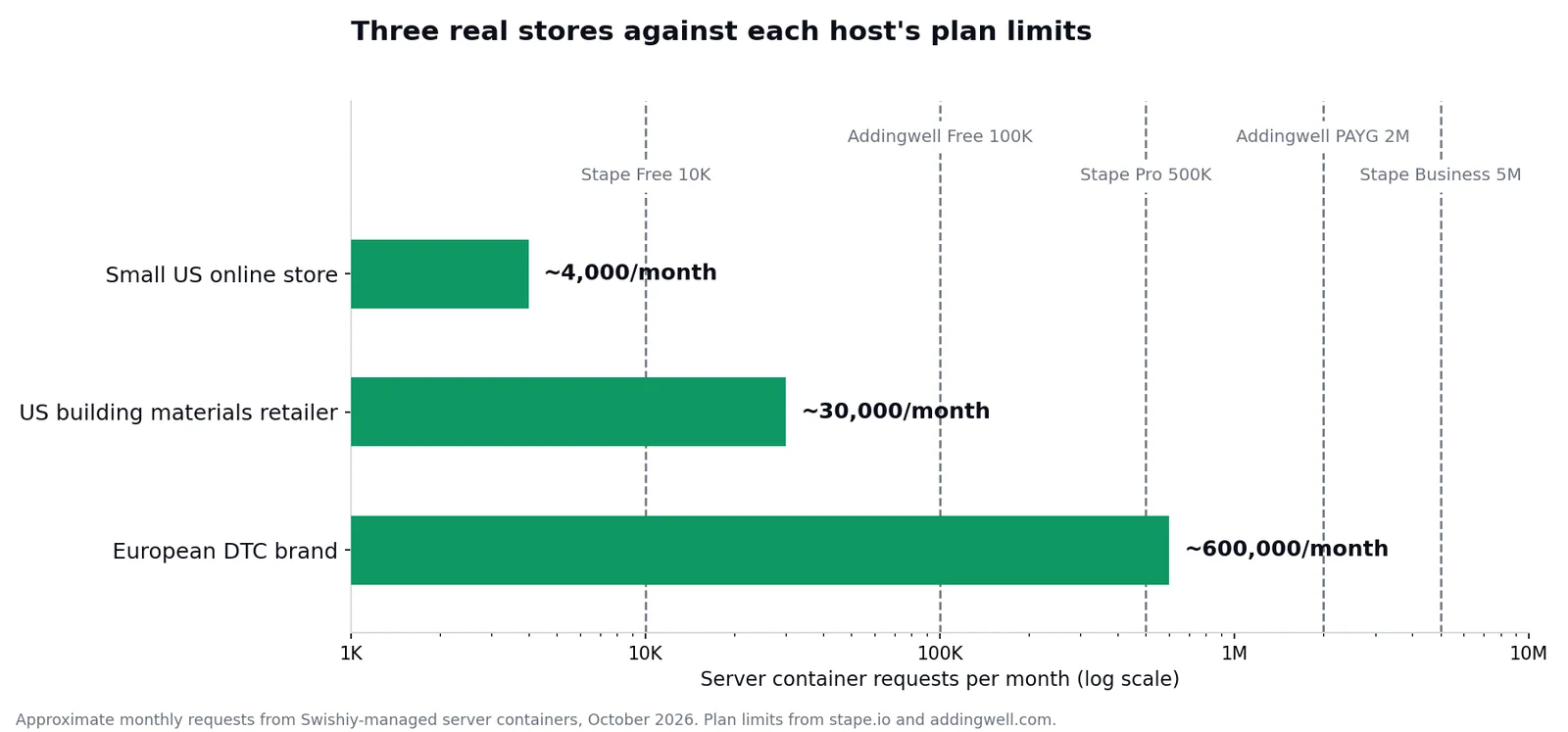
- What three real stores send per month, from about 4,000 to about 600,000 requests
- What each of them would pay on Stape, Addingwell and Google Cloud
- The hidden costs that never show up on the pricing page
What you're actually paying for
Server-side tracking puts a server you control between your website and the ad platforms. Your site sends events to that server, and the server forwards them to Google Analytics, Google Ads, Meta and the rest. If that's new to you, our guide on what server-side tracking fixes covers it properly.
The server itself is a server-side Google Tag Manager container. You can run it on Google Cloud yourself, or pay a hosting company such as Stape or Addingwell to run it for you. Either way, you are paying for the same thing: capacity to receive requests.
Here's the part almost everyone gets wrong. A request is not a GA4 event.
Every incoming hit to the server counts. That includes your GA4 events, your Meta and Google Ads events, and, if you load your Tag Manager script through the server so ad blockers don't stop it, every download of that script too. Addingwell spells this out in its pricing FAQ: script downloads like gtm.js and gtag.js count, outgoing requests to the platforms don't. One incoming event that fans out to GA4, Meta and TikTok is still one request.
So your request count will always be higher than your GA4 event count, sometimes by a lot. Plan on the higher number.
If GA4 shows 300,000 events a month, I need a plan for 300,000 requests.
Script loads and every other platform's events count too. Check the real request number in your host's analytics after a week of live traffic before you pick a plan.
Free Google Ads Audit
See where your budget is going before you commit another month to guessing. Scans your search terms, conversion actions and brand leakage in minutes.
Run a free auditWhat three real stores send each month
We pulled the numbers from the server containers we run. These are approximate monthly volumes. Two are worked out from the current billing cycle, and one is a 90-day total divided by three.
| Store | Approx. requests per month |
|---|---|
| Small US online store | about 4,000 |
| US building materials retailer | about 30,000 |
| European direct-to-consumer brand | about 600,000 |
The spread is the point. The biggest of these three sends roughly 150 times what the smallest does, and our largest client sits on Stape's Business tier, which covers up to 5 million requests a month.
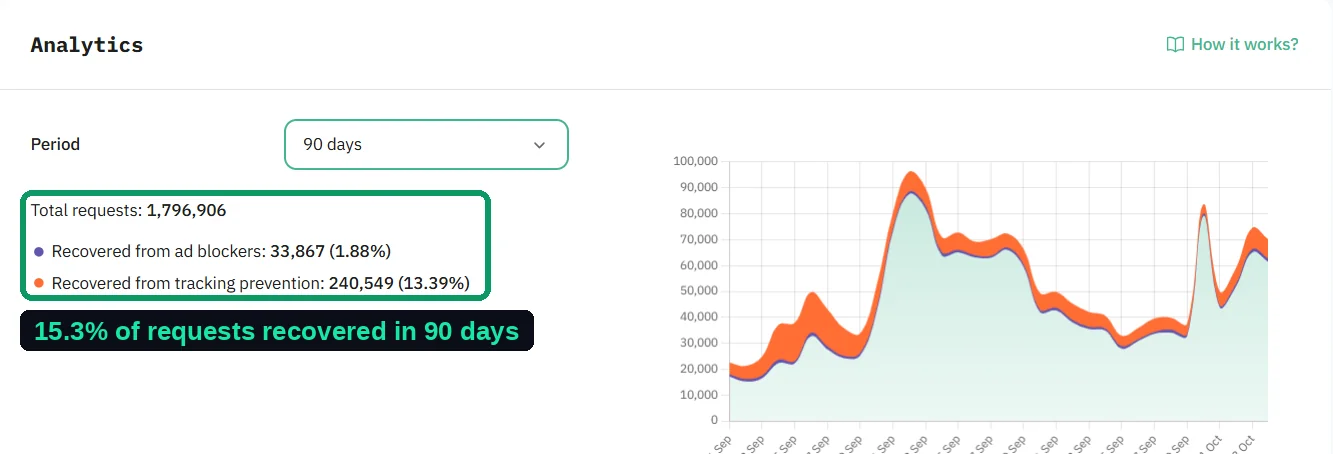
If you want your own number, the host's analytics shows it. In Stape it's the Analytics tab on the container, which also tells you how much of that traffic was recovered from ad blockers and tracking prevention.
What the three main options cost
Here are the published prices as of October 2026. All three change their pricing from time to time, so check before you commit.
| Option | Free allowance | Paid plans | Good to know |
|---|---|---|---|
| Stape | 10,000 requests a month | Pro $20 a month for 500,000. Business $100 a month for 5 million. Enterprise $200 a month for 20 million. Yearly billing saves about 15 to 17% | Hit the limit without auto-upgrade and the container stops until the next cycle |
| Addingwell | 100,000 requests a month | Pay as you go from €90 a month, which includes 2 million requests. Extra requests billed at the end of the cycle | Extra custom domains are €10 each |
| Google Cloud (Cloud Run) | None | About $45 a month per server instance. Google recommends at least two, so roughly $90 a month as a floor | You manage the servers, updates and logging costs yourself |
Two things stand out. Addingwell's free tier is ten times bigger than Stape's. And Google Cloud has a floor: even a store with almost no traffic pays for two servers running around the clock, because that's what Google recommends to avoid losing data if one goes down.
What each store would actually pay
Now put the real volumes against the real prices.
| Store | Requests per month | Stape | Addingwell | Google Cloud |
|---|---|---|---|---|
| Small online store | about 4,000 | $0 (Free) | €0 (Free) | about $90 |
| Building materials retailer | about 30,000 | $20 (Pro) | €0 (Free) | about $90 |
| European DTC brand | about 600,000 | Over Pro's 500,000, so the next tier up | €90 (Pay as you go) | about $90, plus logging if left on |
The small store pays nothing anywhere except Google Cloud. The mid-sized retailer is the interesting one: it outgrew Stape's free tier but sits comfortably inside Addingwell's. At 600,000 requests the three options land close together, and the decision stops being about the hosting bill at all.
That's the honest summary. For most stores under a few million requests a month, the hosting difference between providers is somewhere between zero and about a hundred dollars a month. If your ad spend is in the thousands, that's not what should decide it.
If your server-side hosting bill doubled tomorrow, would it change a single decision you make about your ad budget?
The costs that don't show up on the pricing page
This is where server-side tracking actually gets expensive.
Setup and someone who understands it
The hosting is cheap. The setup is not, and it's where most of the value sits. Someone has to build the server container, connect each platform, set up deduplication so Meta doesn't count every purchase twice, wire consent through, and validate the numbers against real orders before go-live. We have done around 50 of these, and a typical setup takes one to two weeks including testing.
Get that part wrong and you can end up worse off than before. In one Shopify account we rebuilt, the ad platforms had been reporting three to six times more conversions than actually happened. Duplicate events are the usual cause, and no hosting plan fixes them.
Logging on Google Cloud
If you run the container on Google Cloud, every request is logged by default. Google's own setup guide warns that above roughly a million requests a month those logs can add significant charges, and recommends switching request logging off. It's a two-minute fix that many self-hosted setups never make.
Hitting your limit
On Stape's Free plan, and on paid plans with auto-upgrade switched off, the container stops serving traffic when you hit the monthly quota, until the next billing cycle starts. That means tracking simply stops, usually in your busiest week. If you're anywhere near your limit, turn auto-upgrade on or pick the next tier up. Addingwell instead bills extra requests at the end of the cycle.
Features that live on higher tiers
Some of the features you might want aren't sold separately. On Stape, logs start on Pro, monitoring alerts start on Business, and mapping several domains to one container needs Business too. If you run several storefronts, factor that in rather than picking purely on request count.
- Open your host's analytics and note last month's total requests, not GA4 events
- Check how close you are to your plan's limit, and whether auto-upgrade is on
- If you self-host on Google Cloud, check whether request logging is still enabled
- Confirm your server sends one event ID per purchase that matches the browser's, so platforms can deduplicate
- Compare platform purchases with real orders for the same week
Which one should you pick?
There's no single right answer, but there is a sensible default for most situations.
| If you... | Consider | Why |
|---|---|---|
| Are a small store testing server-side for the first time | Stape Free or Addingwell Free | Zero cost while you find out your real request volume |
| Sit between 10,000 and 100,000 requests a month | Addingwell Free, or Stape Pro if you want its power-ups | Addingwell's free tier covers you; Stape Pro adds tools like Cookie Keeper for $20 a month |
| Run several domains or storefronts | A tier that supports multiple domains | On Stape that means Business |
| Have an in-house engineer and Google Cloud already | Google Cloud | Full control, if someone owns updates and logging |
| Don't want to think about servers at all | A managed host | You pay a little for someone else to keep it running |
For transparency: we build most of our client setups on Stape and are part of its agency program, so weigh our preference accordingly. We use it because the power-ups save setup time and the analytics make recovered data easy to show a client. Addingwell is a perfectly good choice, especially if its larger free tier covers you.
Final thoughts: the hosting is the cheap part
Server-side tracking hosting costs somewhere between nothing and a few hundred dollars a month for almost every store we work with. The question worth asking isn't which provider is cheapest. It's whether your setup actually sends clean, deduplicated, consent-aware data, because that's what decides whether the platforms bid on reality or on noise.
If you're not sure your current tracking is counting purchases correctly, our free Google Ads Auditor checks your conversion setup for double counting and other tracking problems in about a minute.